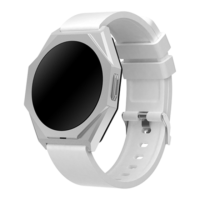
The Canyon Otto SW-86 is a smartwatch with a sporty design and wireless connectivity to a smartphone via the Canyon Life app. It features a stylish metal case, a touch-screen dial, a silicone strap, and a wide range of functions. It is available in three models: CNS-SW86RR (red), CNS-SW86BB (black), and CNS-SW86SS (white).
Function Description
The smartwatch offers a comprehensive set of features designed for daily activity tracking and health monitoring. These include:
- Notification settings: Allows users to manage alerts from various applications.
- Dynamic heart rate and blood pressure measurement: Provides real-time data on cardiovascular health.
- Oxygen saturation level determination: Measures blood oxygen levels.
- Pedometer: Tracks the number of steps taken throughout the day.
- Calorie counter: Estimates the calories burned during physical activity.
- Stopwatch: A timing function for various activities.
- Distance measurement: Calculates the distance covered.
- Detailed activity statistics and sleep monitoring: Offers insights into daily activity patterns and sleep quality.
- Optimization for popular sports: Includes 25 different sport modes for tailored tracking.
- Movement and water intake reminders: Prompts users to stay active and hydrated.
- Remote control for smartphone player and camera: Allows control of media playback and smartphone camera directly from the watch.
- Interchangeable watch faces: Users can customize the watch's appearance with different digital dials.
- Weather forecast: Provides current weather information (requires app connection).
- Games: Includes built-in games for entertainment.
- Screen activation by hand gesture: The screen turns on with a simple wrist movement.
- Support for popular messengers: Displays notifications from apps like Viber, Telegram, Facebook, Twitter, WhatsApp, Instagram, Skype, and others.
Important Technical Specifications
- Power: DC 5.0 V / 1.0 A.
- Memory: 192 KB RAM, 64 MB Flash ROM.
- Processor Frequency: 90/40 MHz.
- Bluetooth: Version 5.1; 6 dBm.
- Transmitter Power: <20.0 mW.
- Water Resistance: IP68.
- Screen: Touch-screen, IPS, Ø 1.3 inches, 360×360 pixels; DPI 30.5×91.5; 256 K colors.
- Case Dimensions: 46×43×10 mm.
- Case Material: Aluminum alloy, plastic.
- Strap: 20 mm, silicone.
- Weight: 40.7 g.
- Compatibility: Android 5.1 and above with Google Play Services; iOS 12.0 and above.
- Battery: Li-polymer, 3.7 V, 280 mAh, non-removable.
- Full Charging Time: 3 hours.
- Operating Time: 6-8 days in active use; up to 30 days in standby mode.
- Operating Conditions: Temperature 0...+35 °C; humidity 5–95%.
- Storage Conditions: Temperature -20...+45 °C; humidity 5–95%.
Usage Features
Getting Started:
- Charging: Before first use, charge the device. Connect the charging cable (6) to the electrical contacts (5) and then to a power source (Figure E).
- Warning: The output parameters of the power supply should not exceed 5.0 V / 1.0 A (power adapter not included).
- Turning On: Press and hold the device's power button (2) for 3-5 seconds until the watch face appears (Figure C).
- Turning Off: From the watch face screen, swipe down. Select "Settings" (gear icon). In the menu that opens, tap "Power Off" (circle with a line) and confirm with "Yes" (checkmark) (Figure F).
- App Installation and Connection: To use the watch with your smartphone, install the free Canyon Life app. Scan the QR code (page 2) to go to Google Play or App Store, download, and run the app. Log in to your account or register a new one. Then, activate Bluetooth on your smartphone. In the Canyon Life app, tap "Connect BT device." Place the watch and smartphone next to each other and tap "Start." Select your watch from the list (SW-86) and tap "Add device."
Menu Navigation (Figure G):
From the watch face screen, swipe down to access the menu. The menu displays information about the device's charge level, BT connection, and various buttons:
- Weather: Provides weather forecasts (requires app connection).
- Theater Mode: Sets minimum screen brightness and disables vibration.
- Vibration: Activates or deactivates vibration.
- Brightness: Adjusts screen brightness (5 levels).
- Settings: Accesses a list of additional functions.
Troubleshooting:
- Watch does not turn on: Charge the device for a few minutes. If it doesn't charge, check the USB cable and charger.
- Smartphone does not detect the watch: Ensure Bluetooth is active on your smartphone. Make sure the watch is not connected to another smartphone.
- Loss of connection with smartphone: Grant the app permission to run in the background and remove any restrictions.
Maintenance Features
Safe Use Practices:
- Do not press the screen with sharp objects or apply excessive pressure.
- Do not disassemble or attempt to repair the device yourself.
- Do not drop, throw, or bend the device.
- To avoid injury, do not use the watch if it has cracks or other defects.
- Clean the device with a dry or slightly damp cloth only after it has been turned off and disconnected from the power supply.
Warranty Conditions:
- The warranty period is 2 years from the date of purchase, unless otherwise specified by local law.
- The service life is 2 years.
- Further warranty information is available on canyon.eu/warranty-terms.
- All information in this document is subject to change without prior notice.
- For updated information and details about the device, connection process, certificates, warranty, quality, and Canyon Life app functionality, refer to the relevant installation and operating manuals available at canyon.eu/drivers-and-manuals.
- All trademarks and brands are the property of their respective owners.
- Manufactured in China.
- The device complies with Directive 2014/53/EU on radio equipment. More information on canyon.eu/certificates.

 Need help?

 To Next Page
 General