Instruction manual CM465 / CM465SS / CM465GM16 Please keep this instruction manual for future reference
EN 14
USE
2. Select the cup size you want to change with the scrolling touch keys
(5 and 7). When the desired cup size is displayed, confirm it with the
touch key ‘OK’ (9).
3. A bar appears on the display, which can be made bigger or smaller;
this represents the cup filling quantity. A different quantity can be
selected using the scrolling touch keys (5 and 7) in 10 steps. A full
bar indicates that the maximum cup filling quantity of 220ml is
selected.
4. Select the desired cup filling quantity and confirm it with the touch
key ‘OK’ (9) to program this setting. If you don’t press the touch key
‘OK’ (9), the appliance automatically returns to the coffee mode after
120 seconds without saving.
After programming the display automatically jumps back to the
menu option for setting the filling quantity. To go back to the coffee
mode immediately, press the touch key ‘MENU’ (2) twice or wait
about 120 seconds until the appliance automatically returns to the
coffee mode.
Setting the grind level
If coffee is dispensed too quickly or too slowly (in drips), you can
change the grind level.
Only change the grind level during the milling process. Otherwise,
the coffee machine may be damaged.
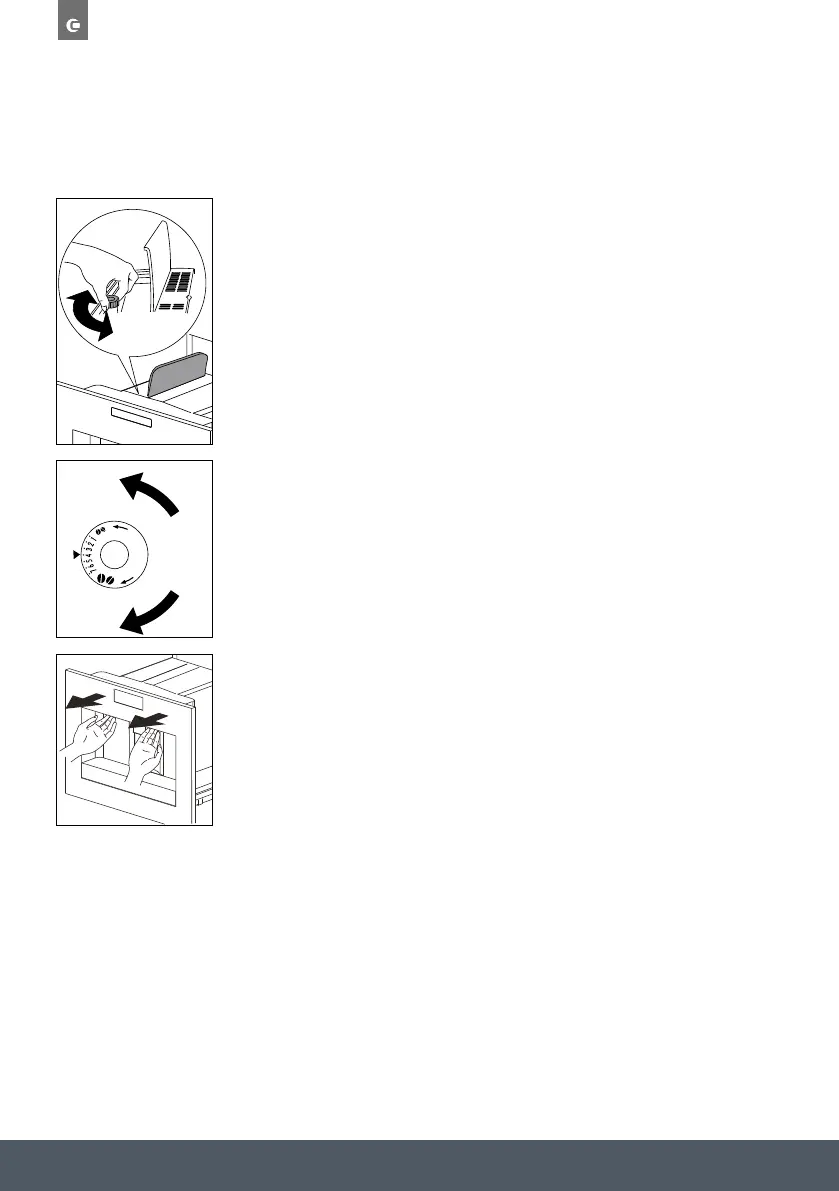
1. Turn anti-clockwise to obtain fi ner ground coffee, slower delivery
and a creamier appearance.
2. Turn clockwise for coarser ground coffee and faster delivery (not a
drop at a time).
The adjustment will be evident after at least 2 cups of coffee are made.
Preparing espresso coffee using ground coffee
1. Press the ‘Coffee strength’ touch key (6) and select
“PRE-GROUND”.
2. Extract the machine by pulling it outwards using the handles.
If coffee is dispensed too quickly or too slowly (in drips), you can change
the grind level.
Only change the grind level during the milling process.
Otherwise, the coffee machine may be damaged.
1. Turn anti-clockwise to obtain finer ground coffee, slower delivery and
a creamier appearance.
2. Turn clockwise for coarser ground coffee and faster delivery (not a
drop at a time).
The adjustment will be evident after at least 2 cups of coffee are made.
PREPARING ESPRESSO COFFEE USING GROUND COFFEE
1. Press the ‘Coffee strength’ touch key (6) and select “PRE-GROUND”.
2. Extract the machine by pulling it outwards using the handles.
3. Lift the central lid, place one measure of preground coffee in the
funnel push the appliance back and proceed as described in the
section “Making coffee using coffee beans”. You can make just one
coffee at a time by pressing the ‘One cup deliver’ touch key (10).
4. After using the machine with pre-ground coffee, to go back to making
coffee using beans, deactivate the pre-ground coffee function by
pressing the ‘Coffee strength’ touch key (6).
EN 15
USE
3. Lift the central lid, place one measure of preground coffee in the
funnel push the appliance back and proceed as described in the
section “Making coffee using coffee beans”. You can make just one
coffee at a time by pressing the ‘One cup deliver’ touch key (10).
4. After using the machine with pre-ground coffee, to go back to
making coffee using beans, deactivate the pre-ground coffee
function by pressing the ‘Coffee strength’ touch key (6).
Notes
• Never introduce pre-ground coffee when the machine is off as it
could spread through the inside of the appliance.
• Never add more than 1 measure, otherwise the appliance will not
make the coffee.
• Use the measure provided only.
• Introduce only pre-ground coffee for espresso coffee machines into
the funnel.
• If more than one measure of pre-ground coffee is used and the
funnel clogs, push the coffee down with a knife then remove and
clean the brewing unit and machine as described in the “Cleaning
the brewing unit” section.
Preparing hot water
Hot water can be used to warm up cups and to make hot drinks, such
as tea or packet soups.
Warning! Escaping hot water can lead to scalds! Only activate the
hot water nozzle when there is a receptacle underneath it.
1. Put the hot water nozzle in place.
2. Place a container underneath the hot water nozzle.
3. Press the ‘Hot water’ touch key (13).
The display shows “HOT WATER PRESS OK”.
4. Press the touch key ‘OK’ (9).
Hot water is dispensed; the display shows “HOT WATER”.
Once the programmed amount of hot water is dispensed,
dispensing stops automatically.
For a few seconds the display shows “PLEASE WAIT”. After that the
appliance is ready to make coffee again and the last selected coffee
setting appears on the display.
SETTING THE GRIND LEVEL


 To Next Page
 Loading...


