Instruction manual COR541SL 21
Please keep this instruction manual for future reference
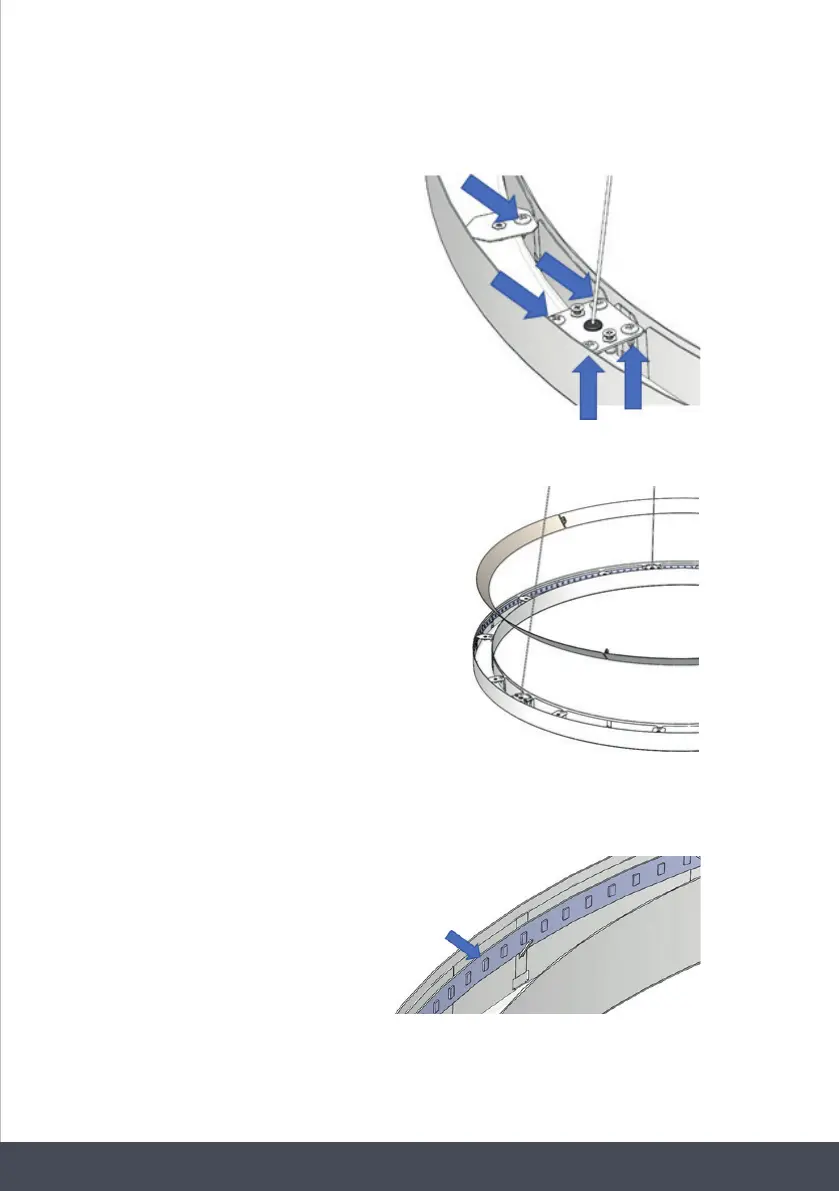
3. Remove the other screws from inside the light structure.
4. Remove the white deflector.
5. Carefully remove the LED bar. Disconnect the connector and change the LED light.
Implement the steps in reverse order.
After waiting 5 minutes, plug in the unit.
Remove the other screws from inside the light
structure.
Remove the white deflector.
Carefully remove the LED bar. Disconnect the
connector and change the LED light.
Implement the steps in reverse order.
After waiting 5 minutes, plug in the unit.
Remove the other screws from inside the light
structure.
Remove the white deflector.
Carefully remove the LED bar. Disconnect the
connector and change the LED light.
Implement the steps in reverse order.
After waiting 5 minutes, plug in the unit.
Remove the other screws from inside the light
structure.
Remove the white deflector.
Carefully remove the LED bar. Disconnect the
connector and change the LED light.
Implement the steps in reverse order.
After waiting 5 minutes, plug in the unit.



 To Next Page