Version 15.03.2023 CAM(V100)/ (EF2L145/V20)+(100)/(V20) CI-RL4-NG4-HU
2.7. Connection – Video sources
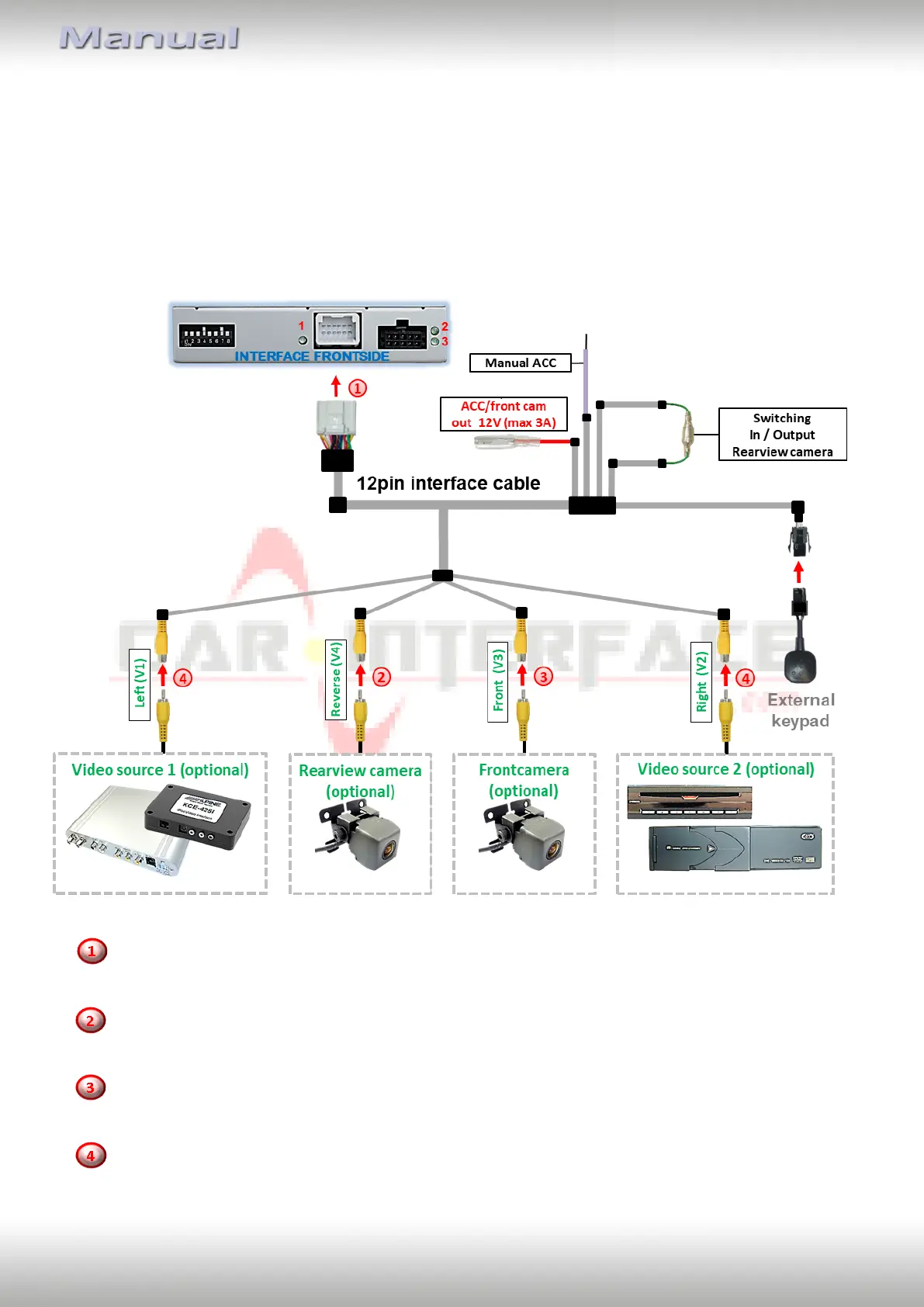
It is possible to connect an after-market rear-view camera, an after-market front camera and
two more video sources to the video-interface.
Before the final installation, we recommend a test-run to detect a incompatibility of
vehicle and interface. Due to changes in the production of the vehicle manufacturer
there’s always a possibility of incompatibility.
Connect the 12pin interface cable’s female 12pin connector to the male 12pin connector of
the video-interface.
Connect the video RCA of the Rear-view camera to the 12pin interface cable’s female
RCA connector „Reverse V4.
Connect the front camera’s video RCA connector to the 12pin interface cable’s female
RCA connector „Front V3“.
Connect the video RCA of the AV source 1 and 2 to the 12pin interface cable’s female RCA
connector “Left (V1)” and ”Right (V2)”.



 To Next Page