Version 15.03.2023 CAM(V100)/ (EF2L145/V20)+(100)/(V20) CI-RL4-NG4-HU
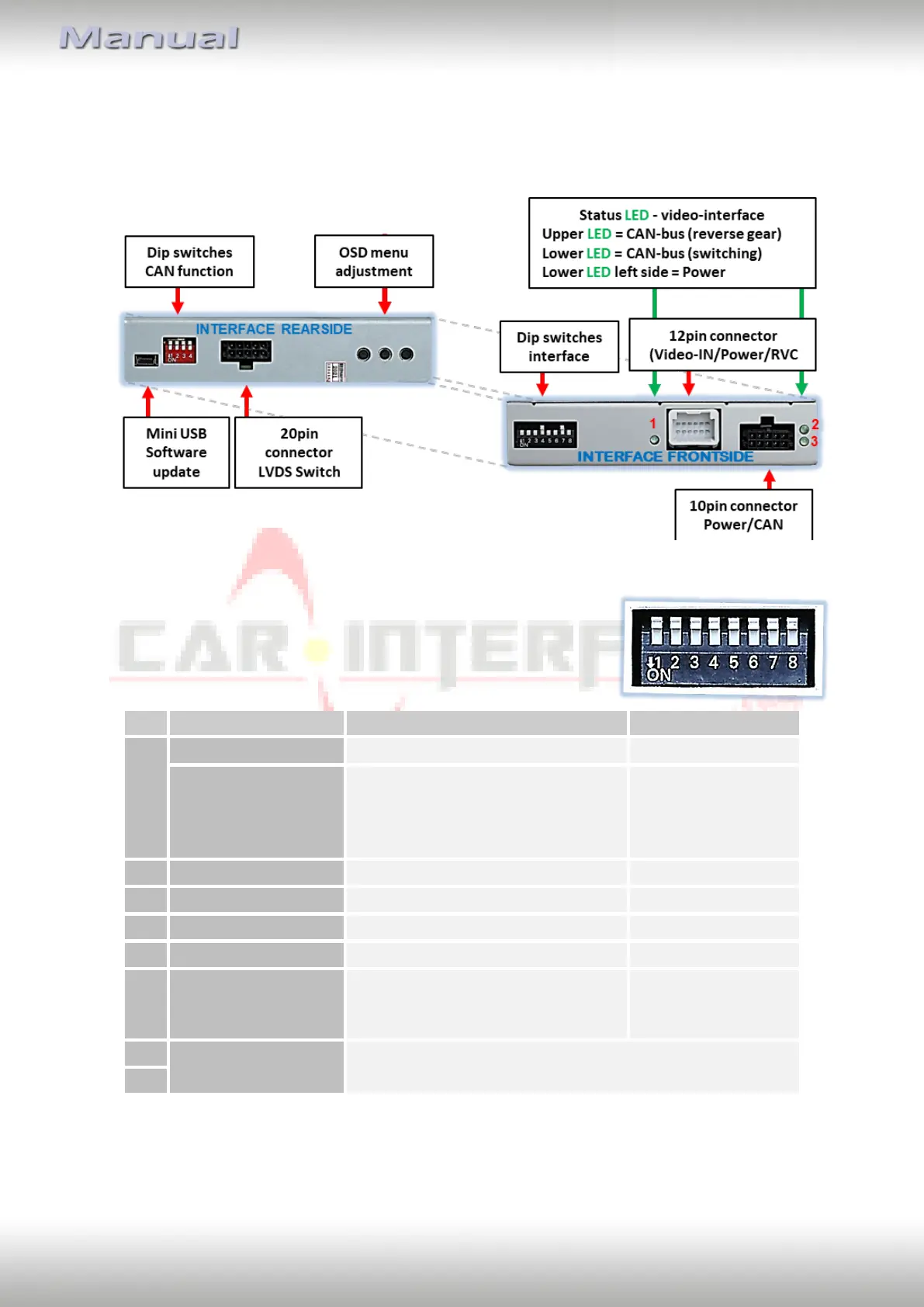
1.3. connectors - video-interface
The video-interface (daughter PCB) converts the video signals of connected after-market
sources in a factory monitor compatible picture signal which is inserted in the factory
monitor, by using separate trigger options.
1.4. Dip-switch settings
1.4.1. 8 dip - black
Some settings have to be selected by the dip-switches on the
video interface.
Dip position down is ON and position up is OFF.
*The front camera will only be switched automatically for 10 seconds after disengaging the
reverse gear, if dip6 is also set to ON (see following information).
After each Dip-switch-change a power-reset of the Video Interface has to be performed!
Power supply
output
(red wire)
+12V (max. 3A) when reverse gear
is engaged incl. 10 seconds delay
and +12V by manual switching to
front camera by keypad
Type of front
camera activation
for 10 seconds after disengaging
the reverse gear and manually by
keypad
Try all 4 possible combinations of dip 7 and 8 to find the
best picture (quality and size)


 To Next Page