GBGB
ON
1 2
ON
1 2
ON
1 2
ON
1 2
1
2
3
5
7
6
8
10
4
Function
n. Off On
Descrption
Notes
During opening, upon pressing the P/P button the gate stops, pressing it again the gate closes.
During closing, upon pressing the P/P button the gate stops, pressing it again the gate opens.
During opening, upon pressing the P/P button the gate stops for a few seconds and then closes.
During closing, upon pressing the P/P button the gate stops for a few seconds and then opens.
During opening, pressing the P/Pbutton has no effect. During the pause, pressing the P/Pbutton has no
effect.
During closing, upon pressing the P/P button the gate stops for a few seconds and then opens.
During opening, pressing the P/Pbutton has no effect. During the pause, upon pressing the P/Pbutton the
gate closes.
During closing, upon pressing the P/P button the gate stops for a few seconds and then opens.
Photocell
Always opens
“Condominium”
Pedestrian
access
OFF
OFF
OFF
OFF
OFF
ON
ON
ON
ON
ON
Opens-Closes
with no reversal
during opening
Clock
Open - Close
Safety edge
Open - Stop -
Close
The flashing light operates together with the motor.
After one complete opening, the control unit only closes again with a manual control.
The flashing light operates 5 seconds before any operation.
See text at page 42.
After one complete opening, the control unit closes automatically after the programmed pause time.
The m. brake serves to overcome the inertia of heavy aut. systems. When the brake is enabled it activates
at the end of every m
The activation of photoelectric cell reduces the pause time for whatever is value previously was to 2
seconds.
3 4 3 4 3 4 3 4
Preflash
Photo test
Jolly
input mode
Step-by-step
input
and
radio channel
mode (CH1)
Re-closure
Timer
Brake
Reclosing after
the
photoelectric
cells
CONFIGURATION DIP-SWITCHES
Safety edge activation reverses the direction for a few seconds. After safety edge activation the control
unit locks; re-closing is cancelled. Use a N.C. contact
Closes the gate when the contact is opened and opens when the contact is closed.
During both opening and closing, activation of this photocell stops the gate until it is reset.
The next movement is always in the opening direction. Use a N.C. contact
The gate open spartially for a programmable time (see“pedestrianopeningprogramming”).
Use a N.O.contact.
PROGRAMMING THE GATE TRAVEL STROKE AND PAUSE TIME
The control unit autolearns the working and pause times during the programming procedure.
The programming procedure involves repeated operation of the P/P control (7, fig. 1), or otherwise the P/P control (terminal 8, fig. 2)
or the remote control (if memorised) can be used.
Important notes before programming:
A. Power up the control unit and check that the control inputs are operating correctly by checking the relative LEDs (the LEDs of the
NC contacts must be on).
B. Remove all obstacles from the gate's operating zone.
C. The limit switch LEDs (16, fig. 1) must be on when the gate is half-open. When the gate is moved to the closed travel limit position,
one of the LEDs (FCC) must go out; the other LED (FCA) must go out when it reaches the open travel limit position.
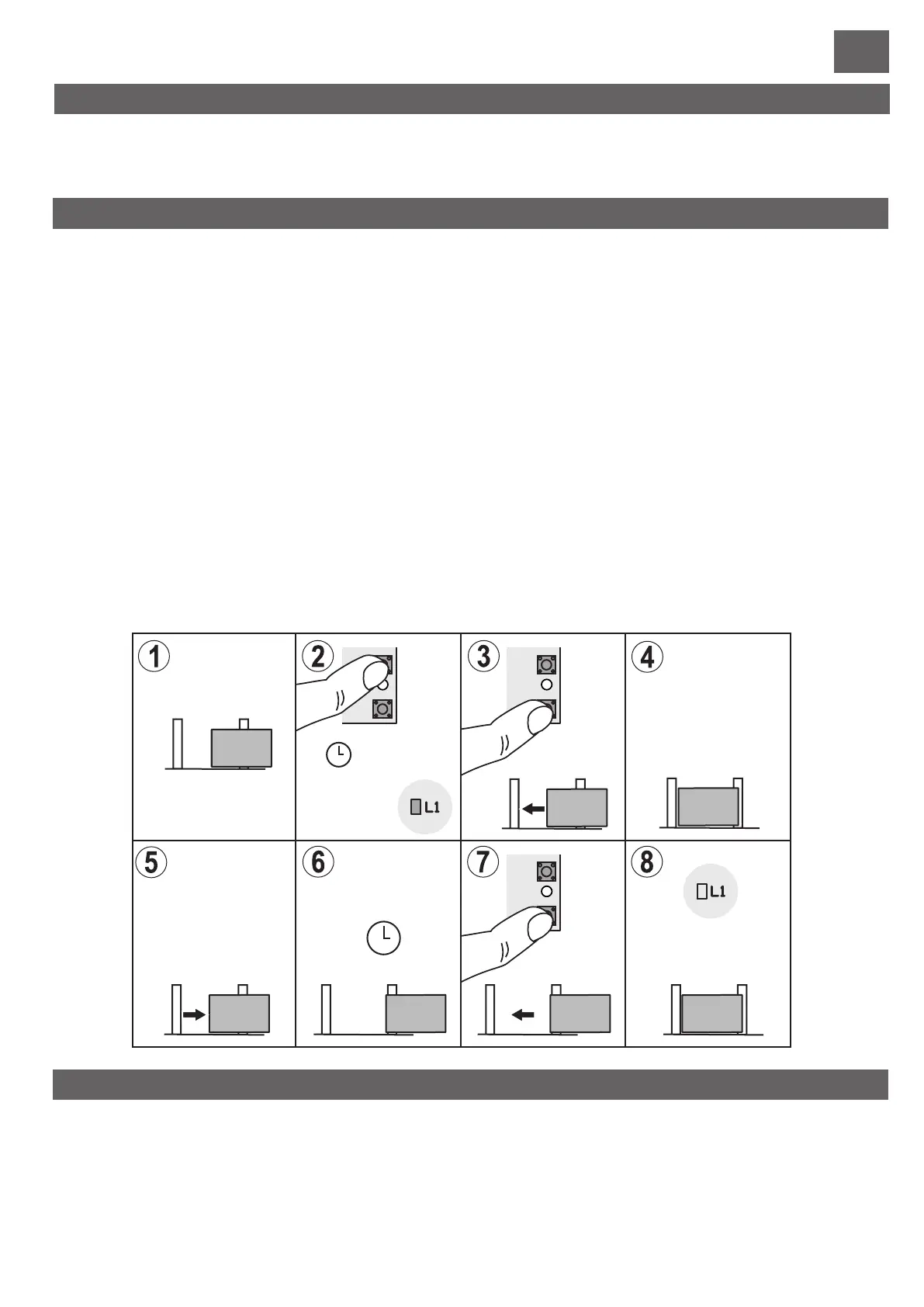
Programming:
1) Position the gate or door at mid-travel.
2) Press the PROG button (6, fig. 1) and hold it down for about 5 seconds, until LED LD1 (17, fig. 1) remains constantly on.
The control unit is now in programming mode.
3) Press the P/P button (part 7 of fig.1). The motor then starts a closing manoeuvre. If the motor is running backwards, cut off the
power, invert the motor phases and repeat the procedure.
4,5) Once the motor has reached the stroke limit, it stops and then the opening stroke starts automatically.
6) Once the opening stroke is complete, the motor stops. The control unit starts the pause time registration phase.
7) Once the desired pause time has lapsed, press the P/P button. The motor then starts the closing manoeuvre.
8) Once the closing stroke is complete, the motor stops. End of programming, led L1 switches off.
NOTE: if the encoder is detected during the motor movement, LED L1 flashes.
9
OFF
ON
There is no slowdown in the last part of travel.
With the slowdown function connected, the motor halves its speed towards the end of every gate movement.
Slowdown
5 55 5
6 6
6 6
9
9
12 12
Select the options required and perform a reset (part. 15, fig. 1) to render the changes operational.
35 36
EN 12445 requires that every automation system must pass impact tests measured with a special instrument.
Carry out the impact tests and change the encoder sensitivity through the trimmer (part 8 fig. 1).
If adjustments are insufficient to make values fall within the graph indicated by the above standard, we recommend installing a soft
rubber profile on the leading edge of the gate in order to soften impact.
If the requirements of the standard can still not be met after having adjusted the sensitivity and mounted the rubber profile, alternative
devices must be mounted, such as a safety edge on the leading edge of the gate.
FORCE ADJUSTMENT
The soft-start function determines a gradual start of movement without jolts on the gate. This function may in any case be bypassed
by inserting the jumper Jp1 (part 9 of Fig. 1).
Attention: by activating jumper Jp1 the motor force will always be at the maximum.
SOFT START
Failure of this component could jeopardise installation operation and safety.
That is why a control prior to every gate movement has been inserted.
Should there by any malfunction, the control unit locks and the open gate warning light blinks slowly.
TRIAC TEST
Pedestrian opening is already programmed in the factory at about 1-1.5 metres.
If this opening requires modification, proceed as follows using the PED input, terminal 10:
First, the total gate travel stroke must be programmed.
1) With the gate closed, access the programming mode by holding the PROG button down until LD1 illuminates
2) Press the PED button; the gate opens.
3) Press the PED button again, in the point required as the pedestrian opening position.
4) The gate stops and then closes. The control unit then quits the programming mode.
PROGRAMMING PEDESTRIAN OPENING
P/P
PROG.
STOP
PROG.
STOP
PROG.
STOP
P/P
P/P
5 sec.
Pause
time
End


 To Next Page
 Loading...