INSTALLATION
Unpacking
This product has been completely tested, cleaned and packed for shipment. Carefully remove all
packing material. Please examine the chamber completely. Should any damage be found, notify
the delivering carrier immediately.
Report any shortages to Customer Service at 1-740-373-6809.
Chamber Location
Chamber
ambient
conditions
20
°
C to
25
°
C.
Exceeding
25
°
C
can
result
in
chamber
failure.
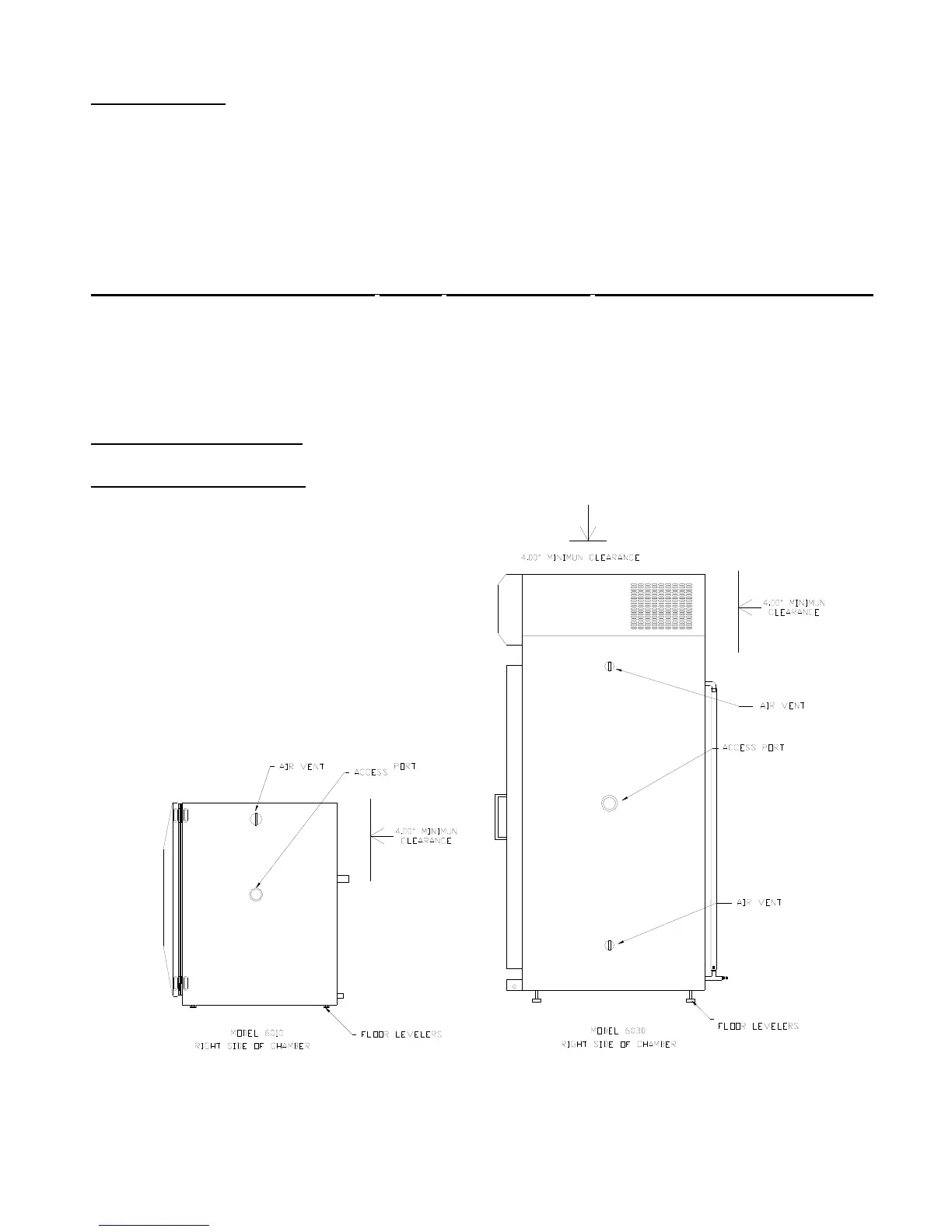
The chamber must be located in a dry, clean, and level area. Allow a 4” clearance from the back
and top of the chamber for proper air circulation and ease of installation. Locate the chamber in
an area out of direct sunlight and away from heating and cooling ducts. The 6010 & 6030
chambers can exhaust 2500 BTU/hr (730 W) and 4000 BTU/hr (1170 W) respectively into the
surroundings. The figure below shows a side view of the chamber with air vent and access port
locations.
Models
6030,
6031,
603 2 : Tilt the unit ½ of a level’s bubble toward the back for proper water
drainage
Models
6010,
6011,
6012: Unit should be completely level for proper water drainage



 To Next Page