27VNA3 Infinity® Variable Speed Heat Pump: Installation Instructions
Manufacturer reserves the right to change, at any time, specifications and designs without notice and without obligations.
9
NOTE: Infinity® System Control indicates acceptable conditions for
subcool charging mode. Do not use subcooling charge method if outside
65°F (18°C) and 105°F(40.6°C) outdoor temperature. Subcool charging
mode will not be available if conditions are not acceptable.
Nominal subcooling targets are found in Table 3 for use as reference or
in specific applications with 25 ft. (7.6 m) lineset, 95°F outdoor
ambient, and 80°F/67°F indoor DB/WB.
Setup for Infinity® Control
Furnace or FE Fan Coil (communicating)
This system can only be installed with Infinity®-capable indoor and
Infinity® System Control using the latest software version. When using
an Infinity® System Control, airflow is automatically selected based on
equipment size. The user has the option of selecting Comfort, Efficiency
and Max airflow for Heating and/or Cooling modes. These should be
selected based on balance between the home owner's comfort and energy
consumption expectations. Efficiency airflow is used to meet published
AHRI performance ratings. See Infinity® System Control Installation
Instructions for additional available adjustments.
Due to using a communicating control with the fan coil or the furnace,
dip switch adjustments are not necessary. The outdoor unit configuration
and the indoor airflows are determined by communicating control setup.
Verify that the PCM, VFD and Infinity® System Control are the latest
software before proceeding with the next steps.
Follow these steps to properly start up the system
1. After system is evacuated, close the disconnects to energize indoor
unit, outdoor unit, and Infinity® System Control. Do not attempt to
operate the system in heating or cooling mode at this time. Mode:
OFF. Vapor and liquid line service valves should be fully closed.
2. If the outdoor ambient temperature is between 65°F and 105°F and
the indoor temperature is between 65°F and 80°F then the system
may be charged using the subcooling method. At this time fully
open the liquid and vapor service valves if the subcooling method is
to be used.
3. The Infinity® System Control will proceed through a series of
setup screens. Follow these setup screens to correctly configure the
indoor unit, lineset configuration, climate zone, and outdoor unit
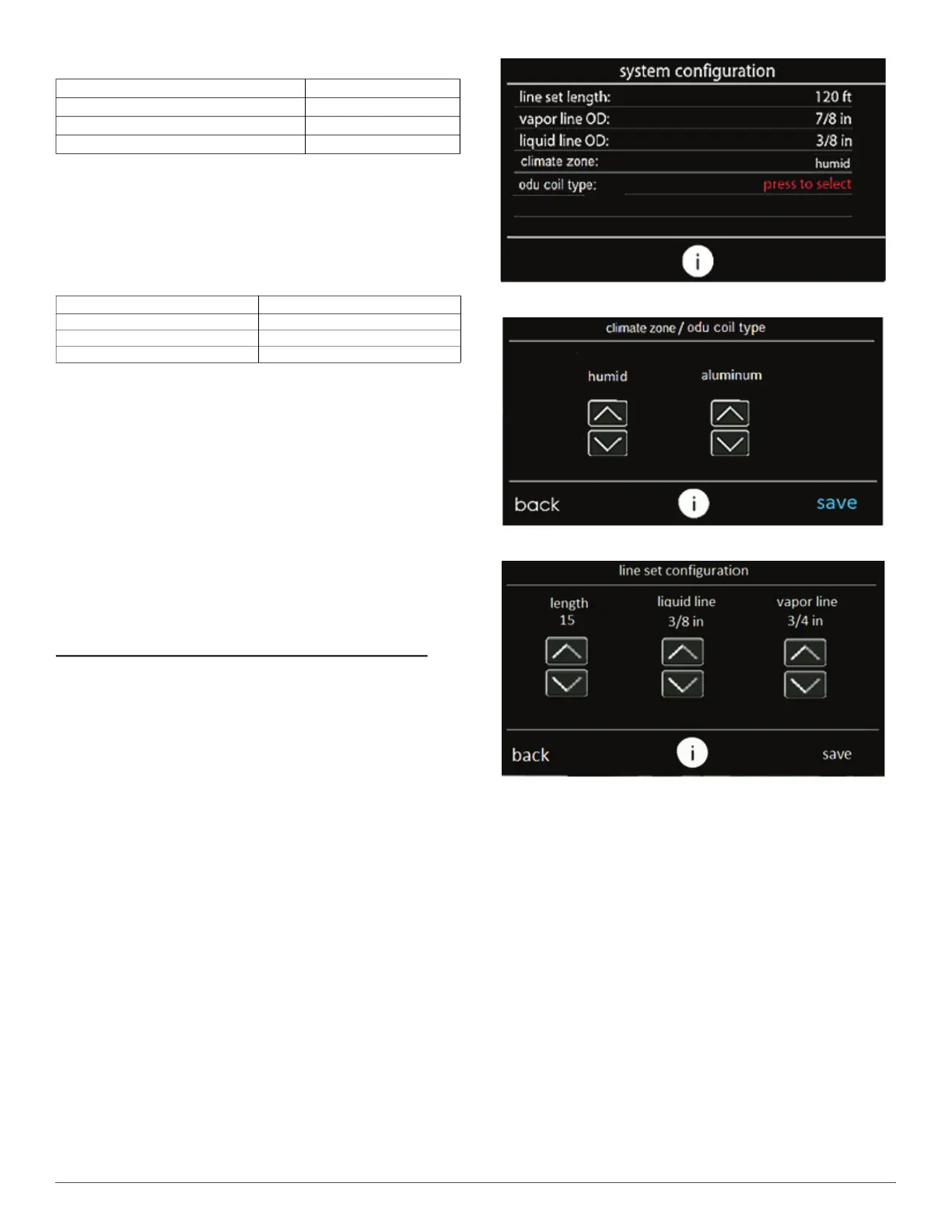
coil material (Fig. 9). Selecting a line in the system configuration
screen will take the user to the respective selection screen for the
line item (Fig. 10 and Fig. 11). “Press to select” in red letters
indicates the line must be pressed and the ODU material type
chosen before learning can continue.
A240369
Fig. 9 – System Configuration Screen
A240351
Fig. 10 – Select Environment and Material
A240350
Fig. 11 – Select Lineset
4. The Infinity® System Control will then advance through the
remaining learning processes including the setup of accessories
such as filter type, UV light, and humidifier. Upon completion of
the setup screens, the equipment summary screen will be presented
(Fig. 12). Verify the correct equipment is shown on this screen.
Next an airflow verification test is executed before returning to the
main screen.
5. Navigate to the “Installation and Service menu” by performing a
long press on the service icon from the main screen (see Fig. 13).
Once in the “Installation and Service” menu, select “Refrigerant
Charging” (see Fig. 14).
Table 2 – Environment Type Guideline
Average Annual Relative Humidity (%) Type
<45 Arid
45 - 65 Semi-Arid
65+ Humid
Table 3 – Standard Subcooling Values
Model Number Subcooling Value
27VNA336 7
27VNA348 7
27VNA360 10





 To Next Page