Home
Casa Systems
Network Hardware
Pebble
Page 20 (Factory Resetting Pebble Wi-Fi)
Casa Systems Pebble - Factory Resetting Pebble Wi-Fi
23 pages
Manual
Save Page as PDF
To Next Page
To Next Page
To Previous Page
To Previous Page
Loading...
20
Pebble
Installation Guide
Factory R
eset
Pebbl
e
Wi
-
Fi
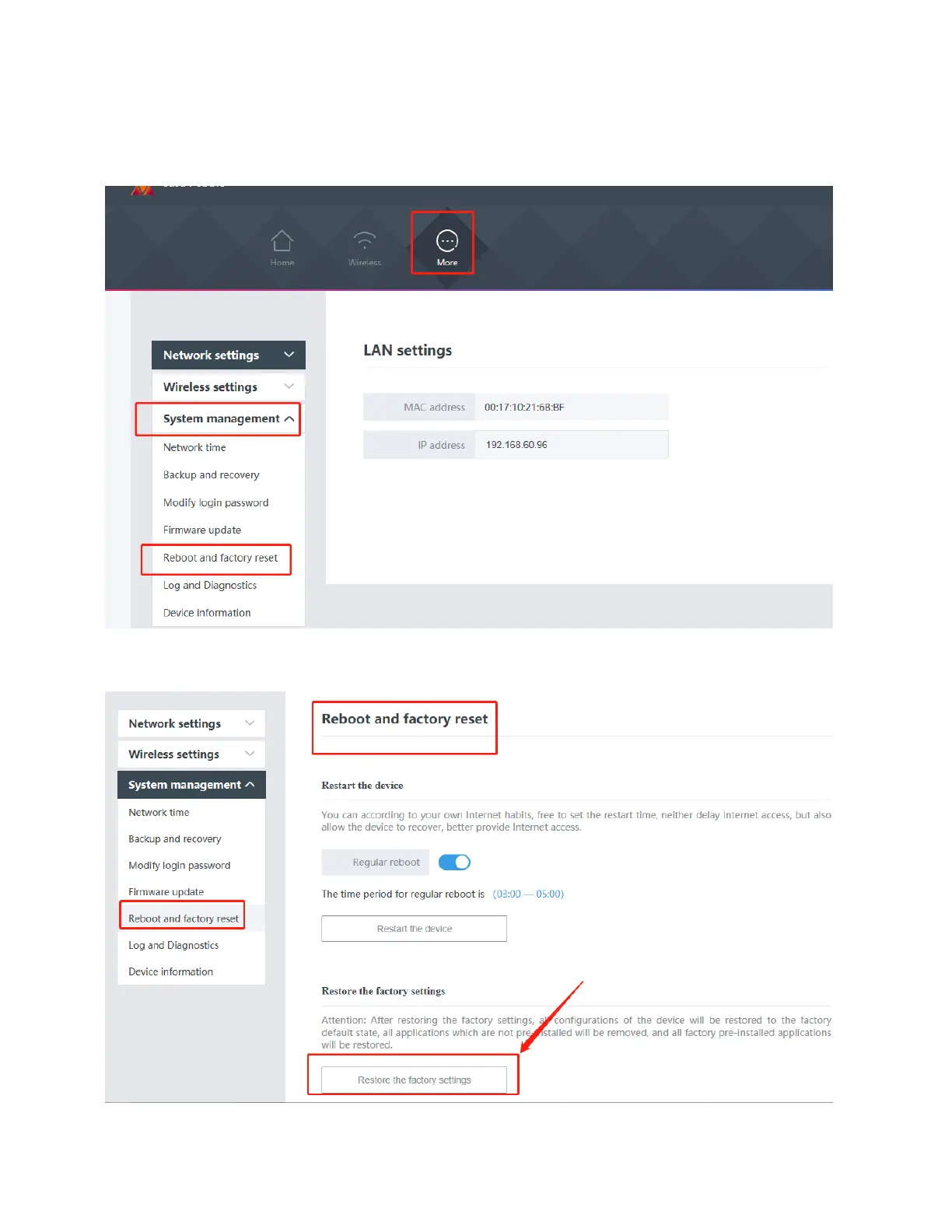
1.
After log
ining t
o Pebbl
e unit
Wi
-
Fi, c
lick
More
on the
top
bar
, then click
S
y
stem
managemen
t
on the l
eft sid
e, then
select
R
e
boot and factor
y
reset
.
2.
Click
Restore t
he fact
ory set
tings
.
19
21
Table of Contents
Main Page
Table of Contents
3
Preface
4
About this Guide
4
Revision History
4
Supported Software Releases
4
Corporate Facility
4
Technical Documentation
5
Overview
6
Network Connection Options
7
Ethernet Connection
7
Wi-Fi Connection (for the First Time)
9
Logging into the Pebble Unit after the Initial Setup
14
Changing the Login Password
17
Manually Reset the Pebble
19
Factory Reset Pebble Wi-Fi
20
Pebble Status & LED Behavior
22
Related product manuals
Casa Systems NDD-0305-01
18 pages
Casa Systems NDD-0315-01
22 pages



 To Next Page