42
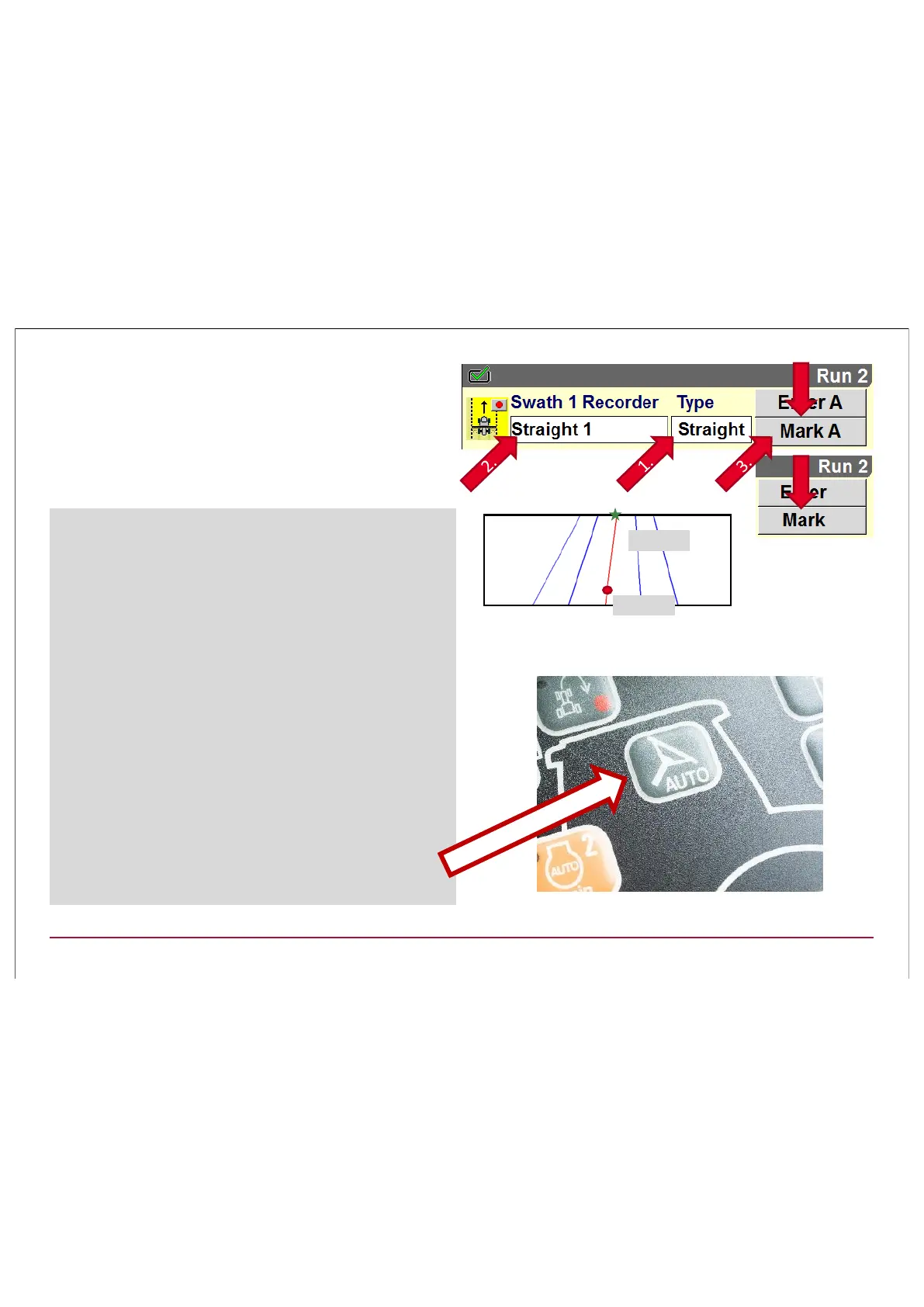
Then use on the RUN screens the Swath
recorder. First a Swath type has to be
chosen. Most common is STRAIGHT A-B or a
CURVE. The recording procedure remains
the same.
Record new swath: Example: A-B straight
1. First select swath type A-B Straight
2. Press the white field Æ "New" and name your
new swath (this is not neccessary)
3. Mark A appears on the right side of the screen
4. Press "Mark A" and start driving to where you
want to have Mark B (end of swath).
5. At the end of the swath press "Mark B"
6. Now you just need to switch to the swath you
are recording!
¾ Curve or Heading is the same Procedere.
¾ When you want to create a curve instead of
A&B is START & STOP.
¾ Now you can activate Accuguide with the
Button on the ICP, in the screen or via HMC II!
B
B
5
4
Mark B
Mark A



 To Next Page