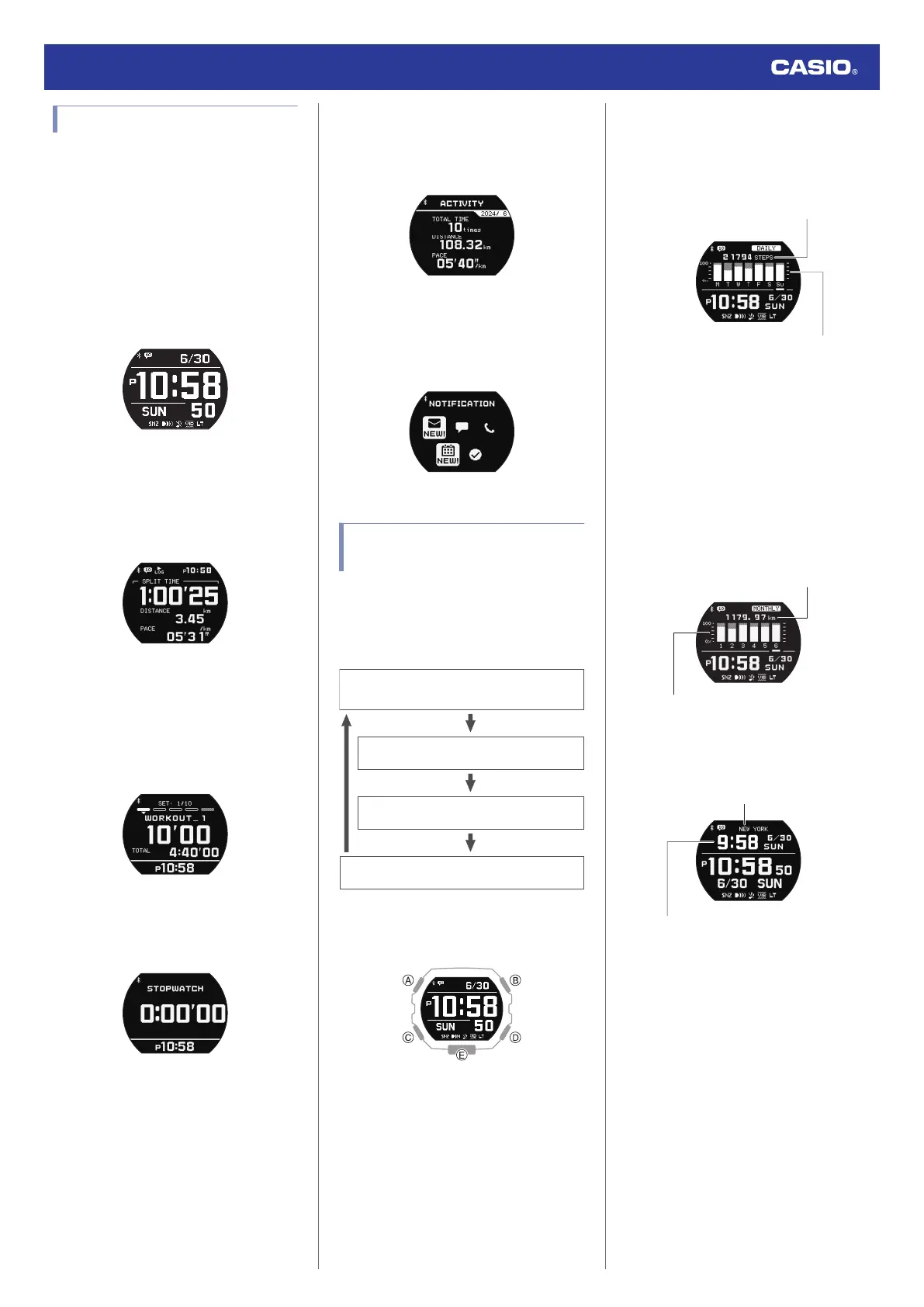
Mode Overview
This section provides an overview of the
modes of your watch.
●
Timekeeping Mode
You can use the Timekeeping Mode to check
the current time and date, and to view your
daily step count, your running distance for a
specific month, and other information. You
can also use this mode to configure Home
City, alarm, and other basic timekeeping
settings.
●
Training Mode
Use this mode to measure and record
distance, elapsed time, pace, and other
running data.
l
Using the Training Function
●
Timer Mode
The timer counts down from a start time
specified by you. The watch performs a sound
and/or vibration operation when the end of the
countdown is reached.
l
Timer
●
Stopwatch Mode
Use this mode to measure elapsed time.
l
Stopwatch
●
Training Log Mode
Use this mode to view recorded training log
data.
l
Viewing Training Log Records
●
Notification Mode
The Notification Mode receives incoming call,
mail, and SNS notifications and information.
l
Receiving Phone Notifications
Selecting a Timekeeping
Mode Digital Display Format
Each press of (A) in the Timekeeping Mode
cycles display contents as shown below. Note
that you can display the current time along with
one other type of information.
BASIC: Watch Only (Basic Screen)
TIME+WORLD TIME
TIME+MONTHLY
TIME+DAILY
BASIC: Watch Only (Basic Screen)
TIME+DAILY: Current Time + Weekly
Information
This screen shows the current time, today’s
step count, and daily step count goal
progress.
Today’s step count
Daily step count goal progress
TIME+MONTHLY: Current Time + Monthly
Information
This screen shows the current time, the
current month’s running distance, and
monthly running distance goal progress.
Instead of running distance, you could also
specify display of running time. Note that you
must use the “G-SHOCK MOVE” app to
specify which item (running distance or
running time) should be displayed.
This month’s running distance or running time
Monthly goal progress
(running distance or running time)
TIME+WORLD TIME: Current Time +
World Time
World Time City
World Time
Watch Operation Guide 3568
10



 To Next Page