E-10
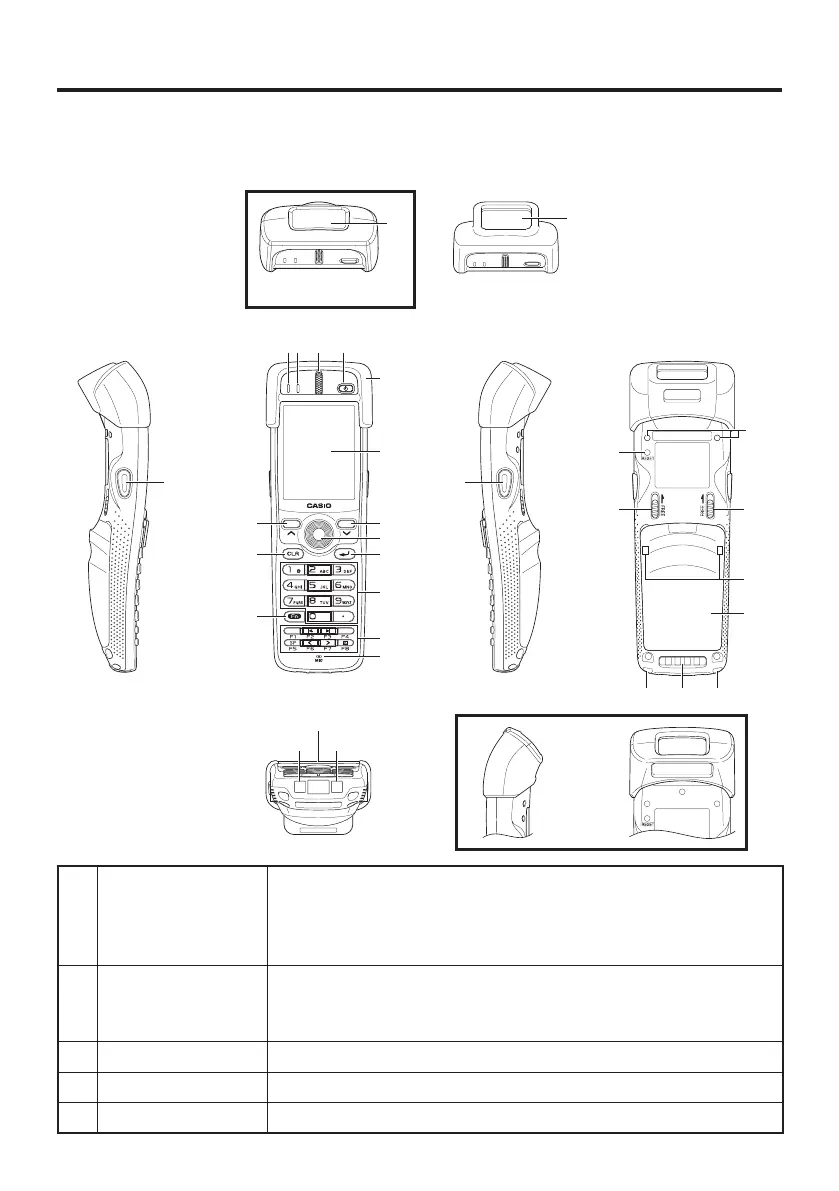
General Guide
Handheld Terminal (DT-X100)
TOP
DT-X100-10E
Left Front Right Back
Bottom
DT-X100-20E
16
17
6
5
8
7
9
10
13
14
8
12
11
4321
15
22
24
23
24
25
26
21 20 21
19
18
19
DT-X100-10E
17
1 Indicator 1 Orange: Charging the battery pack.
Green: Charging the battery pack is complete.
Red: Battery pack error or the surrounding temperature is out of
the charging temperature range.
2 Indicator 2 Flashes in blue when operating via Bluetooth or in orange when
operating via WLAN. Lights in green when reading a bar code
successfully.
3 Speaker Buzzer and voice messages are output here.
4 Power Key Turns the power on and off.
5 Protector Fitted on the Handheld Terminal.



 To Next Page
 Loading...










