90
SHOOTING A MOVIE
Movie Size
The following shows the approximate movie file size for a one-
minute movie.
Audio is also recorded while you shoot a movie. Audio is
monaural.
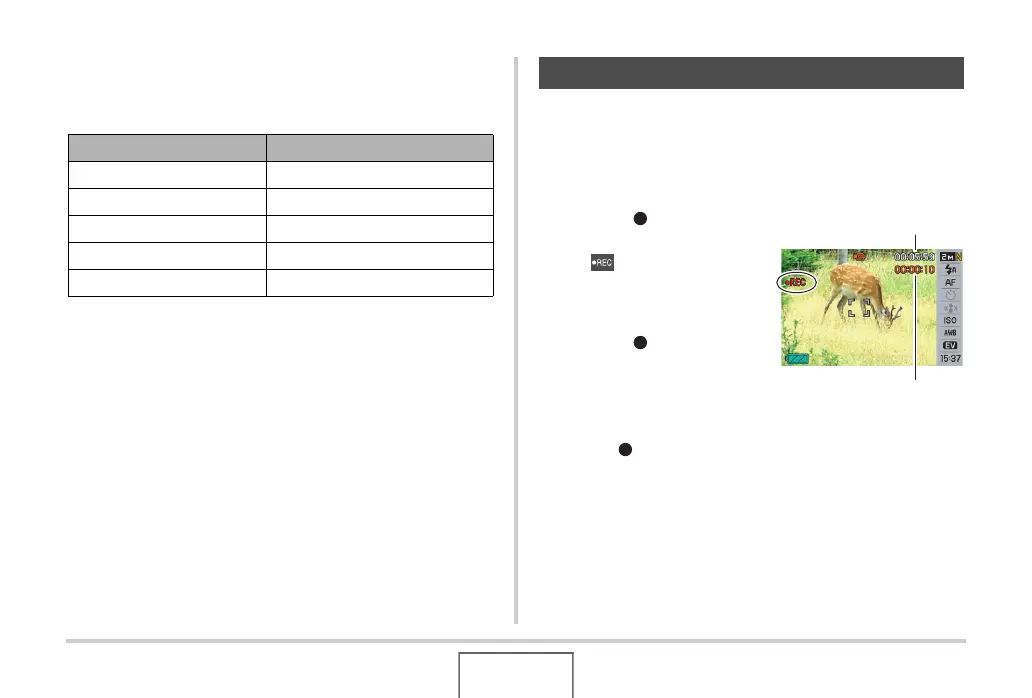
1. In the REC mode, point the camera at the
subject.
2. Press [ ] to start
shooting the movie.
• “ ” is displayed while
movie recording is in
progress.
3. Press [ ] again to
stop shooting.
Movie recording also will
stop automatically if memory
becomes full before you
press [ ].
Image Quality Approximate Size
HQ 28.4 MB
HQ Wide 28.4 MB
Normal 14.9 MB
Normal Wide 14.9 MB
LP 5.3 MB
Shooting a Movie
Recording Time
Remaining Recording Time





 To Next Page