EasyManua.ls Logo

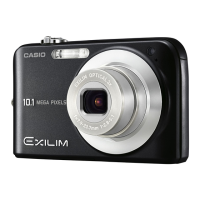
Casio EXILIM EX-Z16 - User Manual

Casio EXILIM EX-Z16
146 pages
Print Icon
To Next Page IconTo Next Page
Loading...
1
E
Thank you for purchasing this CASIO product.
Before using it, be sure to read the precautions contained in this User’s Guide.
Keep the User’s Guide in a safe place for future reference.
For the most up-to-date information about this product, visit the official EXILIM
Website at http://www.exilim.com/
Digital Camera
User’s Guide

Table of Contents

Questions and Answers

  • A
    allisonericJul 28, 2025
    How to fix Casio EXILIM EX-Z16 when power does not turn on?
    • T
      Tony BensonJul 29, 2025
      If your Casio Digital Camera doesn't turn on, it could be due to a few reasons. First, ensure the battery is correctly loaded. If it is, the battery might be dead. Try charging the battery. If the battery quickly dies after being charged, it likely needs replacing. Consider purchasing a CASIO NP-80 rechargeable lithium ion battery.
  • A
    Allison AguilarAug 1, 2025
    Why Auto Focus does not focus properly on Casio Digital Camera?
    • T
      trichardsAug 1, 2025
      If the Auto Focus on your Casio Digital Camera isn't working correctly: 1. Check if the lens is dirty and clean it. 2. Ensure the subject is within the focus frame. 3. The subject may not be compatible with Auto Focus. Use manual focus. 4. Avoid moving the camera during shooting. Try using Anti Shake or a tripod.
  • M
    mirandamcdonaldAug 6, 2025
    Why does my Casio EXILIM EX-Z16 suddenly power down?
    • M
      michaeldominguezAug 6, 2025
      Your Casio Digital Camera might be powering down for several reasons: 1. The Auto Power Off feature may be enabled. Simply turn the power back on. 2. The battery may be dead. Try charging it. 3. The camera's internal protection might be activated due to high temperature. Turn off the camera and allow it to cool down before using it again.
  • K
    kennedybrandyAug 10, 2025
    What to do if my Casio EXILIM EX-Z16 does not record image when pressing the shutter button?
    • S
      Sierra ValdezAug 10, 2025
      If your Casio Digital Camera isn't recording images when you press the shutter button: 1. Ensure the camera is in REC mode by pressing the REC button. 2. If the flash is charging, wait for it to finish. 3. If a “Memory Full” message appears, transfer images to your computer, delete unnecessary images, or use a different memory card.
  • J
    Janice HarrisAug 14, 2025
    Why does the flash not fire on my Casio Digital Camera?
    • D
      Danielle ShawAug 14, 2025
      If the flash on your Casio Digital Camera isn't firing, check the following: 1. Ensure the flash mode is not set to Flash Off. Change to another mode. 2. The battery might be dead; charge it. 3. If a BEST SHOT scene with Flash Off is selected, change the flash mode or select a different BEST SHOT scene.
  • C
    Colleen CollinsAug 19, 2025
    What to do if Casio EXILIM EX-Z16 Digital Camera powers down during Self-timer countdown?
    • E
      Erik GrayAug 19, 2025
      If your Casio Digital Camera powers down during the self-timer countdown, the battery may be dead. Try charging the battery.
  • W
    William KingAug 23, 2025
    What to do if images cannot be transferred over a USB connection from Casio Digital Camera?
    • K
      Kevin RiosAug 23, 2025
      If you're having trouble transferring images from your Casio Digital Camera via USB: 1. Ensure the USB cable is securely connected. 2. Verify that the correct USB communication protocol is selected. 3. Make sure the camera is turned on. 4. Connect the camera directly to your computer's USB port instead of using a USB hub.

Summary

Important Precautions

Read This First!

Manual change notice, contact info, copyright, and LCD panel notes.

Battery Charging

Initial Charging Procedure

Instructions for charging a new battery using the charger unit.

Loading the Battery into the Camera

Initial Camera Setup

Memory Card Preparation

Loading a Memory Card

Step-by-step instructions for inserting a memory card.

Formatting a New Memory Card

Camera Power Management

Powering On and Off

Details how to turn the camera on and off.

Taking a Snapshot

Control Panel Operations

Flash Photography

Flash Mode Selection

Details available flash modes (Auto, Off, On, Red Eye).

Setting the Auto Focus Area

Using Easy Mode

Using Face Detection

Using the Cameras Zoom

Movie and Audio Recording

Recording a Movie

Step-by-step guide for capturing video and sound.

Using BEST SHOT Scenes

What is BEST SHOT?

Explains the function and benefit of BEST SHOT scenes.

Advanced Camera Settings

REC Mode Settings

Adjusting Image Brightness

Direct Printing Setup: PictBridge

Connecting Camera to Computer

Using with Windows Computers

Saving and Viewing Images on PC

Using with Macintosh Computers

Wireless Image Transfer with Eye-Fi

Setting USB Connection Protocol

Formatting Storage Media

Monitor Screen Settings

Appendix

Precautions during Use

Covers safe operation, viewing sun, flash safety, monitor care, connections, transport.

Abnormalities and Handling Precautions

Environmental and Data Handling Precautions

Battery Life and Handling

Camera, Battery, and Charger Care

Power Supply and Charging

Replacing the Battery

Step-by-step guide for removing the old and loading a new battery.

Battery Precautions

Using Memory Cards

Resetting Camera Settings

Troubleshooting

Power Supply Problems

Addresses issues like camera not turning on or sudden power-downs.

Image Focus and Flash Issues

Image Saving Issues

Playback and Transfer Issues

Understanding Camera Messages

Recording Capacity Guide

Camera Specifications

Approximate Battery Life

Battery and Charger Specs

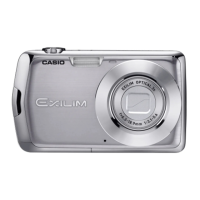
Casio EXILIM EX-Z16 Specifications

General IconGeneral
Megapixel12.1 MP
Camera typeCompact camera
Sensor typeCCD
Image stabilizerNo
Image sensor size1/2.3 \
Supported aspect ratios3:2, 16:9
Maximum image resolution4000 x 3000 pixels
Digital zoom4 x
Optical zoom3 x
Combined zoom18.7 x
Focal length range6.3 - 18.9 mm
Lens structure (elements/groups)6/5
InterfaceUSB 2.0
Built-in flashYes
Aperture range (F-F)2.9 - 5.4
Camera shutter speed1/2 - 1/2000 s
Compatible operating systems-
Focal length (35mm film equivalent)35.5 - 106.5 mm
Auto focusing (AF) modesMulti Point Auto Focus, Single Auto Focus, Spot Auto Focus
Super Macro focusing range0.078 - 0.5 m
Macro focusing range (wide)0.1 - 0.5 m
Auto Mode focusing range (wide)1 - ∞ m
Light meteringCentre-weighted, Spot
ISO sensitivity80, 100, 200, 400, 800, 1600, Auto
Flash modesAuto, Flash off, Red-eye reduction
Flash range (tele)2 - 5 m
Flash range (wide)0.3 - 10 m
Internal memory14.9 MB
Compatible memory cardsSD, SDHC
Video formats supportedAVI
Maximum video resolution848 x 480 pixels
Display diagonal2.7 \
Display resolution (numeric)230400 pixels
USB version2.0
Scene modesSelf-portrait
White balanceAuto, Daylight, Flash, Fluorescent, Manual, Shade, Tungsten
Camera playbackSingle image
Product colorPink
Battery typeNP-80
Battery life (max)3.5 h
Battery life (CIPA standard)270 shots
Camera shutter typeelectronic, mechanical
Weight and Dimensions IconWeight and Dimensions
Depth21.59 mm
Width98.8 mm
Height58.42 mm
Weight140 g

Related product manuals