EasyManua.ls Logo

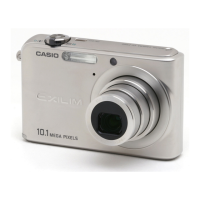
Casio Exilim EX-Z1080 - User Manual

Casio Exilim EX-Z1080
267 pages
Print Icon
To Next Page IconTo Next Page
Loading...
1
E
Digital Camera
User’s Guide
Thank you for purchasing this CASIO product.
Before using it, be sure to read the precautions
contained in this User’s Guide.
Keep the User’s Guide in a safe place for future
reference.
For the most up-to-date information about this
product, visit the official EXILIM
Website at http://www.exilim.com/
EX-Z1080
K848PCM1DMX

Table of Contents

Questions and Answers

  • J
    Jeffrey GonzalezAug 15, 2025
    What to do if my Casio Digital Camera image is not recorded when I press the shutter button?
    • J
      Jeffrey ConleyAug 15, 2025
      If your Casio Digital Camera is in PLAY mode, press the REC button to enter REC mode. If the flash is charging, wait until it finishes. If the message “Memory Full” appears, transfer images to your computer, delete unnecessary images, or use a different memory card.
  • B
    Beth HartmanAug 18, 2025
    How to fix Casio Exilim EX-Z1080 power if it does not turn on?
    • D
      deanrichardAug 18, 2025
      If your Casio Digital Camera does not turn on, charge the battery. If the battery goes dead soon after being charged, it needs to be replaced. Purchase a separately available CASIO NP-40 rechargeable lithium ion battery. Also, check the battery orientation.
  • B
    Brandon MacdonaldAug 21, 2025
    Why does my Casio Digital Camera battery die so fast?
    • K
      kevin80Aug 22, 2025
      Your Casio Digital Camera may be powering down suddenly because the battery needs to be charged. Charge the battery as a solution. Also, the camera’s protection function may have activated because camera temperature is too high. Turn off the camera and wait until it cools down before trying to use it again. The Auto Power Off may have activated. In this case, simply turn the power back on.
  • N
    Nancy MortonAug 25, 2025
    How to fix Casio Exilim EX-Z1080 image if it is out of focus during movie recording?
    • D
      Derek OrrAug 25, 2025
      If the image on your Casio Digital Camera is out of focus during movie recording, make sure you shoot within the allowable range if focusing is not possible because the subject is outside the focus range. Also, the lens may be dirty, so clean it.
  • T
    Timothy WhiteAug 27, 2025
    How to fix wrong date and time displayed on Casio Digital Camera?
    • N
      Noah HollowayAug 27, 2025
      If your Casio Digital Camera displays the wrong date and time, you need to set the correct date and time.
  • P
    Patricia FisherAug 30, 2025
    What to do if Casio Exilim EX-Z1080 flash does not fire?
    • A
      Ashley GarciaAug 30, 2025
      If the flash on your Casio Digital Camera does not fire, and “Flash Off” is selected, change to another mode. If a BEST SHOT scene that uses the “Flash Off” flash mode is selected, change to a different flash mode or select a different BEST SHOT scene. Also, the battery may need to be charged.
  • A
    andrewfernandezSep 2, 2025
    How to fix Casio Exilim EX-Z1080 if it powers down during self-timer countdown?
    • J
      John AdamsSep 2, 2025
      If your Casio Digital Camera powers down during the self-timer countdown, try charging the battery.
  • R
    Robert SandersSep 5, 2025
    Why I can’t transfer images over a USB connection from my Casio Exilim EX-Z1080 Digital Camera?
    • M
      Mary NelsonSep 5, 2025
      If you can’t transfer images over a USB connection from your Casio Digital Camera, check all connections to ensure the USB cable is securely connected. If your computer is running Windows 98SE or 98, install or reinstall the USB driver correctly. Also, select the correct USB communication protocol in accordance with the type of device you are connecting. Ensure that the camera is turned on.
  • M
    Matthew WilliamsSep 8, 2025
    How to fix Casio Exilim EX-Z1080 power if it does not turn off?
    • M
      Monica CastroSep 8, 2025
      If the power on your Casio Digital Camera does not turn off, remove the battery from the camera and then reinsert it.
  • S
    Steven YoungSep 12, 2025
    Why does the display language setting screen appear when my Casio Exilim EX-Z1080 Digital Camera is turned on?
    • J
      Jamie HillSep 12, 2025
      The display language setting screen may appear when your Casio Digital Camera is turned on because you did not configure initial settings after purchasing the camera, or the battery may have been left with a dead battery. Check the camera setup. Also, perform the reset operation to initialize the camera’s setup.

Summary

Shooting a Snapshot Guide

Holding the Camera Correctly

Proper techniques for holding the camera to ensure stable shots.

Shooting a Snapshot

Basic procedure for capturing a still image with the camera.

Using Flash

Guide to selecting and using different flash modes for better lighting.

Shooting a Movie Guide

Shooting a Movie

Step-by-step guide to recording video clips with the camera.

Using Best Shot Scenes

Selecting a Sample Scene

Choosing pre-defined shooting modes for various scenarios.

Reducing the Effects of Hand and Subject Movement

Using Anti Shake to minimize blur from camera or subject movement.

Advanced Camera Settings

Changing the Focus Mode

Selecting from different focus modes like Auto, Macro, Manual, etc.

Resetting the Camera to Its Initial Factory Defaults

Restoring all camera settings to their factory defaults.

Viewing Snapshots and Movies

Editing Images

Managing Your Files

Protecting a File Against Deletion

Preventing accidental deletion of important image files.

Deleting Files

Deleting a Specific File

Removing individual image, movie, or audio files from the camera.

Other Camera Settings

Formatting Built-in Memory

Erasing all data from the camera's internal memory.

Printing Your Images

Using the Camera with a Computer

Using the Camera with a Windows Computer

Instructions for connecting and using the camera with Windows.

Appendix: Camera Information

Troubleshooting Guide

Solutions for common camera problems.

Display Messages

Explanations of various on-screen messages.

Casio Exilim EX-Z1080 Specifications

General IconGeneral
ModelCasio Exilim EX-Z1080
CategoryDigital Camera
Effective Pixels10.1 megapixels
Optical Zoom3x
Digital Zoom4x
LCD Screen Size2.6 inches
ISO SensitivityAuto, 64, 100, 200, 400, 800, 1600
Video Recording640 x 480 pixels at 30 fps
Storage MediaSD/SDHC
BatteryRechargeable lithium-ion battery (NP-40)
Video Resolution640 x 480
Image Sensor1/1.75-inch CCD
Focus Range40cm to infinity (normal), 6cm to 50cm (macro)

Related product manuals