96
SHOOTING A MOVIE
■ Getting Ready to Shoot with Past Movie
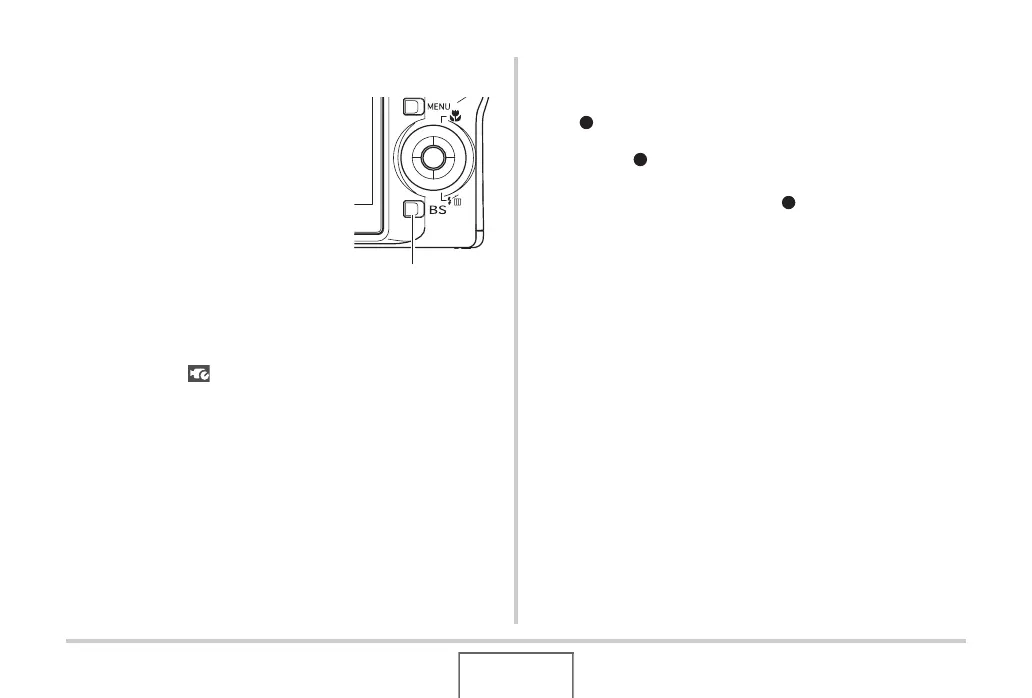
1. In the REC mode, press
[BS].
2. Use [S], [T], [W], and [X] to select the “Past
Movie” scene and then press [SET].
This causes “ ” to appear on the monitor screen, which
indicates that Past Movie is enabled.
■ Shooting a Past Movie
1. With the camera pointed at the subject, press
[].
2. Press [ ] again to stop shooting.
Movie recording also will stop automatically if memory
becomes full before you press [ ].
To return to the REC mode
After Past Movie recording is complete, the camera stands by
for shooting of another Past Movie.
To exit Past Movie recording, press [BS], select something other
than “Past Movie” and then press [SET]. If you want to set the
camera up for normal snapshot shooting, for example, select
“Auto” and then press [SET].
[BS]











 To Next Page