EasyManua.ls Logo

Casio FD-1 - Page 11

Casio FD-1
30 pages
Print Icon
To Next Page IconTo Next Page
To Previous Page IconTo Previous Page
Loading...
gle
ORICON
Te
me
tramp
am
RT
TI
et
TT
nto
ORE
EOIN
OC
REN
ae
arate
SD
NYE
A
LE
AEE
ee
ET
8S
LRT
RENNIE
Tem
TE
CHR
ERS
RUA
Raat
NC
We
Ogre
a
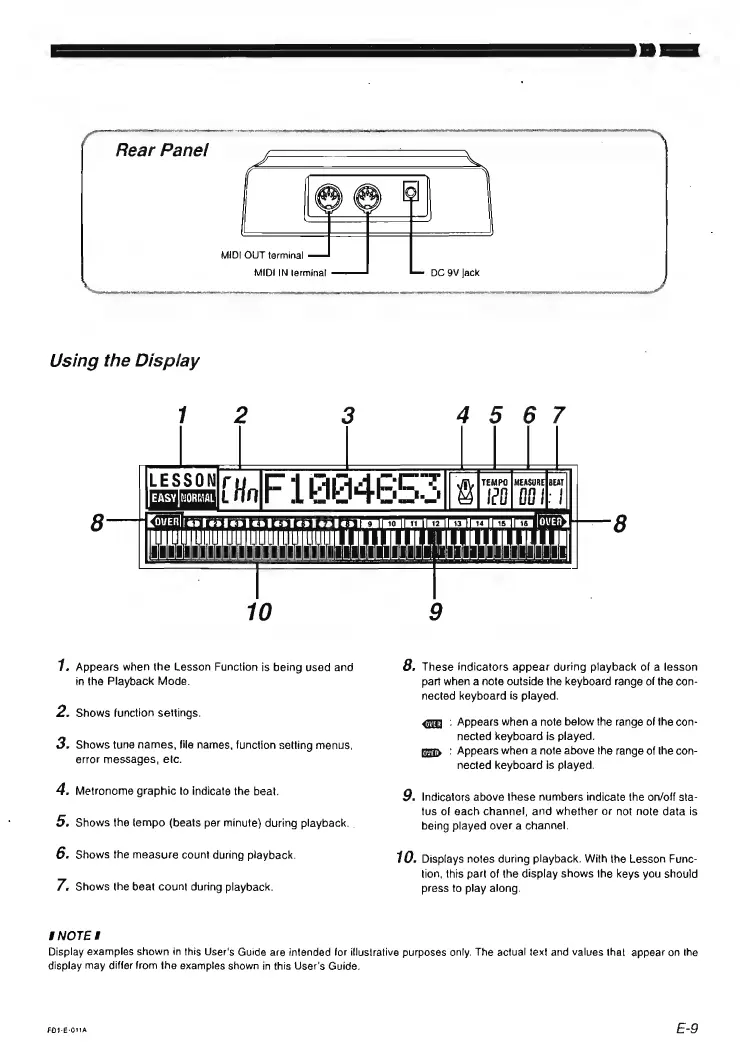
Rear
Panel
MIDI
OUT
terminal
MIDI
IN
terminal
DC
9V
Jack
Na
cache
TAN
Tm
RADI
eee
See
ONS
FS
EI
ne
RL
UL
ON
TETRA
U
TE
O
Pele
VIO
CE
TUR
RN
EEA
OPENER
INE
ERAT
IY
ORAS
QMO
REA
RTT
1
2
3
45
67
pasa
MF
LEMES
S|
ooy
|
QOvVER||
cppestenentesled
Foo
0
<>
IRB
IRCHININIECRIRCRIECElEcHlEre
[OVERS
AAA00004g00AUOFNGTUNERNAAEUUSSORRLAS
ASHLEE
10
9
7.
Appears
when
the
Lesson
Function
is
being
used
and
8,
These
indicators
appear
during
playback
of
a
lesson
in
the
Playback
Mode.
part
when
a
note
outside
the
keyboard
range
of
the
con-
nected
keyboard
is
played.
Shows
function
settings.
:
Appears
when
a
note
below
the
range
of
the
con-
nected
keyboard
is
played.
[ap
:
Appears
when
a
note
above
the
range
of
the
con-
nected
keyboard
is
played.
oe
Shows
tune
names,
file
names,
function
setting
menus,
error
messages,
etc.
4.
Metronome
graphic
to
indicate
the
beat.
9.
Indicators
above
these
numbers
indicate
the
on/off
sta-
tus
of
each
channel,
and
whether
or
not
note
data
is
5.
Shows
the
tempo
(beats
per
minute)
during
playback.
|
being
played
over
a
channel.
6.
Shows
the
measure
count
during
playback.
70.
Displays
notes
during
playback.
With
the
Lesson
Func-
tion,
this
part
of
the
display
shows
the
keys
you
should
7.
Shows
the
beat
count
during
playback.
press
to
play
along.
HNOTES
Display
examples
shown
in
this
User's
Guide
are
intended
for
illusirative
purposes
only.
The
actual
text
and
values
that
appear
on
the
display
may
differ
from
the
examples
shown
in
this
User's
Guide.
FOI-E-O1A
E-9