EasyManua.ls Logo

Casio FD-1 - Lesson Part Octave Shift

Casio FD-1
30 pages
Print Icon
To Next Page IconTo Next Page
To Previous Page IconTo Previous Page
Loading...
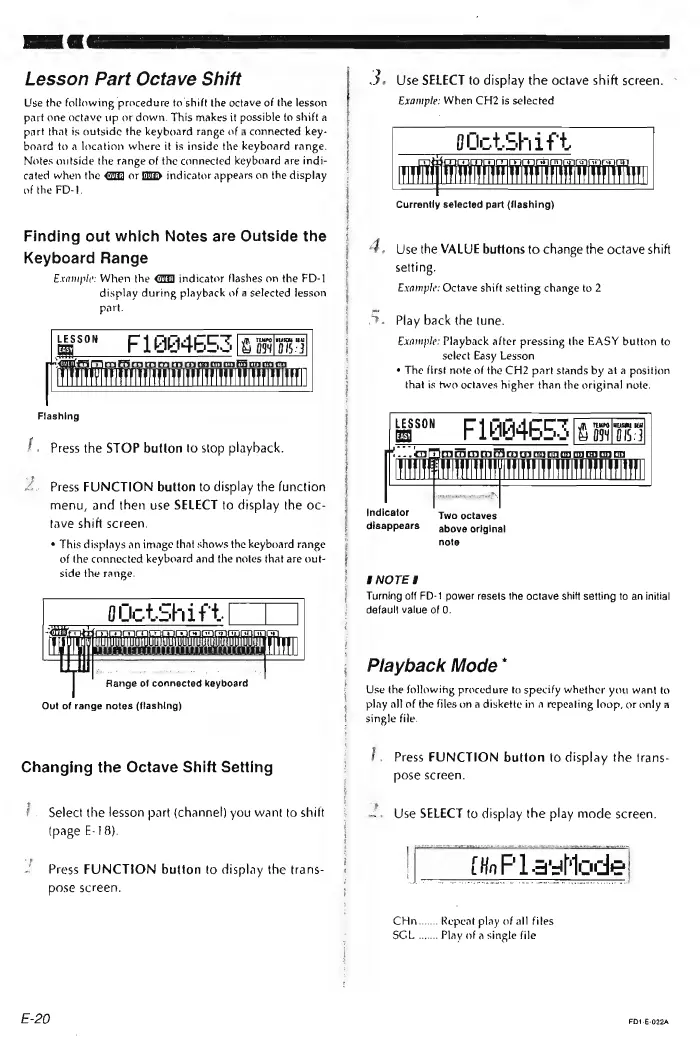
Lesson
Part
Octave
Shift
Use
the
following
procedure
to
shift
the
octave
of
the
lesson
part
one
octave
up
or
down.
This
makes
it
possible
to
shift
a
part
that
is
outside
the
keyboard
range
of
a
connected
key-
board
to
a
location
where
it
is
inside
the
keyboard
range.
Notes
outside
the
range
of
the
connected
keyboard
are
indi-
cated
when
the
@@
or
HD
indicator
appears
an
the
display
of
the
FD-1.
Finding
out
which
Notes
are
Outside
the
Keyboard
Range
Example:
When
the
@@J
indicator
flashes
on
the
FD-1
display
during
playback
of
a
selected
jesson
part.
ao
Fi
AR
MESS
[8
MTR
OVEN
«ns
WO
mmo
co
ALMA
AAMAS
IASG
fi
ff
Flashing
“Poa,
Press
the
STOP
button
to
stop
playback.
Press
FUNCTION
button
to
display
the
function
menu,
and
then
use
SELECT
to
display
the
oc-
tave
shift
screen.
¢
This
displays
an
image
that
shows
the
keyboard
range
of
the
connected
keyboard
and
the
notes
that
are
out-
side
the
range.
bocksnie
ET
oa
ae
aaa
:
Rane
of
connected
pavboard
Out
of
range
notes
(flashing)
Changing
the
Octave
Shift
Setting
/.
Select
the
lesson
part
(channel)
you
want
to
shilt
(page
E-
18).
Press
FUNCTION
button
to
display
the
trans-
pose
screen.
E-20
3.
Use
SELECT
to
display
the
octave
shift
screen.
>
Example:
When
CH2
is
selected
LESTE
ETRE
TETYE
EL
Currently
selected
part
(flashing)
4.
Use
the
VALUE
buttons
to
change
the
octave
shift
setting.
Example:
Octave
shift
setting
change
to
2
>,
Play
back
the
tune.
Example:
Playback
after
pressing
the
EASY
button
to
select
Easy
Lesson
*
The
first
note
of
the
CH2
part
stands
by
at
a
position
that
is
two
octaves
higher
than
the
original
note.
LESSON
[1
_FlbB4eo
3
8
BT
Cr
eT
|
Indicator
Two
octaves
disappears
~—
above
original
note
ENOTES
Turning
off
FD-1
power
resets
the
octave
shift
setting
to
an
initial
default
value
of
0.
Playback
Mode
*
Use
the
followihy
procedure
to
specify
whether
you
want
to
play
all
of
the
files
on
a
diskette
in
a
repeating
loop,
or
only
a
single
file.
'.
Press
FUNCTION
button
to
display
the
trans-
pose
screen.
.
Use
SELECT
to
display
the
play
mode
screen.
anger
CHn.......
Repeat
play
of
all
files
BG
Uy
sinw
Play
of
a
single
file
FD1-E-0224