EasyManua.ls Logo

Casio FD-1 - About Floppy Diskettes

Casio FD-1
30 pages
Print Icon
To Next Page IconTo Next Page
To Previous Page IconTo Previous Page
Loading...
About
Floppy
Diskettes
This
section
explains
precautions
you
need
to
follow
when
using
floppy
diskettes.
It
also
contains
other
basic
informa-
tion
about
diskettes.
Floppy
Diskette
Handling
Precautions
IMPORTANT!
¢
Keep
diskettes
away
from
televisions,
stereos,
and
other
sources
of
magnetism.
Magnetism
can
affect
diskette
con-
tents.
¢
Keep
diskettes
out
of
direct
sunlight,
and
areas
subjected
to
high
humidity
and
temperature
extremes.
©
Never
try
to
take
a
diskette
apart.
*
Never
apen
the
shutter
of
a
diskette
or
touch
the
inside
with
your
fingers.
¢
Never
bend
a
diskette
or
apply
strong
pressure
to
it.
°
Make
vou
affix
diskette
labels
only
within
the
areas
pro-
vided,
and
never
affix
a
new
label
on
top
of
an
old
one.
¢
Do
not
eject
the
diskette
while
the
access
lamp
is
lit
or
while
playback
is
in
progress.
Also,
never
tuen
off
power
while
a
diskette
is
loaded
inside
the
FD-1.
Doing
so
can
corrupt
data
on
the
diskette
and
cause
malfunction
of
the
FD-1.
®
Never
insert
any
other
object
besides
the
specified
type
of
diskette
into
the
FD-1.
Doing
so
can
cause
malfunction
of
the
FD-1.
*
The
FD-1
uses
a
magnetic
head.
A
dirty
head
can
make
it
impossible
to
read
data
from
a
diskette
or
even
corrupt
dis-
kette
contents.
Use
a
commercially
available
cleaning
dis-
kette
to
periodically
clean
the
magnetic
head.
*
CASIO
COMPUTER
CO.,
LTD.
assumes
no
responsi-
bility
for
the
loss
of
any
data
stored
on
a
floppy
dis-
~
kette.
FDI-E-013A
Diskette
Types
The
FD-1
supports
use
of
both
3.5"
2HD
(1.44MB
formatted)
and
2DD
(720KB
formatted)
diskettes.
Use
of
other
disk
siz-
es
and
capacities
is
not
supported.
Diskette
Type
Indicators
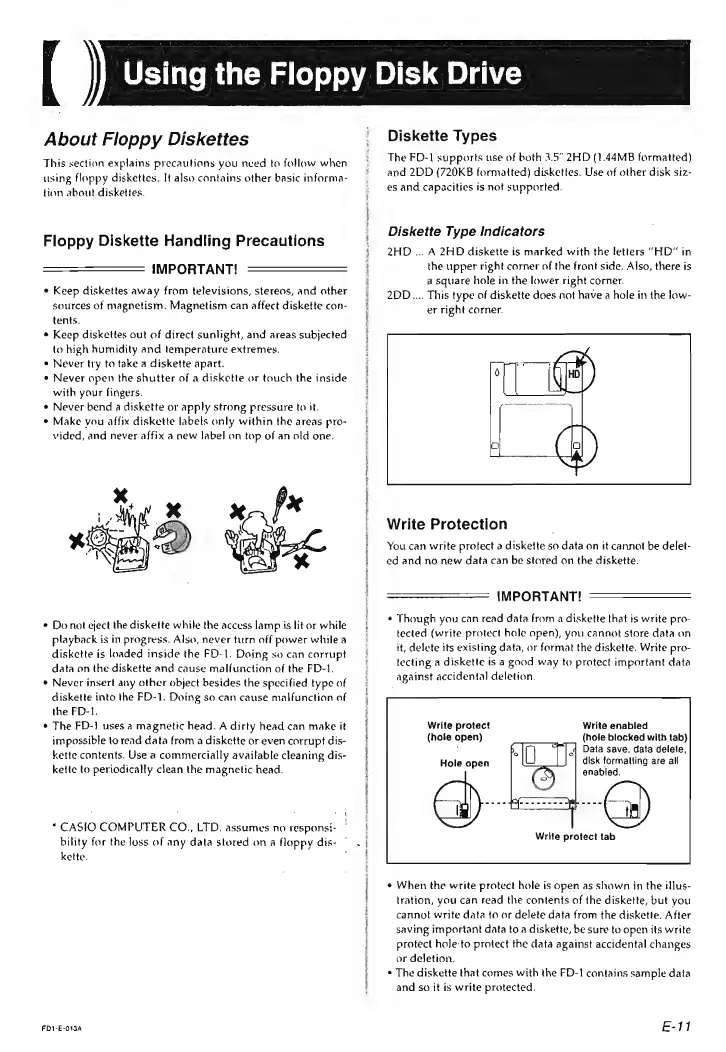
2HD
...
A
2HD
diskette
is
marked
with
the
letters
“HD”
in
the
upper
right
corner
of
the
front
side,
Also,
there
is
a
square
hole
in
the
lower
right
corner.
2DD.....
This
type
of
diskette
does
not
have
a
hole
in
the
low-
er
right
corner.
Write
Protection
You
can
write
protect
a
diskette
so
data
on
it
cannot
be
delet-
ed
and
no
new
data
can
be
stored
on
the
diskette.
IMPORTANT!
¢
Though
you
can
read
data
from
a
diskette
that
is
write
pro-
tected
(write
protect
hole
open),
you
cannot
store
data
on
it,
delete
its
existing
data,
or
format
the
diskette.
Write
pro-
tecting
a
diskette
is
a
good
way
to
protect
important
data
against
accidental
deletion.
Write
enabled
(hole
blocked
with
tab)
Data
save,
data
delete,
disk
formatting
are
all
enabled.
Write
protect
(hole
open)
Hole
open
Write
protect
tab
When
the
write
protect
hole
is
open
as
shown
jn
the
illus-
tration,
you
can
read
the
contents
of
the
diskette,
but
you
cannot
write
data
to
or
delete
data
from
the
diskette.
After
saving
important
data
to
a
diskette,
be
sure
tu
open
its
write
protect
hole
to
protect
the
data
against
accidental
changes
or
deletion.
The
diskette
that
comes
with
the
FD-1
contains
sample
data
and
so
it
is
write
protected.
E-1