EasyManua.ls Logo

Casio FD-1 - Connecting to a Digital Piano (AP-21, AP-22 S, AP-128 S, Etc.); Accessories and Options

Casio FD-1
30 pages
Print Icon
To Next Page IconTo Next Page
To Previous Page IconTo Previous Page
Loading...
Connecting
to
a
Digital
Piano
(AP-
21,
AP-22S,
AP-12S,
etc.)
IMPORTANT!
=
The
FD-1
can
be
used
to
play
back
digital
piano
data
only
when
it
is
connected
to
a
digital
piano.
Setting
Up
the
FD-1
In
addition
to
the
following
settings,
also
see
the
set-
tings
under
"Making
Function
Settings"
on
page
E-19.
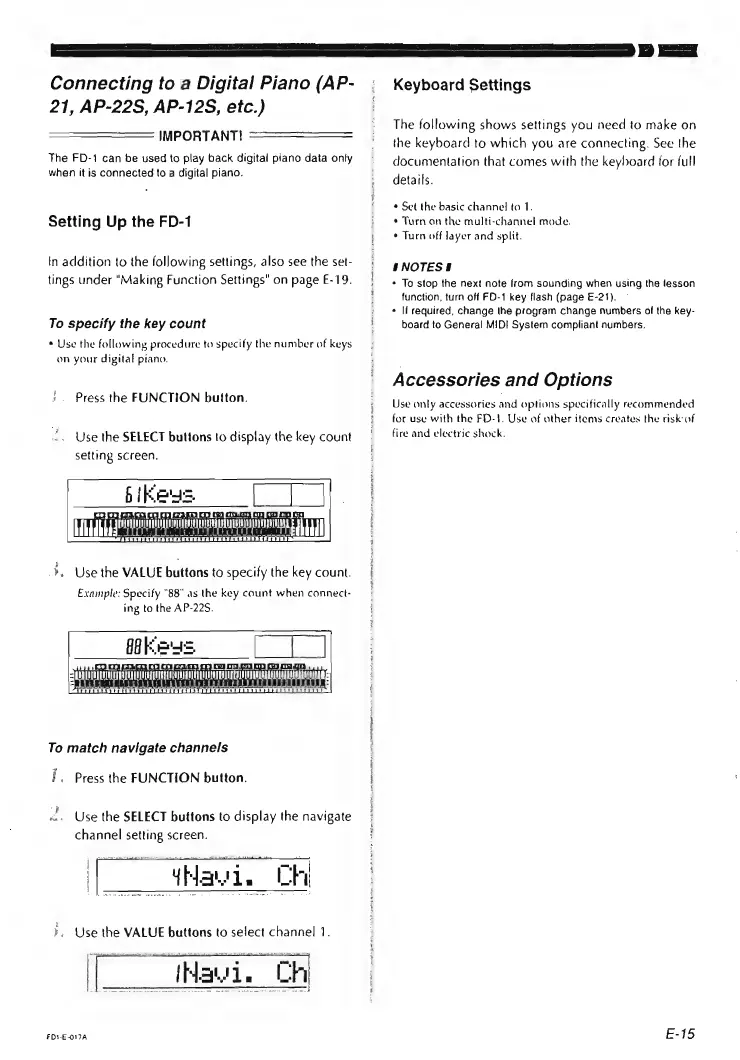
To
specify
the
key
count
*
Use
the
following
procedure
to
specify
the
number
of
keys
on
your
digital
ptano.
Press
the
FUNCTION
button.
Use
the
SELECT
buttons
to
display
the
key
count
setting
screen.
bi
Kees.
Muddbgennneninaoeneo
¥.
Use
the
VALUE
buttons
to
specify
the
key
count.
Example:
Specify
"88"
as
the
key
count
when
connect-
ing
to
the
AP-22$.
feeaninah
i
mT
canoe
i
To
match
navigate
channels
f.
Press
the
FUNCTION
button.
Use
the
SELECT
buttons
to
display
the
navigate
channel
setting
screen.
mews
De
|
hi
=a
PT
Hawi
FDS-E-O17A
Keyboard
Settings
The
following
shows
settings
you
need
to
make
on
the
keyboard
to
which
you
are
connecting.
See
the
documentation
that
comes
with
the
keyboard
for
full
details.
¢
Set
the
basic
channel
to
1.
*
Turn
on
the
multi-channel
mode.
¢
Turn
off
layer
and
split.
SNOTESE
*
To
stop
the
next
note
from
sounding
when
using
the
lesson
function,
turn
off
FD-1
key
flash
(page
E-21).
«
If
required,
change
the
program
change
numbers
of
the
key-
board
to
General
MIDI
System
compliant
numbers.
Accessories
and
Options
Use
only
accessories
and
options
specifically
recommended
for
use
with
the
FD-}.
Use
of
other
items
creates
the
risk:
of
fire
and
electric
shock.
E-15