EasyManua.ls Logo

Casio FD-1 - Connecting Toa Keyboard and Setting up the; Connecting to a Key Lighting Keyboard (CTK-620 L, LK-80, Etc

Casio FD-1
30 pages
Print Icon
To Next Page IconTo Next Page
To Previous Page IconTo Previous Page
Loading...
Connecting
toa
Keyboard
and
Setting
Up
the
FD-1
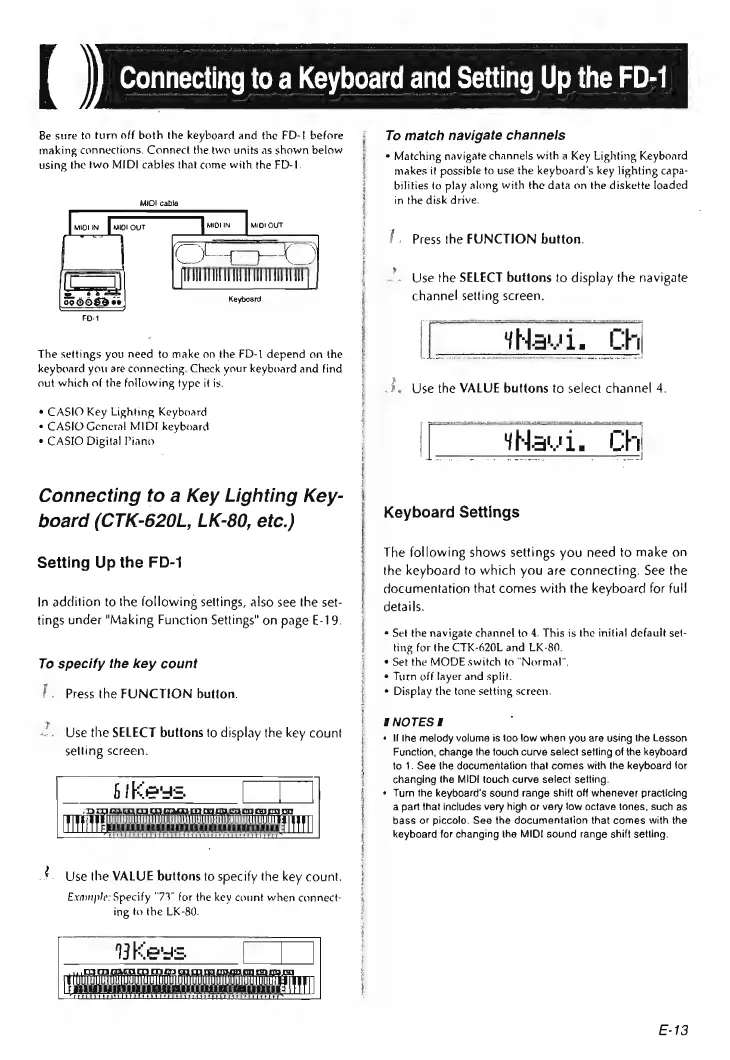
Be
sure
to
turn
off
both
the
keyboard
and
the
FD-!
before
making
connections.
Connect
the
two
units
as
shown
below
using
the
two
MIDI
cables
that
come
with
the
FD-1.
MIDI
cable
The
settings
you
need
to
make
on
the
FD-1
depend
on
the
keyboard
you
are
connecting.
Check
your
keyboard
and
find
out
which
of
the
following
type
it
is.
¢
CASIO
Key
Lighting
Keyboard
¢
CASIO
General
MIDI
keyboard
°
CASIO
Digital
Piano
Connecting
to
a
Key
Lighting
Key-
board
(CTK-620L,
LK-80,
etc.)
Setting
Up
the
FD-1
In
addition
to
the
following
settings,
also
see
the
set-
tings
under
"Making
Function
Settings"
on
page
E-19.
To
specify
the
key
count
zy
»
5
Press
the
FUNCTION
button.
Use
the
SELECT
buttons
to
display
the
key
count
selling
screen.
£.
Use
the
VALUE
buttons
to
specify
the
key
count.
Example:
Specify
°73"
for
the
key
count
when
connect-
ing
to
the
LK-80.
Veegs
FUEL
EERE
GL
To
match
navigate
channels
*
Matching
navigate
channels
with
a
Key
Lighting
Keyboard
makes
it
possible
to
use
the
keyboard's
key
lighting
capa-
bilities
to
play
along
with
the
data
on
the
diskette
loaded
in
the
disk
drive.
f.
Press
the
FUNCTION
button.
Use
the
SELECT
buttons
to
display
the
navigate
channel
setting
screen.
[__#Nawi.
Ch
ee
me
Ae
Se
ee
3
«
Use
the
VALUE
buttons
to
select
channel
4.
sect
[__YNawie
Ch
Keyboard
Settings
The
following
shows
settings
you
need
to
make
on
the
keyboard
to
which
you
are
connecting.
See
the
documentation
that
comes
with
the
keyboard
for
full
details.
*
Set
the
navigate
channel
to
4.
This
is
the
initia)
default
set-
ting
for
the
CTK-620L
and
LK-80.
«
Set
the
MODE
switch
to
“Normal”.
¢
Turn
off
layer
and
split.
¢
Display
the
tone
setting
screen.
ENOTESE
*
Ii
lhe
melody
volume
is
too
low
when
you
are
using
the
Lesson
Function,
change
the
touch
curve
select
setting
of
the
keyboard
to
1.
See
the
documentation
that
comes
with
the
keyboard
for
changing
the
MIDI
touch
curve
select
setting.
Turn
the
keyboard's
sound
range
shift
off
whenever
practicing
a
part
that
includes
very
high
or
very
jow
octave
tones,
such
as
bass
or
piccolo.
See
the
documentation
that
comes
with
the
keyboard
for
changing
the
MIDI
sound
range
shift
setting.
E-13