EasyManua.ls Logo

Casio FD-1 - Page 21

Casio FD-1
30 pages
Print Icon
To Next Page IconTo Next Page
To Previous Page IconTo Previous Page
Loading...
This
section
describes
how
to
make
settings
for
the
various
functions
available
on
the
FD-1.
IMPORTANT!
FUNCTION
button
operation
is
disabled
while
a
tune
is
play-
ing.
Be
sure
to
stop
playback
before
trying
to
perform
the
operations
in
this
section.
Function
Menu
The
first
item
of
the
function
menu
appears
on
the
display
of
the
FD-1
when
you
press
the
FUNCTION
button.
Next,
each
press
of
the
SELECT
button
cycles
thorough
function
menu
items
in
the
sequence
shown
below.
*
The
settings
of
items
marked
with
an
asterisk
above
and
in
the
following
sections
are
retained
even
when
FD-1
power
is
turned
off.
Transpose
aes)
Lesson
Part
Octave
Shift
an
|
Playback
Mode
be
ff
Key
Flash’
tad
Navigate
Channel”
LT
Key
Count
aml
Display
Contrast’
LOT
§NOTES
The
Transpose
(Trans.)
item
appears
first
whenever
you
press
the
FUNCTION
button.
FOV-E-O21A
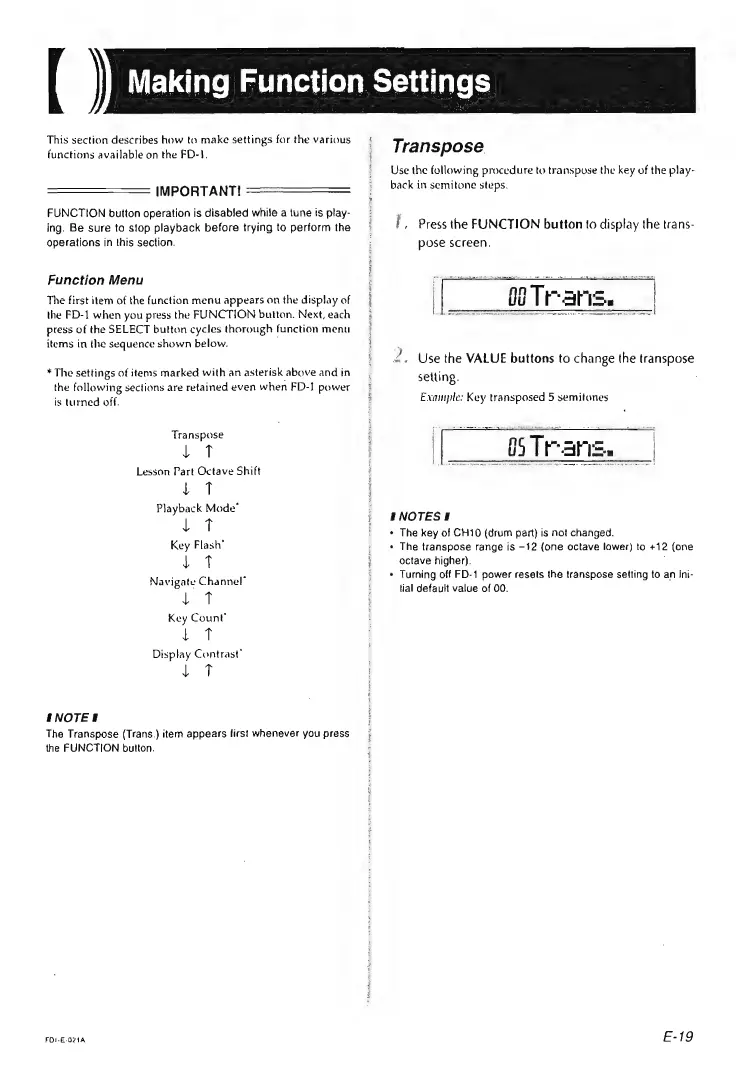
Transpose
Use
the
following
procedure
to
transpose
the
key
of
the
play-
back
in
semitone
steps.
I,
Press
the
FUNCTION
button
to
display
the
trans-
pose
screen.
OTR
ari.
H
'
{
2,
Use
the
VALUE
buttons
to
change
the
transpose
setting.
Example:
Key
transposed
5
semitones
|
65
Tr.
ate
|
SNOTESI
¢
The
key
of
CH10
(drum
part)
is
not
changed.
«
The
transpose
range
is
—12
(one
octave
lower)
to
+12
(one
octave
higher).
«
Turning
off
FD-1
power
resets
the
transpose
setting
to
an
Ini-
tial
default
value
of
00.
E-19