EasyManua.ls Logo

Casio FD-1 - Page 26

Casio FD-1
30 pages
Print Icon
To Next Page IconTo Next Page
To Previous Page IconTo Previous Page
Loading...
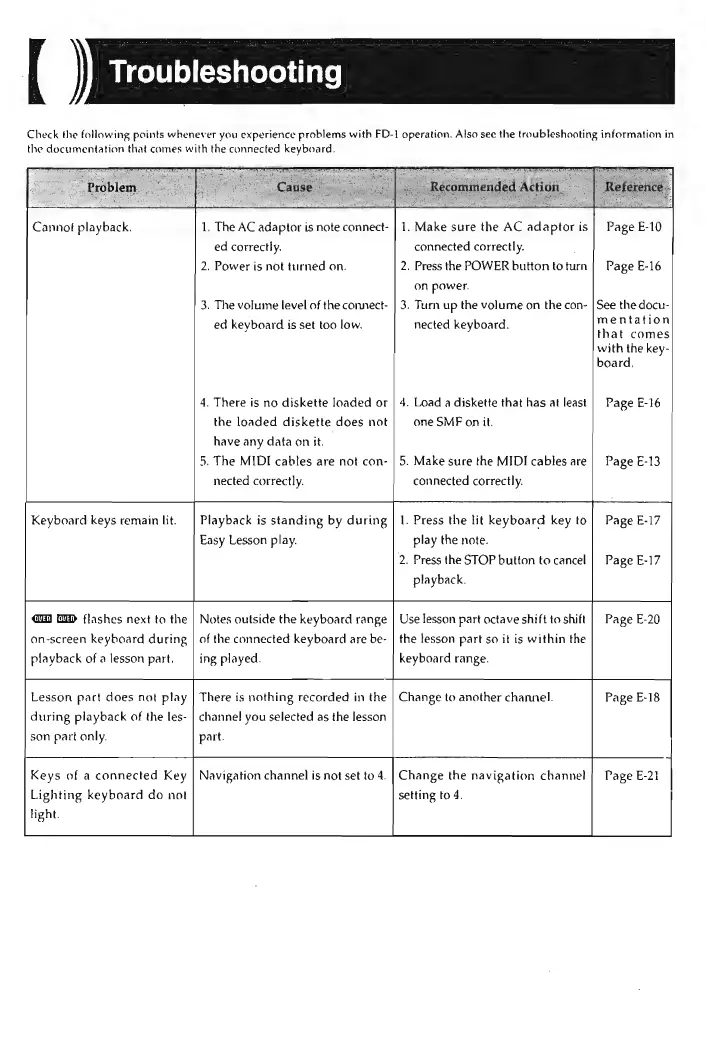
Check
the
following
points
whenever
you
experience
problems
with
FD-1
operation.
Also
see
the
troubleshooting
information
in
the
documentation
that
comes
with
the
connected
keyboard.
Cannot
playback.
Keyboard
keys
remain
lit.
@W) GED
flashes
next
to
the
on-screen
keyboard
during
playback
of
a
lesson
part.
Lesson
part
does
not
play
during
playback
of
the
les-
son
part
only.
Keys
of
a
connected
Key
Lighting
keyboard
do
not
light.
=
oy
ca
probleme
3)
fs
—_
.
The
AC
adaptor
is
note
connect-
ed
correctly.
.
Power
is
not
turned
on.
The
volume
level
of
the
connect-
ed
keyboard
is
set
too
low.
4.
There
is
no
diskette
loaded
or
the
loaded
diskette
does
not
have
any
data
on
it.
.
The
MIDI
cables
are
not
con-
SJ
nected
correctly.
Playback
is
standing
by
during
Easy
Lesson
play.
Notes
outside
the
keyboard
range
of
the
connected
keyboard
are
be-
ing
played.
There
is
nothing
recorded
in
the
channel
you
selected
as
the
lesson
part.
Navigation
channel
is
not
set
to
4.
pea
connected
correctly.
.
Press
the
POWER
button
to
turn
on
power.
3.
Turn
up
the
volume
on
the
con-
nected
keyboard.
4.
Load
a
diskette
that
has
at
least
one
SMF
on
it.
5.
Make
sure
the
MIDI
cables
are
connected
correctly.
.
Press
the
lit
keyboard
key
to
play
the
note.
2.
Press
the
STOP
button
to
cancel
playback.
Use
lesson
part
octave
shift
to
shift
the
tesson
part
so
it
is
within
the
keyboard
range.
Change
to
another
channel.
Change
the
navigation
channel
setting
to
4.
.
Make
sure
the
AC
adaptor
is
Page
E-10
Page
E-16
See
the
docu-
mentation
that
comes
with
the
key-
board,
Page
E-26
Page
E-13
Page
E-20
Page
E-18
Page
E-21