20
E
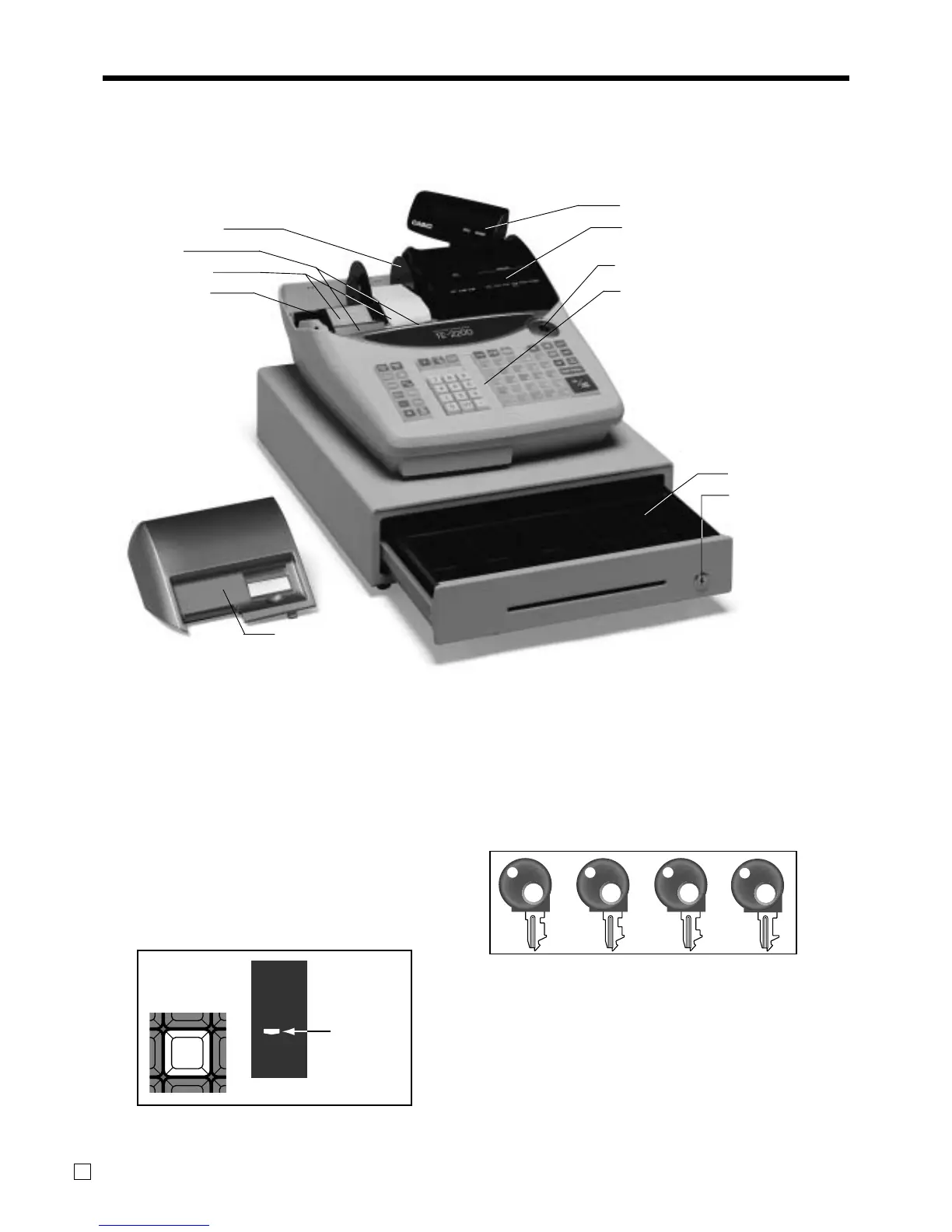
Take-up reel
Printer
Platen arm
Roll paper
Pop-up display
Main display
Mode switch
Keyboard
Printer cover
Drawer
Drawer lock
Mode key
The following four types of mode keys are provided
with the unit.
M
OP
OW
PGM
a. OP (Operator) key
Switches between OFF and REG1.
b. M (Master) key
Switches between OFF, REG1, REG2, X1 and RF.
c. OW (Owner) key
Switches between OFF, REG1, REG2, X1, Z1, X2/
Z2 and RF.
d. PGM (Program) key
Switches to any position.
Roll paper
You can use the roll paper to print receipts and a
journal (pages 12 ~ 13).
Receipt on/off key
Use the receipt on/off key in REG1, REG2 and RF
modes to control issuance of receipts. In other modes,
receipts or reports are printed regardless the receipt key
setting.
A post-finalization receipt can still be issued after
finalization when the key is set to off. The cash register
can also be programmed to issue a post-finalization
receipt even when the key is set to on.
General guide
This part of the manual introduces you to the cash register and provides a general explanation of its various
parts.
RECEIPT
ON/OFF
RCT
8



 To Next Page