23
Check for parts online at www.castlestoves.com or call 800-450-EDGE (3343) M-F 8-5
Operator's Manual
Serenity Pellet Stove
ENGLISH
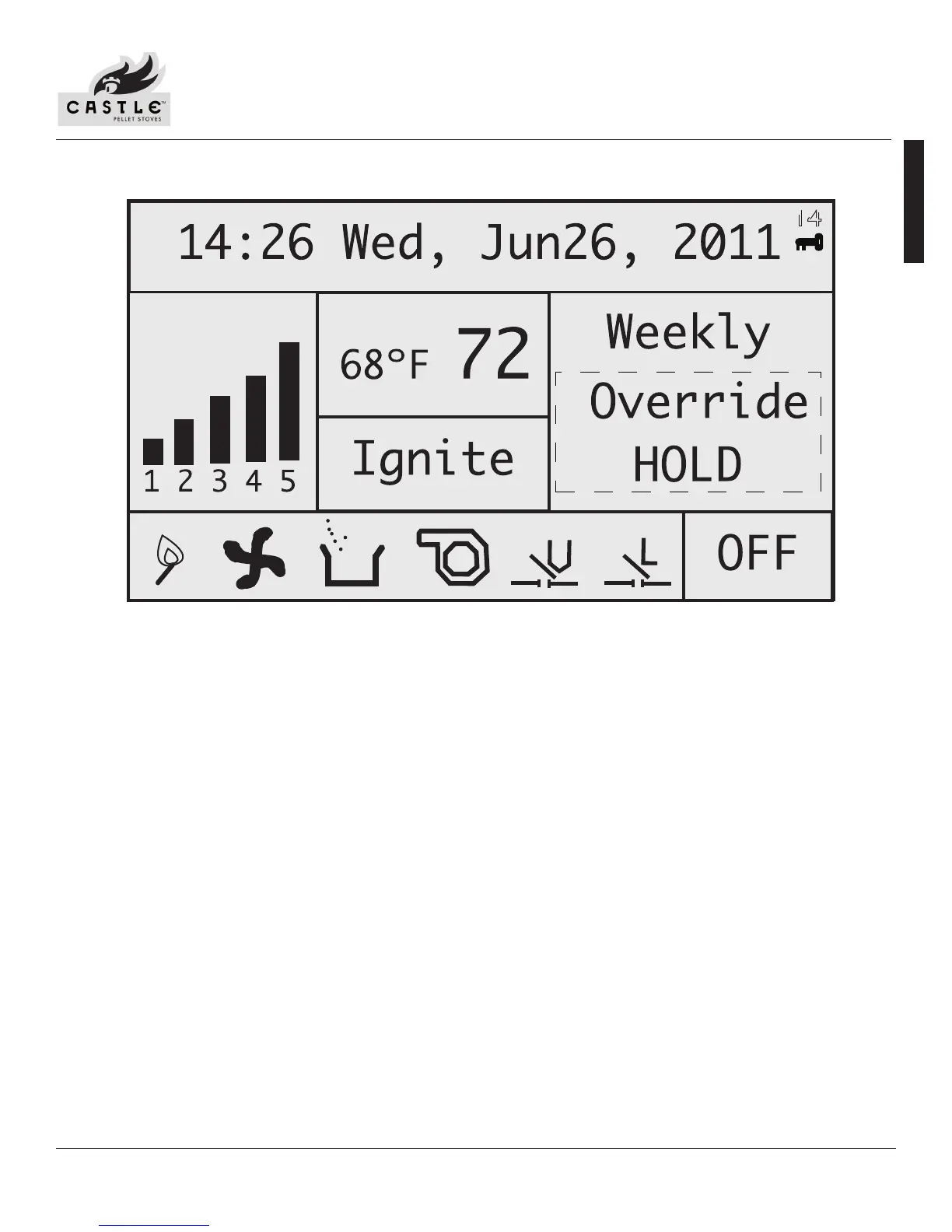
MAIN OPERATION CONTROLLER SCREEN DISPLAY
1. Date and Time: Displays time and date.
2. Heating Power Level: Indicates the level of power at which the stove is currently heating.
3. Current Room Temperature/Call To Temperature: Displays current room temperature and, in the thermostat mode, the
“call to” temperature.
4. Main Mode: Displays operation mode--weekly, thermostat (temperature) and manual.
5. Work Stage: Displays operational stage in which the stove is currently operating (i.e. ignite, heating room).
6. Additional Control Mode: Only appears if weekly temp setting is changed manually.
7. Ignitor Indicator: Indicates ignition cycle/burning cycle is currently happening.
8. Combustion Blower Indicator: Indicates combustion blower is running.
9. Auger Indicator: Indicates auger is feeding pellets.
10. Convection Blower Indicator: Indicates convection blower is running and the fan is heating the room.
11. Vacuum Switch Indicator: Indicates there is vacuum pressure in the stove.
12. Hopper Lid Open Indicator (Limit Indicator): If lit, indicates the hopper lid is closed. When hopper lid is open, this will
disappear.
13. On/O State Indicator: Indicates if the stove is on and in operational mode or if it is in the process of shutting down.
14. Controller Lockout Mode Activated
NOTE: During stove operation number 11 and 12 must be displayed or the stove will not feed pellets.
Figure 19: Main Operation Controller Screen Display
1
2
3
4
5
6
7
8
9
10 11
12
13
14


 To Next Page