31
S Series Liquid Level Display
Verification & Calibration
The following section includes verification and calibration procedures for the Liquid Level
Display on the Standard Liquid Nitrogen Storage Units.
S Series Level Display Verification
1) With power on and no alarm condition occurring, look at the liquid level display and note
the current reading.
2) With proper protection (Cryo-gloves or equivalent) place a yardstick into the liquid inside
the storage vessel until it touches the bottom. Note where the liquid measures on the yard-
stick. If visibility is blocked by some part of an inventory system, simply hold the yardstick
in place for thirty seconds then remove it into open air and wave it around until frost forms.
The liquid level is one half inch below the frost line on the yardstick.
3) Compare the reading on the level display to the measurement on the yardstick. If the level
display is showing a discrepancy, the display should be calibrated using the following steps.
S Series Level Display Calibration
1) In order to calibrate the liquid level display there must be at least 5 inches of liquid nitrogen
in the storage vessel. With this in mind, bring the liquid level in the storage vessel up to the
next highest inch and note the actual measure of the liquid level.
2) Unplug the storage unit from its power source.
3) Access the printed circuit board in the controller unit. On the Series 1500 and 3000, this
is done by removing the two screws at the bottom of the controller back plate and sliding
the controller out. On the 5000, the top cover of the controller comes off by removing the
screw on each end which holds it in place.
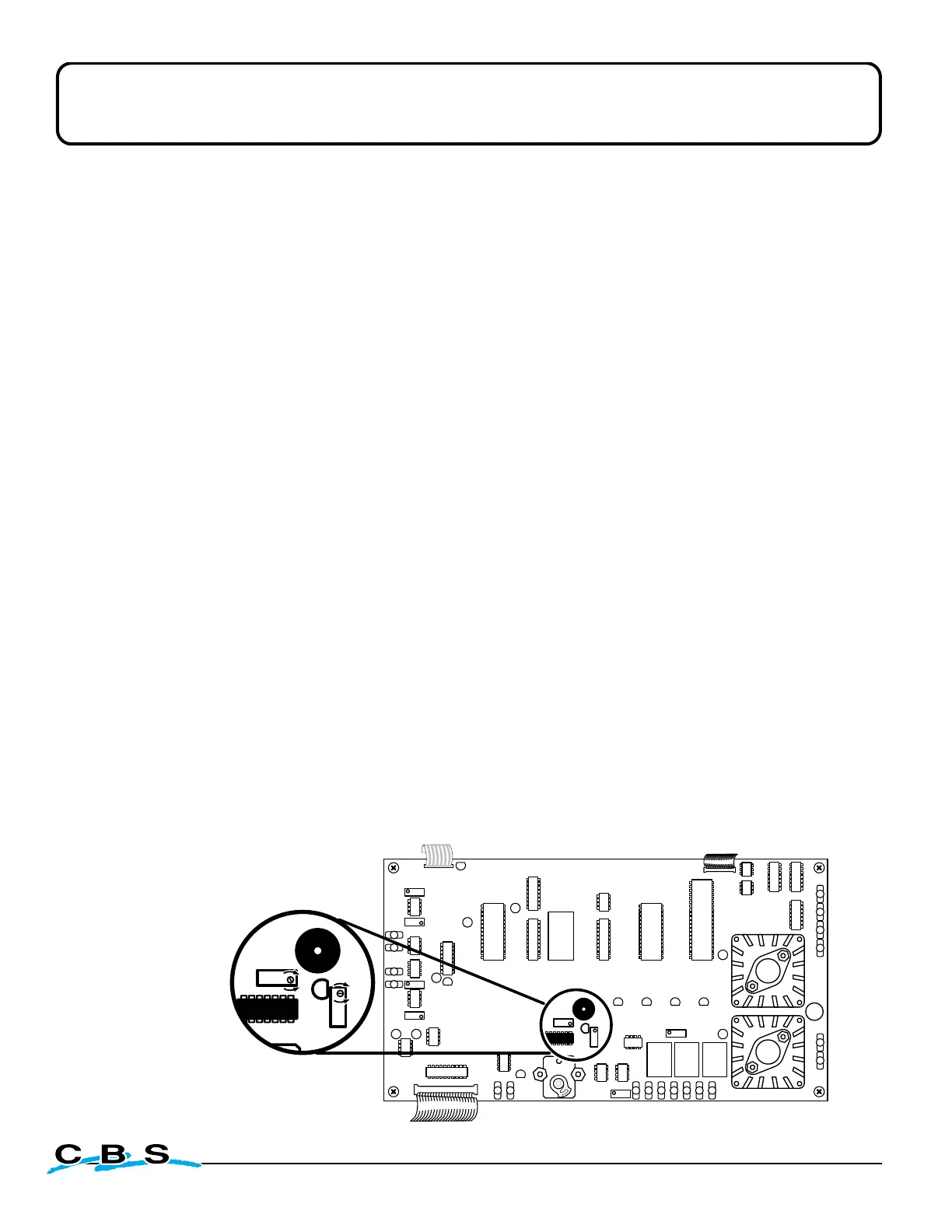
4) Once the circuit board is in view, locate the P6 & P7 Level Display Calibration Trimmers. See
diagram below for help identifying the proper location.
5) Reconnect power to the unit.
6) If display reading is below the actual liquid level, turn the P6 adjustment very slowly
counterclockwise until display reading matches the actual liquid level.


 To Next Page