LIQUID LEVEL XX.XCM LID TEMP.-XXX C
LOW SET XX.XCM HIGH SET XX.XCM
SYSTEM STATUS NORMAL
FILL/START FILL/STOP REPORT
This is the standard display
which will appear during normal
operation under most circum-
stances.
Press this button to
begin a manual fill
Press this button to
advance to display
#99 and print report
(see page 17)
#1
o
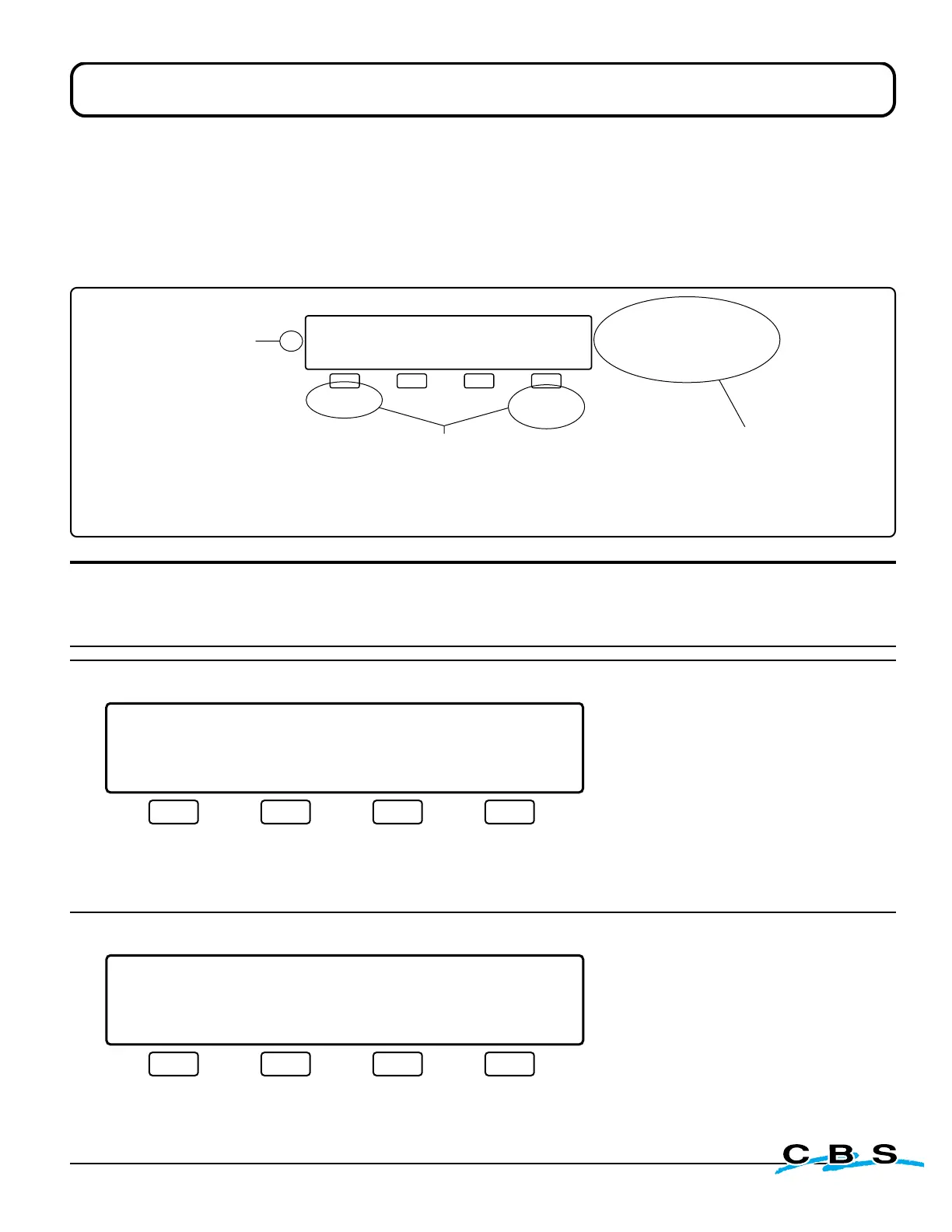
- LCD Display Functions -
Using the diagrams to understand the display functions
Sample Display Window
X's are used in place of numbers in the display window diagrams, since the actual numbers will vary
Standard Operating Mode Display Windows
LIQUID LEVEL XX.XCM LID TEMP.-XXX C
LOW SET XX.XCM HIGH SET XX.XCM
SYSTEM STATUS NORMAL
FILL/START FILL/STOP REPORT
#1
o
This is the standard display
which will appear during normal
operation under most circum-
stances.
Press this button to
begin a manual fill
Press this button to
advance to display
#99 and print report
(see page 17)
LIQUID LEVEL XX.XCM LID TEMP.-XXX C
LOW SET XX.XCM HIGH SET XX.XCM
SYSTEM STATUS NORMAL FILLING
FILL/START FILL/STOP REPORT
#2
o
** **
This display will appear during
normal operation when either a
manual or automatic fill is
occurring.
Press this button
to stop filling
Press this button to
advance to display
#99 and print report
(see page 17)
Below is a sample display window as they're shown in the following section. Use the diagram
to become familiar with the way this section is organized, and how the information is presented
in reference to each display window and it's functions.
The text to the right of the
display explains the specifics
of the display message and
why it is occurring
The text below the buttons
explains the function of each
of the buttons. also tells
which display the button will
advance to, and the page
number where it can be found
in the instruction manual.
This number to the left
of each window is a
general identification
number used only to
organize the displays
for this manual. This
number will not appear
anywhere on the
controller or the actual
display windows
www.custombiogenics.com


 To Next Page