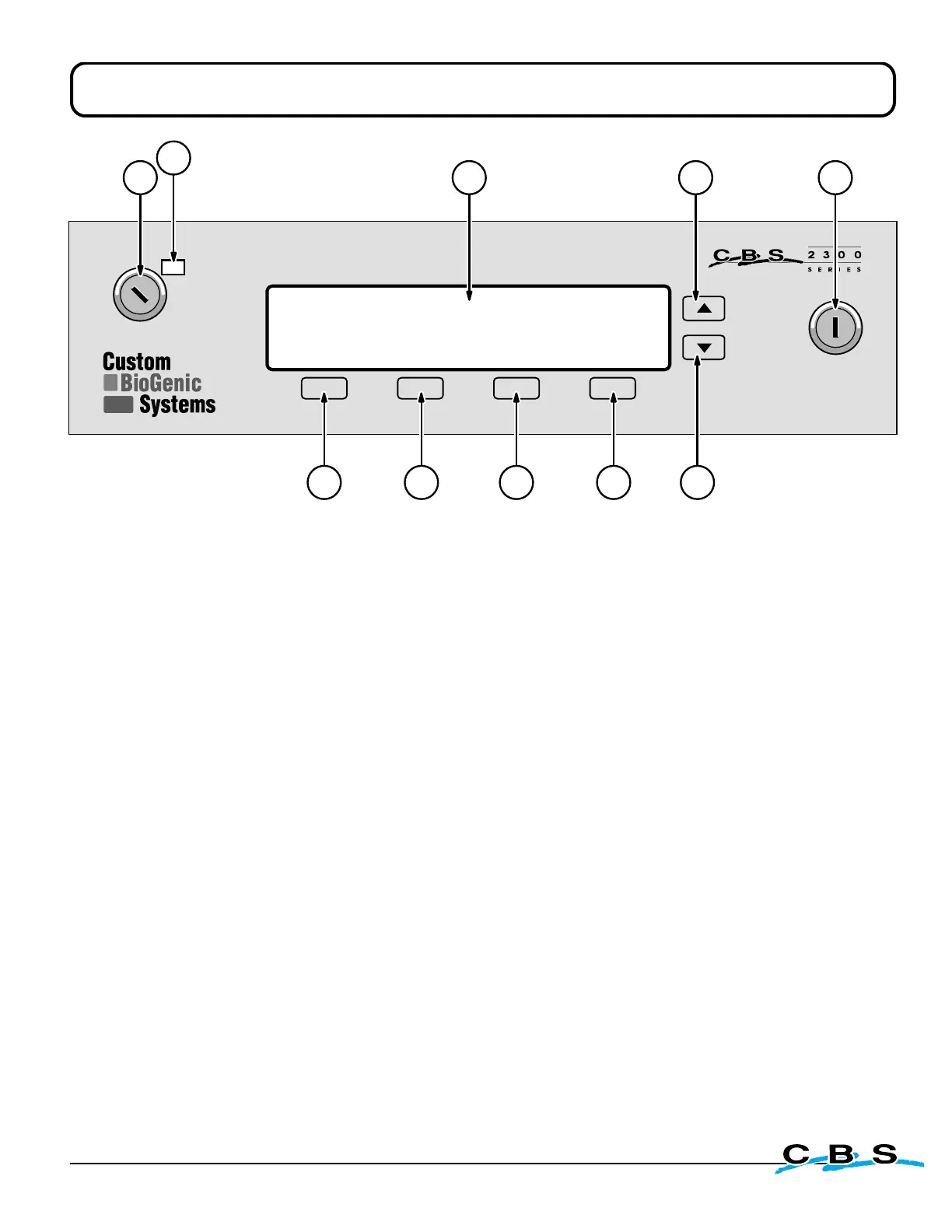
1) Key-Switch Power Control -
Main power control switch for the unit.
1a) Power-On Indicator Light -
Lights-up when power is turned on.
2) LCD Display Window -
Text interface for the storage unit electronic settings. See page 15 for
complete listing of all display menus and functions.
3) First Menu Select Button -
This is used to select various control menus and to make
changes in programming as shown by the text which appears above the button.
4) Second Menu Select Button -
This is used to select various control menus and to make
changes in programming as shown by the text which appears above the button.
5) Third Menu Select Button -
This is used to select various control menus and to make
changes in programming as shown by the text which appears above the button.
6) Fourth Menu Select Button -
This is used to select various control menus and to make
changes in programming as shown by the text which appears above the button.
7) Scroll "Down" Button -
Scrolls to lower numbers when programming electronics.
8) Scroll "Up" Button -
Scrolls to higher numbers when programming electronics.
9) "Program/Lock" Key-Switch -
Switches the controller between the Standard Operating
Mode and the Program Mode. Also protects electronic programming from being changed
by unauthorized personnel.
- Front Panel Controls -
www.custombiogenics.com


 To Next Page