EasyManua.ls Logo

cec DD-8200 - 5 Parts Replacement

Default Icon
11 pages
Print Icon
To Next Page IconTo Next Page
To Previous Page IconTo Previous Page
Loading...
7.
§.
The
tone
arm
will
not
go
down
even
with
the
cueing
lever
in
¥
position.
No
sound
from
the
speaker.
Check
to
see
that
the
output
cords
are
securely
connected
to
the
amplifier
(receiver).
No:
Connect
the
cord.
Yes:
Check
to
see
that
connections
are
made
to
the
PHONO
input
terminals
of
the
amplifier.
No:
Connect
to
PHONO.
Yes:
Check
to
see
that
the
select
switch
of
the
amplifier
is
placed
to
PHONO.
No:
Place
select
switch
to
PHONO.
Yes:
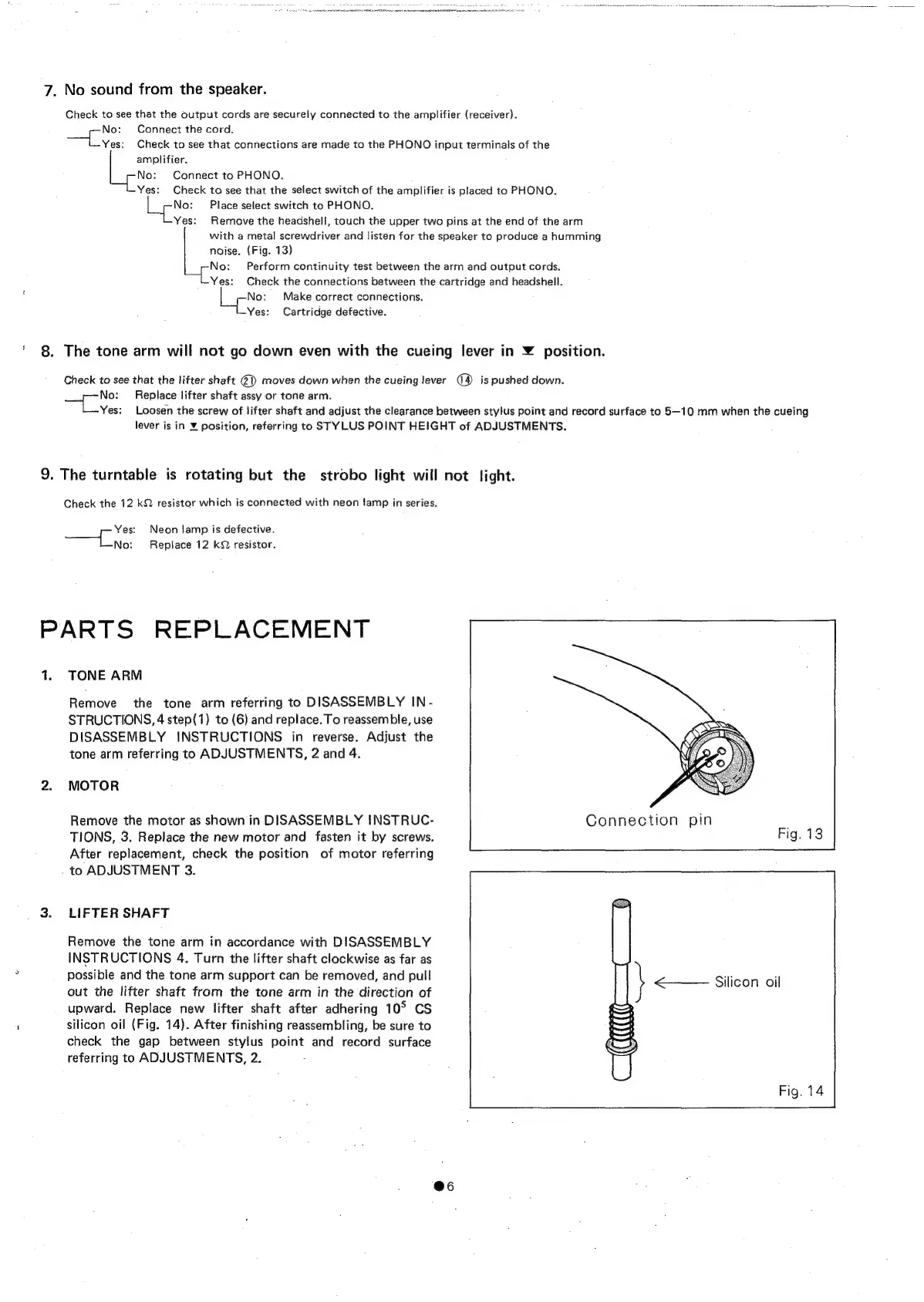
Remove
the
headshell,
touch
the
upper
two
pins
at
the
end
of
the
arm
with
a
metal
screwdriver
and
listen
for
the
speaker
to
produce
a
humming
noise.
(Fig.
13)
No:
Perform
continuity
test
between
the
arm
and
output
cords.
Yes:
Check
the
connections
between
the
cartridge
and
headshell.
No:
Make
correct
connections.
Yes:
Cartridge
defective.
Check
to
see
that
the
lifter
shaft
@})
moves
down
when
the
cueing
lever
is
pushed
down.
No:
Replace
lifter
shaft
assy
or
tone
arm.
Yes:
Loosen
the
screw
of
lifter
shaft
and
adjust
the
clearance
between
stylus
point
and
record
surface
to
5—10
mm
when
the
cueing
lever
is
in
¥
position,
referring
to
STYLUS
POINT
HEIGHT
of
ADJUSTMENTS.
9.
The
turntable
is
rotating
but
the
strobo
light
will
not
light.
Check
the
12
kQ
resistor
which
is
connected
with
neon
famp
in
series
Yes:
Neon
lamp
is
defective.
iets
Replace
12
kQ
resistor.
PARTS
REPLACEMENT
1.
TONE
ARM
Remove
the
tone
arm
referring
to
DISASSEMBLY
IN-
STRUCTIONS,
4
step(1)
to
(6)
and
replace.
To
reassemble,
use
DISASSEMBLY
INSTRUCTIONS
in
reverse.
Adjust
the
tone
arm
referring
to
ADJUSTMENTS,
2
and
4.
MOTOR
Remove
the
motor
as
shown
in
DISASSEMBLY
INSTRUC-
TIONS,
3.
Replace
the
new
motor
and
fasten
it
by
screws.
After
replacement,
check
the
position
of
motor
referring
to
ADJUSTMENT
3.
LIFTER
SHAFT
Remove
the
tone
arm
in
accordance
with
DISASSEMBLY
INSTRUCTIONS
4.
Turn
the
lifter
shaft
clockwise
as
far
as
possible
and
the
tone
arm
support
can
be
removed,
and
pull
out
the
lifter
shaft
from
the
tone
arm
in
the
direction
of
upward.
Replace
new
lifter
shaft
after
adhering
10°
CS
silicon
oil
(Fig.
14).
After
finishing
reassembling,
be
sure
to
check
the
gap
between
stylus
point
and
record
surface
referring
to
ADJUSTMENTS,
2.
@6

Related product manuals