33
AUTO STIMULATION MODE
To provide a pain relieving effect, the level of stimulation should be perceived as a little bit stronger than
the pain intensity. Since the body initially adapts to the set level of stimulation, it is often required to
adjust the amplitude a couple of times to reach the optimal level of stimulation.
By using the Auto stimulation mode the amplitude is automatically adjusted, and the optimal level is
reached after a few minutes of stimulation.
To use the Auto stimulation mode:
Follow steps 1-4 in the section STEP-BY-STEP USE.
5. START THE AUTO TEST
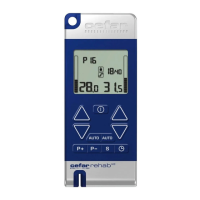
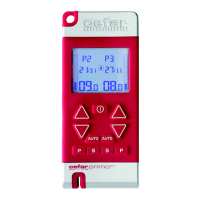
Press the AUTO button
for the left or right channel. “AUTO” starts flashing on the display, and
the amplitude increases gradually.
6. FINISH THE AUTO TEST
Press the AUTO button
again when you feel the stimulation at a comfortable level.
If you press AUTO too late, or want to start again for any reason, press the AUTO button again to start over.
7. REPEAT THE AUTO TEST FOR THE OTHER CHANNEL
If you want to use the Auto stimulation mode for both channels, repeat steps 5-6 for the other channel.
8. THE STIMULATION STARTS
The program starts after a few seconds, and the amplitude is automatically adjusted to an optimal level of
stimulation.
Even if you use Auto stimulation mode, you can increase or decrease the amplitude at any time by pressing
the INCREASE or DECREASE buttons
until the stimulation feels pleasant. If doing so, the auto-
matic amplitude setting is lost.
TIMER
You have the option to change the timing from “- -“ to 60 minutes. If you choose to stay on “- -“, the stimu-
lation will go on until you stop the stimulation manually. The preset treatment time for Program 1–5 and 7
is set to “- -“ minutes and for Program 6 to 10 minutes, but an integrated timer allows you to set the treat-
ment time yourself.
When setting the timer, use the left side buttons of the stimulator for the left channel and the right side
buttons for the right channel.
To set the timer:
1. Select a program and start the stimulation, see section STEP-BY-STEP USE.
2. Press the PROGRAMMING/CONFIRMATION button
on the active channel to initiate the timer
function.
Supplied by EME Services Ltd


 To Next Page