EasyManua.ls Logo

Ceia HI-PE multi-zone Series - User Manual

Ceia HI-PE multi-zone Series
48 pages
Print Icon
To Next Page IconTo Next Page
Loading...
HI-PE multi-zone --- Rev. FI 050 GB 60K10 v2_1
1
ATTENTION!
This manual contains the necessary instructions for the CEIA equipment described in the test report attached to the end of the
manual itself (Factory Acceptance Test Report). These instructions are not, generally, applicable to equipment different from
that described in the test report.
Rev.:
FI 050 GB 60K10 v2_1
Program Version:
8.11
Date:
2005-04-18
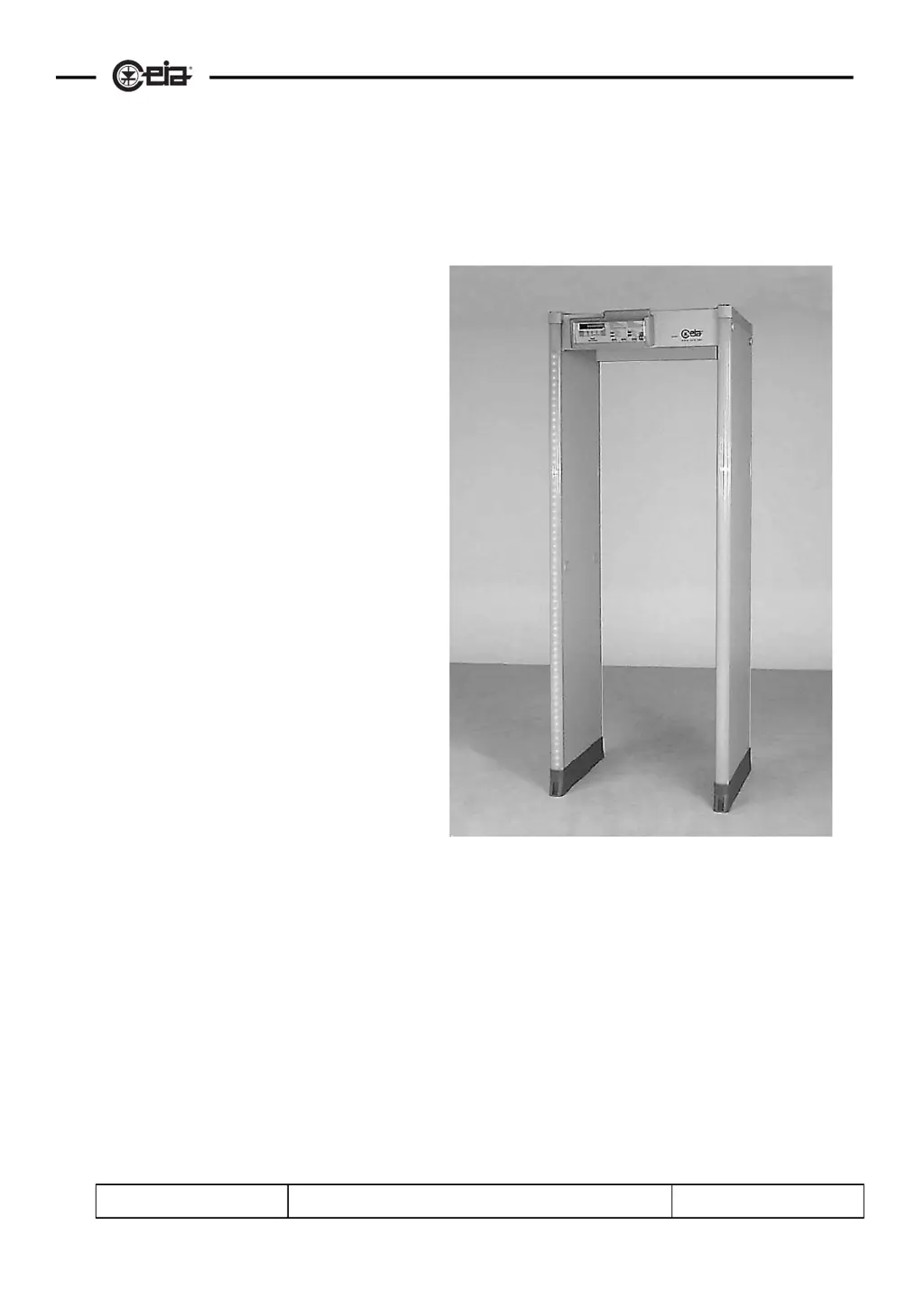
METAL DETECTOR
HI-PE multi-zone
Installation Use and Maintenance

Table of Contents

Questions and Answers

  • M
    Mathew BlairAug 4, 2025
    What to do if the display is off on my Ceia Metal Detector with emergency batteries?
    • M
      Marc MorrisAug 4, 2025
      If you have a Ceia Metal Detector and the display is off, and it is a model with emergency batteries, connect the equipment to the mains supply to recharge the batteries.
  • C
    Carl BakerAug 22, 2025
    Why does my Ceia HI-PE multi-zone Metal Detector power come on and off repeatedly?
    • T
      terryjordanAug 23, 2025
      If your Ceia Metal Detector's power comes on and off repeatedly, this could be due to an unstable or low power supply voltage. You should check the power supply voltage using instruments or by performing the Autotest procedure.
  • A
    Ashley FreyNov 11, 2025
    How to troubleshoot a Ceia HI-PE multi-zone Metal Detector with a display that is off?
    • S
      scastroNov 12, 2025
      If the Ceia Metal Detector display is off, first ensure the power is on by setting PW = ON. Check all power connections including the mains cable, the electronics unit to TX antenna cable, and connector J2 on the electronics unit. If the power supply voltage is present (check via Autotest or instrument check on connector J2, contacts +/~ and -/GND), but the display remains off, replace the electronics unit. If the voltage only appears when disconnected from the electronics unit, replace the electronics unit. Also, check that the LED on the ALP card is on; if it's off, replace the external PSA power adapter; if it's on, replace the ALP card. If you are using a model with emergency batteries, connect the equipment to the mains to recharge them. If the malfunction is caused by the ALP card, c...
  • A
    AnthonyOct 14, 2026
    Gate direction: how to change the side

    Summary

    Installation, Use, and Safety Information

    Essential Safety Instructions and User Responsibilities

    Essential safety guidelines, user responsibilities for setup, and qualified installation requirements.

    Site Selection and Electrical Safety

    Guidance on site selection, power connection, earthing, and electrical safety precautions.

    Handling, Maintenance, and Service Precautions

    Guidelines for safe handling, maintenance, and when to contact authorized service personnel.

    Symbols, Warranty, and Feedback

    Understanding Warning and Information Symbols

    Explanation of symbols indicating manual references, high voltage, and performance tips.

    Warranty Conditions and Customer Satisfaction

    Details warranty terms for CEIA products and encourages customer feedback.

    I - DESCRIPTION

    Detector Operating Principle

    Explanation of the fundamental operating principle of a modern metal detector.

    Key Metal Detector Parameters

    Overview of key parameters characterizing a metal detector's performance and functionality.

    Models and Construction

    Standard and Outdoor Model Configurations

    Details of standard (HIPE/PTZ) and outdoor (HIPE/PTZ-WP) models and their configurations.

    Electronics Unit Features

    Description of the compact electronics unit, casing options, and front/top panel features.

    Archway and Adapter Specifications

    Archway Dimensions for Models

    Technical dimensions for standard and outdoor archway models, including width and height.

    Mains Adapter Details

    Specifications for the mains adapter, including input voltage, dimensions, and protection degree.

    Optional Features

    Transit Counter Functionality

    Explanation of the transit counter using photocells for counting transits and alarms.

    Emergency Battery Backup System

    Information on emergency batteries providing backup power and their operation indicators.

    II - INSTALLATION PROCEDURES

    Detector Unpacking Instructions

    Step-by-step instructions for safely unpacking the metal detector and its components.

    Mechanical Assembly Guide

    Guidance on the mechanical assembly of the probe and archway, including configurations.

    Fixing the Electronics Unit

    Unit Mounting and Securing

    Procedure for fixing the electronics unit to the archway cross-bar using provided tools.

    Positioning and Interference Minimization

    Optimal Detector Placement for Transit Flow

    Guidelines for positioning the detector to optimize people flow and comply with installation rules.

    Minimizing Interference with Minimum Distances

    Rules for maintaining minimum distances from electrical devices and avoiding interference.

    Antenna Ground Anchoring and Stability

    Instructions for anchoring the antenna to the ground and ensuring probe stability.

    Electrical Assembly and Connections

    Unit to Archway Cable Connections

    Procedure for connecting the electronics unit to the transmitter and receiver panels via cables.

    Power Supply and Auxiliary Connectivity

    Details on connecting the power supply, serial communication, and emergency batteries.

    Outdoor Model Assembly Kit

    Protective Kit Component Overview

    Illustration of the kit composition for assembling the outdoor model's protective parts.

    Installation Examples and Scenarios

    Airport Environment Installation Notes

    Notes on installing the detector in an airport departure terminal with X-ray units.

    Managing Luggage and Auxiliary Passages

    Advice on positioning for luggage movement and providing auxiliary passages.

    Barriers and Personal Effects Depository

    Barrier Material and Placement Recommendations

    Recommendations for using insulating materials for barriers to avoid affecting the detector's antenna.

    Depository Usage for Spacing and Storage

    Guidance on placing the depository as a spacer and temporary holder for personal effects.

    Flow-Rate Application Configurations

    Medium-Low Flow Rate with Manual Detector

    Description of a medium-low flow-rate application using a manual secondary metal detector.

    High Flow Rate with Zonal Detection

    Description of a high flow-rate application using a secondary metal detector with zonal detection.

    Coupled Metal Detector Synchronization

    Synchronization Procedure for Multiple Units

    Instructions for synchronising multiple metal detectors operating near each other using transmission channels.

    III - SWITCHING ON AND DISPLAY MESSAGES

    Detector Power-On Sequence and Indicators

    Procedure for switching on the metal detector and the information displayed upon activation.

    Display Message Interpretation

    Overview of messages that may appear on the display during operation.

    Detailed Alarm Indication Meanings

    Details of display messages and buzzer signals indicating different alarm conditions and metal mass levels.

    Other Operational Messages and Keypad Functions

    Emergency Battery and System Warning Indicators

    Indicators for emergency battery status and system warnings like self-diagnosis.

    Keypad Interaction for Parameter Display

    How keypad operations display operating parameter values without entering programming mode.

    Visual Alarm Zone Indication

    LED Bar Functionality Explained

    Explanation of the LED bar feature indicating the height and type of metal mass detected.

    Zone Operation Mode Selection

    Description of operating modes like floating, 4-zone, or 8-zone operation for alarm indication.

    Stand-by Mode Operation

    Using the Software Power Switch

    How to use the software power switch to place the detector in stand-by mode, reducing power consumption.

    IV - PROGRAMMING INTERFACE

    Local Programming using Keypad

    Explanation of using the built-in keypad for local programming and command execution.

    Executing Commands Locally

    Details on executing commands and parameters through the local programming interface.

    Command Description: Reception Parameters

    Reception Parameter Settings (SE, Z1-Z8)

    Description of reception signal parameters like sensitivity (SE) and zone sensitivity (Z1-Z8).

    Programming: Transmission and Alarm Parameters

    Transmission Program and Channel Settings

    Setting for choosing transmission programs and channels for synchronization or interference avoidance.

    Alarm Signal Configuration

    Setting alarm duration, volume, minimum volume, and tone selection.

    Detector Management Settings

    Setting serial speed, creating new passwords, and viewing alarm counts.

    Detector Counters, Measurements, and Diagnostics

    Counter Reset, Noise Measurement, and Self-Diagnosis

    Functions for counter reset, environmental noise measurement, and self-diagnosis status.

    Gate Direction and Command Reference

    Selecting gate direction and referencing command functionalities.

    Parameter Control and User Customization

    LED Bar Modes and User Parameter Storage

    Setting LED bar modes and storing custom parameter sets for specific applications.

    Parameter Loading, Security Standards, and Autoset

    Loading parameters, selecting security standards, and using the autoset function.

    V - Technical Characteristics

    Gate Design and Electronics Unit Specs

    General gate design, electronics unit protection, dimensions, and I/O specifications.

    Environmental Conditions and Alarm Modes

    Operating conditions, alarm signalling types, and preset parameter values.

    Special Features, Programmability, and Standards

    Highlights technology, programmability, synchronisation, safety certifications, and standards compliance.

    VI - MAINTENANCE SCHEDULE

    Suggested Maintenance Operations and Frequency

    Schedule outlining operations, tools, frequency, and responsibility for maintenance tasks.

    Diagnosis and Troubleshooting

    Error Message Troubleshooting Guide

    Table listing error messages, possible causes, and recommended actions for troubleshooting.

    Common Fault Resolution Procedures

    Procedures for resolving common faults like display issues, power problems, or no detection.

    Compatibility and Interference Resolution

    Troubleshooting Electrical and Mechanical Interference

    Actions to take for irregular alarms due to electrical or mechanical interference.

    Procedures and Diagnostic Tools

    Autotest Program and ALP Card Troubleshooting

    Running the autotest program and using the ALP card troubleshooting diagram.

    Battery Replacement Procedure

    Step-by-Step Battery Replacement Guide

    Step-by-step visual guide for replacing the detector's batteries.

    VII - APPENDICES

    Declaration of CE Conformity

    Declaration of conformity to relevant CE directives for safety and electromagnetic compatibility.

    Electrical Connections Guide

    Connection Diagrams and Pinout Details

    Detailed table and diagrams of electrical connections for serial communication, photocells, relay, and power supply.

    ACCESSORIES AND SPARE PARTS

    RCU, Battery Supply Unit, and Depository Descriptions

    Descriptions of RCU, battery supply unit, and personal effects depository accessories.

    Spare Parts Lists for HIPE;PTZ and HIPE;PTZ-WP Models

    Lists of spare parts and optional accessories for both HIPE/PTZ and HIPE/PTZ-WP models.

    Ceia HI-PE multi-zone Series Specifications

    General IconGeneral
    ApplicationSecurity Screening
    Target ThreatMetallic objects, weapons, contraband
    Alarm IndicationVisual and audible alarms
    Operating FrequencyAdjustable
    Detection ZonesMulti-zone
    SensitivityAdjustable
    Power Supply100-240VAC (+/- 10%) 50/60Hz, 40VA
    Communication InterfacesRS-232, Ethernet

    Related product manuals