INSTRUCTION MANUAL
CELESTRON ORIGIN | 13
Focus
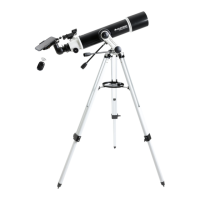
You can either autofocus or manually focus your Origin. To autofocus, press “AutoFocus” on the far right (Figure 12). In most cases, the
AutoFocus button is all you will need. Remember that Origin will autofocus as a regular part of its initialization routine, so you should
not need to rerun it under most circumstances.
To manually focus, use the -100/-10/+10/+100 controls to move the focuser in and out until stars come into sharp focus. You can see
the relative position of the focuser under “Focuser Position.” Each complete turn of the focuser knob equates to 1000 counts.
Fig. 12: Use the focus icon to access autofocus and manual focus controls. The Focuser Position can also provide useful information.
SnapShot
In SnapShot mode, stacking is disabled. Origin will take a single snapshot and save it to your device’s camera roll. SnapShot mode is
ideal for sub-exposures under one second and is the correct mode for terrestrial imaging or imaging the Moon and planets. The toggle
to turn SnapShot mode on and off is in the manual camera settings. Please refer to Section 9 of this manual for more information.
FOCUSER POSITION MANUAL FOCUS CONTROLS AUTOFOCUS BUTTON









 To Next Page