INSTRUCTION MANUAL
CELESTRON ORIGIN | 37
Low Bandwidth
In Direct Connect mode
• Move your device closer to Origin or vice-versa.
• If Origin is outside and you are inside, place the device where
there is minimal interference between the device and Origin.
• For example, if there is a thick wall between the device
and Origin, try placing the device closer to a window.
• If Origin is outside and you are inside, we highly
recommend trying Network Connect mode.
• Using a WiFi antenna
• Origin is compatible with a third-party USB WiFi antenna,
the TP-Link Archer T2U Plus AC600 High Gain Wireless
Dual Band USB Adapter. If you would like to use the
antenna, first turn Origin off. Then, connect the antenna
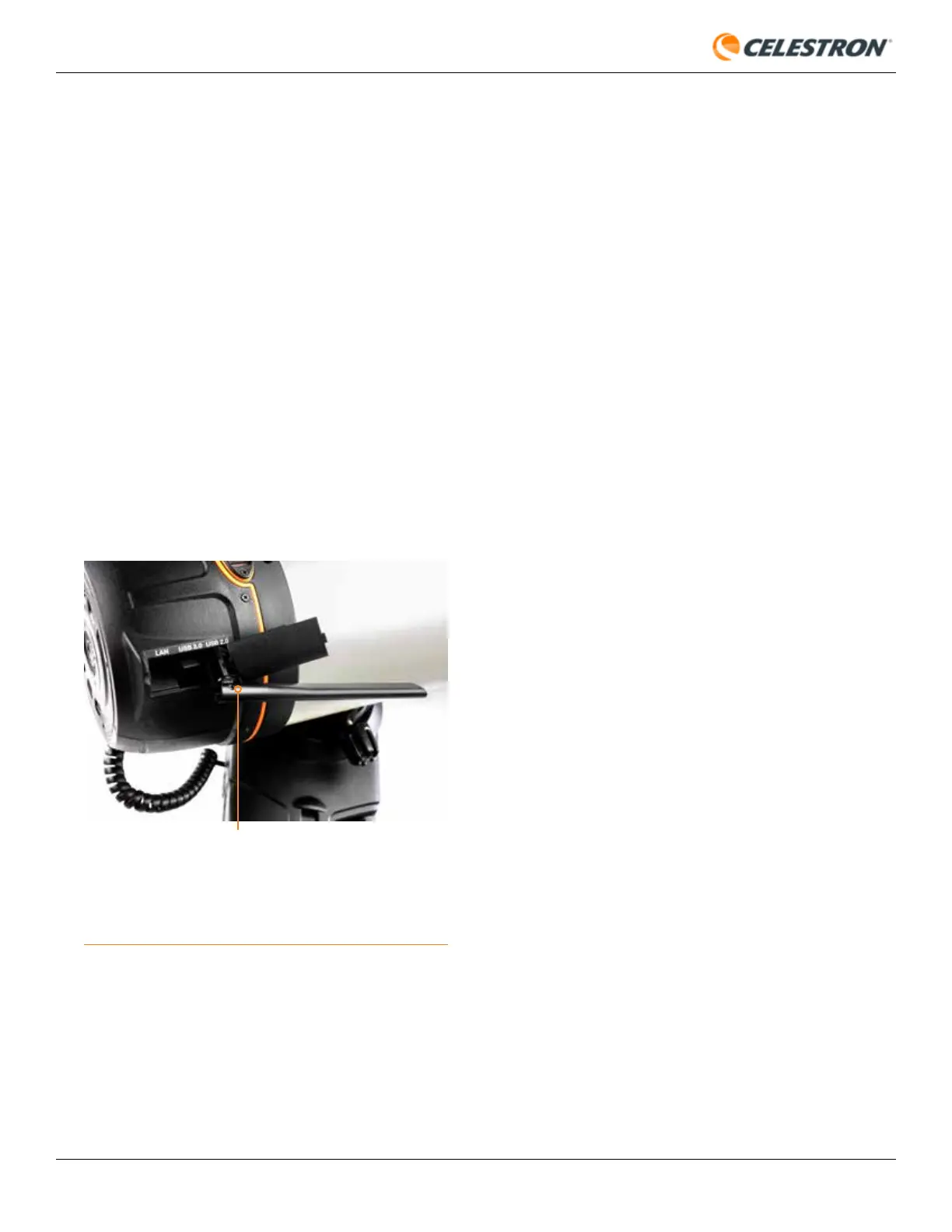
to the USB 2.0 port in Origin’s rear cell (Figure 35).
In Network Connect mode
• WiFi Routers
• When operating in Network Connect mode, where Origin
is connected through your home network, performance
highly depends on your home network’s WiFi router. If
you consistently get low bandwidth in Network Connect
mode, consider upgrading or reconfiguring your WiFi
router.
• The WiFi router’s location relative to Origin can also
impact performance. If you are getting low bandwidths in
Network Connect mode and your WiFi router is a good
one, consider moving your router closer to where you
observe with Origin (or vice-versa).
• WiFi Extenders
• If your Origin will usually be located far away from your
router, consider purchasing a WiFi extender. You can
place this somewhere in your home closer to Origin. It
will help increase your router’s bandwidth and range.
Tripod leveling
• Origin’s tripod should be within about 5° of level for the best
tracking and pointing accuracy. Use the bubble level on the
top of the tripod to confirm. If the tripod is over 5° out of level,
it will not properly initialize.
Date/Time/Location
Check the date/time/location by pressing the information
button
• If Origin has problems initializing, check Date & Time and
Location under Menu>Settings to confirm the data is correct.
Nebula Filter activated,
but Clear Filter installed
• Initialization may fail if the app indicates that you have the
Clear Filter installed but another filter (or no filter) is installed.
Conversely, initialization may fail if the app indicates you have
a Nebula Filter installed but you have the Clear Filter (or no
filter) installed.
• In either of these instances, simply press the filter button
to change its state to match your installed filter. Then, try
initializing again.
• If no filter is installed, Origin’s optical performance will be
slightly degraded, as the fast F/2.2 optics were designed to
be used with a 2.0mm thick filter of flat glass. So, if you are
not using an optional filter, ensure that the Clear Filter that
came with your Origin is always installed.
Wind
• Strong winds can influence Origin’s performance, especially
FIG 35: You can install an optional third-party WiFi antenna into the USB 2.0
port in Origin’s rear cell.
TPLINK ARCHER T2U PLUS AC600 HIGH GAIN
WIRELESS DUAL BAND USB ADAPTER









 To Next Page