DE
ES
FR
IT
EN
5. Making calls with BTEASYCOM
If BTEASYCOM is connected to a Bluetooth® cell phone,
now you can make calls with BTEASYCOM. The specific
operations are as follows:
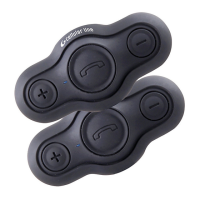
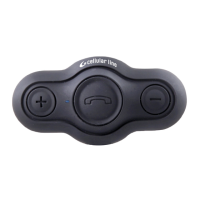
Function Basic Operation Indication tone
Incoming ring Auto-ringing Ringing
Redial last number
Short press MFB
button twice
quickly
1 short tone
Cancel calling
Short press MFB
button when the
call is not put
through
1 short tone
Answer a call
Short press MFB
button
1 short tone
Reject a call
Long press MFB
button for 2 sec-
onds
1 short tone
End a call
Short press MFB
button
1 short tone
Volume up
Short or long press
VOL+ button
None
Volume down
Short or long press
VOL– button
None
Notes:
- When the volume is adjusted to max. or min. you will
hear two “DU” tones.
- When two interphones are connected each other and
a Bluetooth® cell phone is also connected, you can
answer incoming calls with the interphone or dial a
number with the Bluetooth® cell phone during inter-
com and the intercom will be kept. After ending the
call, the interphone will recover to intercom status.
But you can’t send out intercom during a phone call.
6. LED Indicator
a) When it is charging
LED indicator Status of BTEASYCOM
Red LED is on Charging in progress
Red LED is off Charging finished
b) When it is not charging
LED indicator Status of BTEASYCOM
Red and blue LEDs flash
alternately
Pairing mode
Blue LED flashes once every 3
seconds
Standby mode (not
connected)
Blue LED flashes twice quickly
every 4 seconds
Standby mode
(connected)
Blue LED flashes twice quickly
every 4 seconds
Incoming call/calling
Blue LED flashes slowly During a call
Red LED flashes Low power
CARE AND MAINTENANCE
Read the following recommendations before using
BTEASYCOM. Following these you will be able to enjoy
our product for many years.
- Keep it dry and don’t take it to damp places to avoid
the product’s internal circuit being affected.
- Keep the product away from direct sunlight or hot
places. High temperatures will shorten the life of
electronic devices, destroy the battery or distort
certain plastic parts.
- Don’t expose the product to cold areas. It may dam-
age the internal circuit board.
- Don’t try to disassemble the product as it may get
damaged if you are not professional.
- Don’t let it fall down onto the floor or other hard
surfaces. The internal circuit might get damaged.
BTEASYCOM


 To Next Page