10
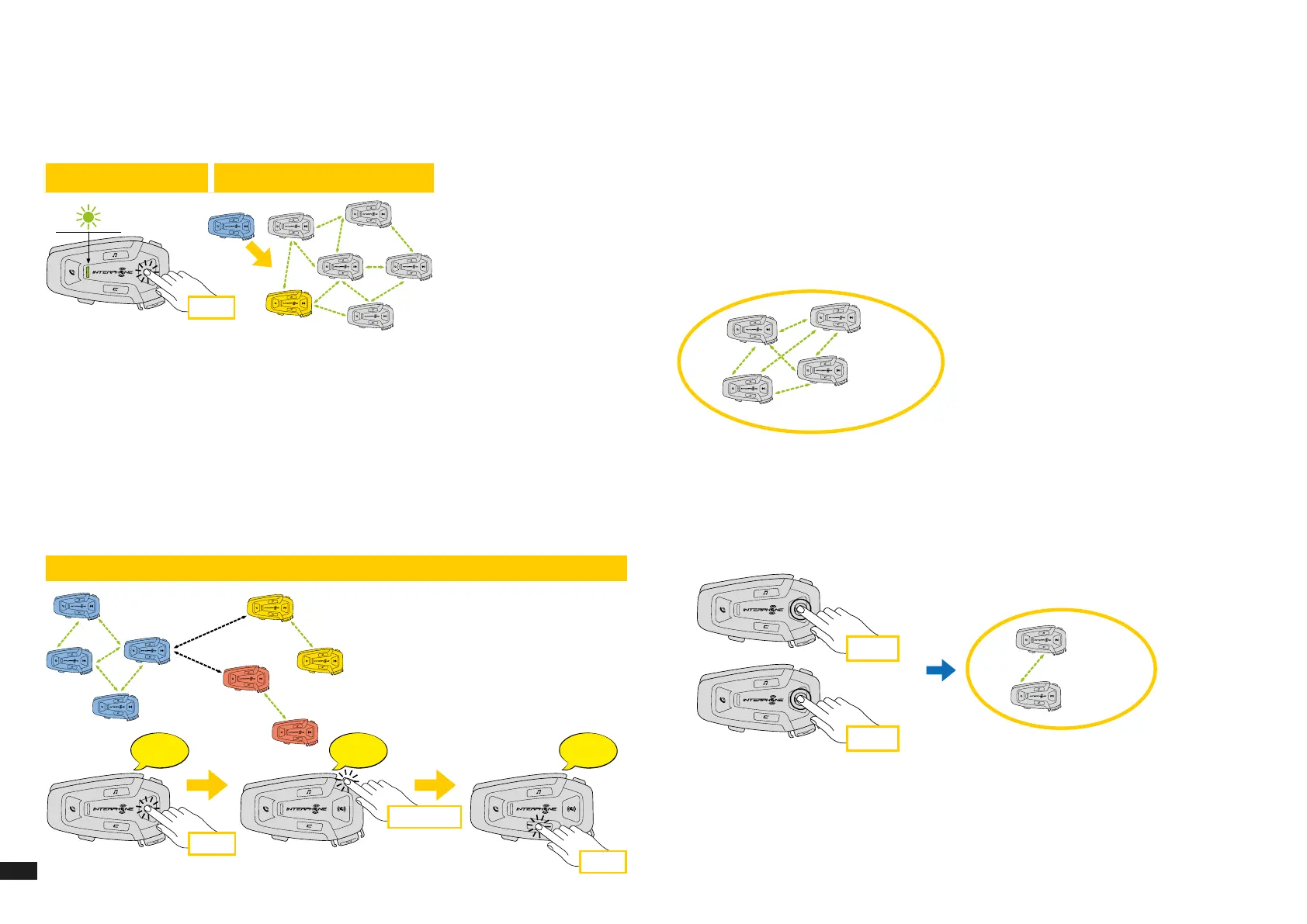
7.3 Start Mesh intercom in OPEN MESH mode
With U-COM 8R on, press the MESH button on each control unit, to activate
the communication mode. Each control unit automatically will connect to
other units simply by speaking into the microphone. Adjust the volume of
Mesh communication according to your needs.
x 1
x 1
x 1, 2, 3...
ch2
ch1
ch1
ch1
ch1
ch2
ch3
ch3
X
X
X
X
Bluetooth
Gruppo Mesh Ripristina Mesh
Modalità attuale
On / O
Canale 1
Mesh
Open Mesh
x 2
Mesh Intercom - OPEN MESH
Mesh Intercom - GROUP MESH
OPEN MESH mode (default)
Start/stop intercom
OPEN MESH
Intercom connection OPEN MESH
Change intercom channel OPEN MESH 1 > 2 > 3 > 4 > 5 > 6 > 7 > 8 > 9 > Exit > 1 > 2 >...)
GROUP MESH mode
Channel
setting
One-Two-
Three-…
Channel
is set
Private
group
! Read the full
user manual and
check the APP
7.3.1 OPEN MESH channel selection
By activating OPEN MESH, the default factory setting is Channel1.
Only the control units working on the same channel will be able to connect
together.
You can choose a dierent channel to manage dierent conversation groups.
To change channel, press the MESH button twice, change the channel by
pressing the VOLUME + button (each press advances one channel), conrm
the channel selected by pressing the CONFIRMATION button.
x 1
x 1, 2, 3...
ch2
ch1
ch1
ch1
ch1
ch2
ch3
ch3
X
X
Bluetooth
Gruppo Mesh Ripristina Mesh
Modalità attuale
On / O
Canale 1
Mesh
Open Mesh
x 2
Mesh Intercom - OPEN MESH
Mesh Intercom - GROUP MESH
OPEN MESH mode (default)
Start/stop intercom
OPEN MESH
Intercom connection OPEN MESH
Change intercom channel OPEN MESH 1 > 2 > 3 > 4 > 5 > 6 > 7 > 8 > 9 > Exit > 1 > 2 >...)
Channel
setting
One-Two-
Three-…
Channel
is set
Private
group
! Read the full
user manual and
check the APP
7.4 Group Mesh (only available if “Advanced Features” is
activated on the APP)
Group Mesh is an intercom function, which allows users to join a closed /
private group conversation (as opposed to OPEN MESH which is open /
public), limited to members of that group only.
Users belonging to the group can freely communicate with each other when
they are in the same Group Mesh private group, taking advantage of all
benets of MESH 2.0 technology.
For a private intercom conversation using Group Mesh, rst step is to create
the group by users. When users create a private group in Group Mesh, the
intercom switches automatically from Open Mesh a Group Mesh mode.
A
C
B
D
Private
group
Private
group
Private
group
Private
group
7.4.1 Creating a group “Group Mesh”
Creating a Group Mesh requires two or more “Open Mesh” users.
1. Activate the GROUP MESH function on the control units by pressing the
MESH button on both control units for 5 seconds.
A
B
A
B
D
C
5 sec
Private
Gruppe
Private
Gruppe
Private
Gruppe
Private
Gruppe
5 sec
5 sec
Units will complete the group creation and switch automatically from Open
Mesh to Group Mesh mode.



 To Next Page