25
26
2. Getting Started
2-3. Basic Function
3. Music
Navigation Button
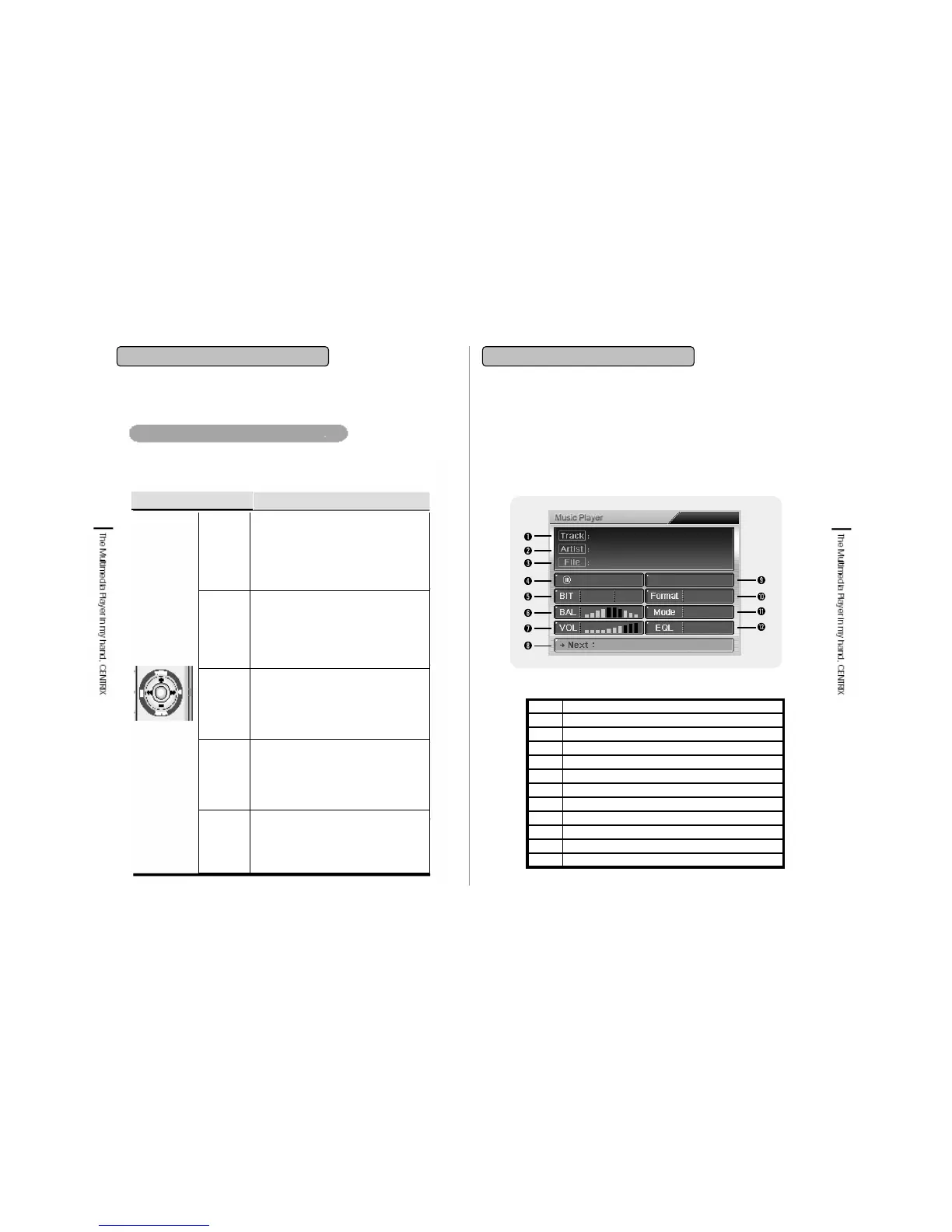
3-1. Music Playback Screen
Music Player Display
•셋팅화면으로 바로 나갈 때 사용합
니다.
•재생모드에서 메뉴버튼을 누르면
해당재생파일에대한환경설정화
면으로 전환되고 원하시는 환경모드
설정 후 ■/ESC키를 누르면 재생모
드로 전환이 됩니다.
•제품의 기능 작동 시(음악, 동영상 플레이나
사진 찍기 등) 정지버튼을 누르면 기능이 정지
되고 바로 상위 화면으로 이동합니다.
• 해당메뉴에서 상위 메뉴로 이동 시 사용합니
다.
• 셔터를 오래 누르면 바로 사진 찍기 모드로
이동합니다. 단 PC와 USB로연결시작동되
지 않습니다.
During file navigation: Transfer to down
direction.
While music/video file playing: Decreases the
volume.
While Photo viewing: Rotates the photo.
Snapshot: Set the setting value.
VOL -
While playing: Playback of next song for
music, next frame for video, next image for
photo.
Snapshot: Use FF button for correction of
setting item.
File Manager: Use FF button to shift Device &
Host.
FF
(press the button from above directly)
Playbacks selected file.
Transfers to selected folder.
Watching video: Selects screen swift function.
Listening music: Changes Equalizer function.
Select
During file navigation: Transfers to upper
direction.
While music/video file playing: Increases the
volume.
While Photo viewing: Rotates the photo.
Snapshot: Set the setting value.
VOL +
File playing: Playback of previous song for
music, previous frame for video, previous
image for photo.
Snapshot: Use REW button for correction of
setting item.
File Manager: Use REW button to shift
Device & Host.
REW
Button
Functions
Button
• Below functions are realized by pressing Navigation button to desired
direction.
You can listen stored music file (MP3, WMA, OGG etc) through music player.
Equalizer12
Playback mode11
File format (mp3, wma etc)10
Duration of playback9
File name of next Song8
Volume7
Balance indicator of Right & Left6
Transfer Rate (Bit rate)/ Sampling (Sampling Rate)5
Time of processing4
File name3
Name of Artist2
Song Title1


 To Next Page