43
44
8. File Manager
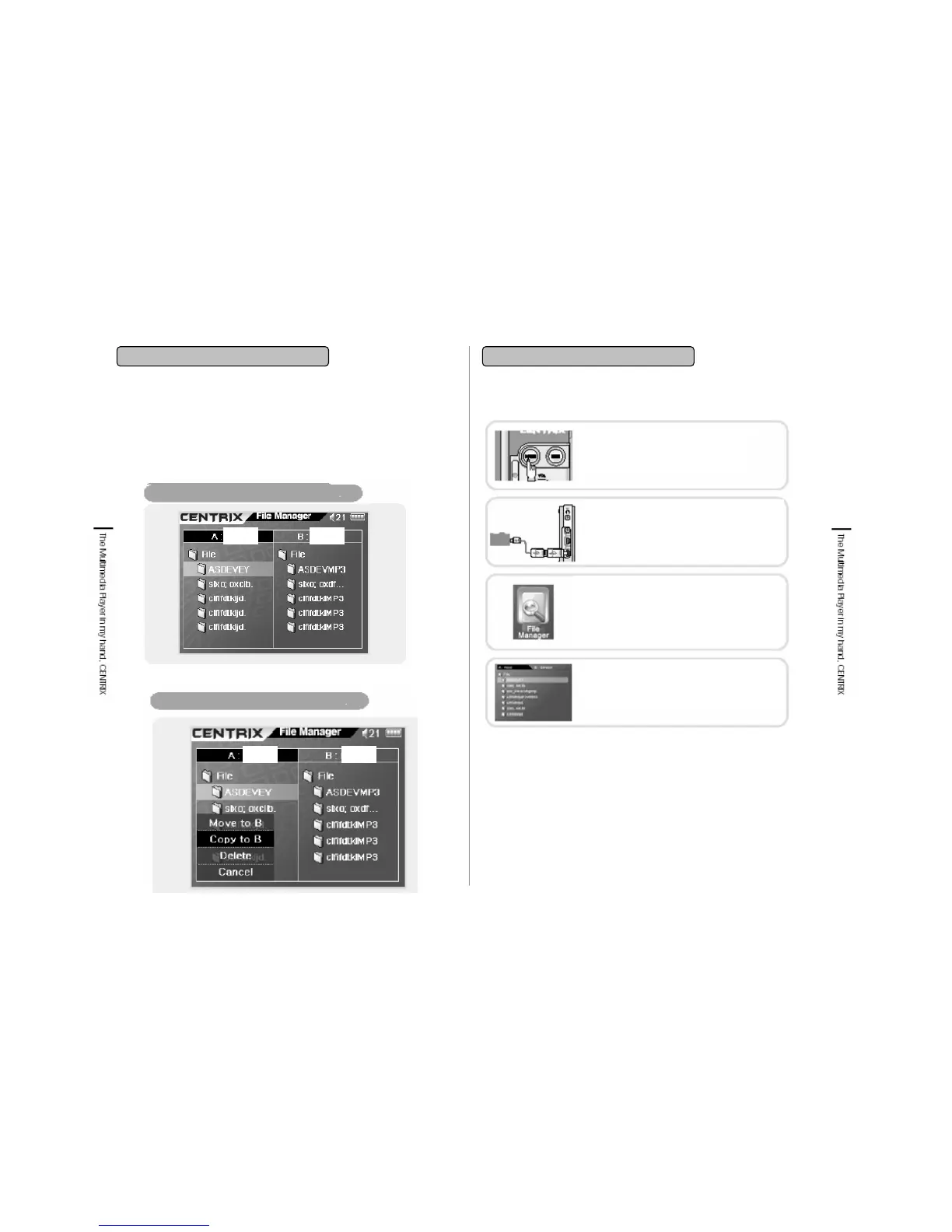
8-1. File Manager Screen 8-2. USB Host Function
8. File Manager
• You can transfer and receive data by connecting external storage device
(device) with MVP-100(Host)without PC connection. USB speed is USB 1.1.
• File Manager is compatible with external storage device which is formatted as
FAT 16/32 file system.
Connecting external storage to USB OTG
Transfer files from the host to device
POWER ON
Press the Power button to turn on the
power.
Connecting Device
Under all functions of player are stopped, by
using USB Host cable connect external
storage devices such as digital camera, USB
memory Stick to USB Host port.
Selecting File Manager
Put cursor on File Manager and press enter
button then a screen showing A:HDD, B:USB
will be displayed. If is not correctly connected
this screen will not be displayed. Read through
above points and connect again.
Selecting Device
Select desired A/B Drive using Navigation
button (REW/FF).
MVP-100 is detected
as A:HDD.
External Storage Device is
detected as A:HDD.
HDD USB
HDD USB


 To Next Page