COMMON FUNCTION BUTTONS IN DISC OR RADIO MODE
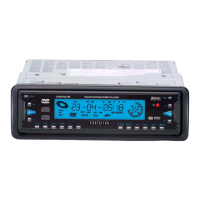
1. POWER BUTTON
Press on the front panel or on the remote control to turn on the unit and display WELCOME on the
LCD. Press and hold for more than 2 seconds to display SEE YOU and then turn off the unit.
2. MODE BUTTON
Press the MODE button on the front panel or the remote control to select DISC or RADIO mode.
3. AUDIO MODE AND LEVEL BUTTONS
Press the SEL button on the front panel or the remote control to select the audio mode such as VOL,
TAVOL, BALANCE and FADER, then press the + or - buttons on the front panel or the remote control
to adjust the level of them as desired.
4. MUTE/LCD COLOUR (EFFECT ONLY FOR MULTI-COLOUR LCD, NO EFFECT FOR BLACK
MASK LCD) BUTTON
Press the MUTE button on the front panel or the remote control to eliminate the sound immediately and
the audio mute indicator on the LCD will flash, press it again to resume normal playback.
5.CLOCK DISPLAY AND ADJUSTMENT BUTTONS
Press the CLK button on the front panel or the remote control to display the time on the LCD. Press
the CLK button and hold for about 2 seconds to flash HOUR, then press the + or - button on the front
panel or the remote control to adjust the HOUR setting, then press the SEL button to flash MINUTE,
then press the + or - button to adjust MINUTE setting.
6. DSP BUTTON
Press the DSP button on the front panel or the remote control to select between the preset music
equalizer curves: VOCAL, POP, ROCK and DSP off. The sound effect will be changed.
CENDVDLFM Page 8


 To Next Page