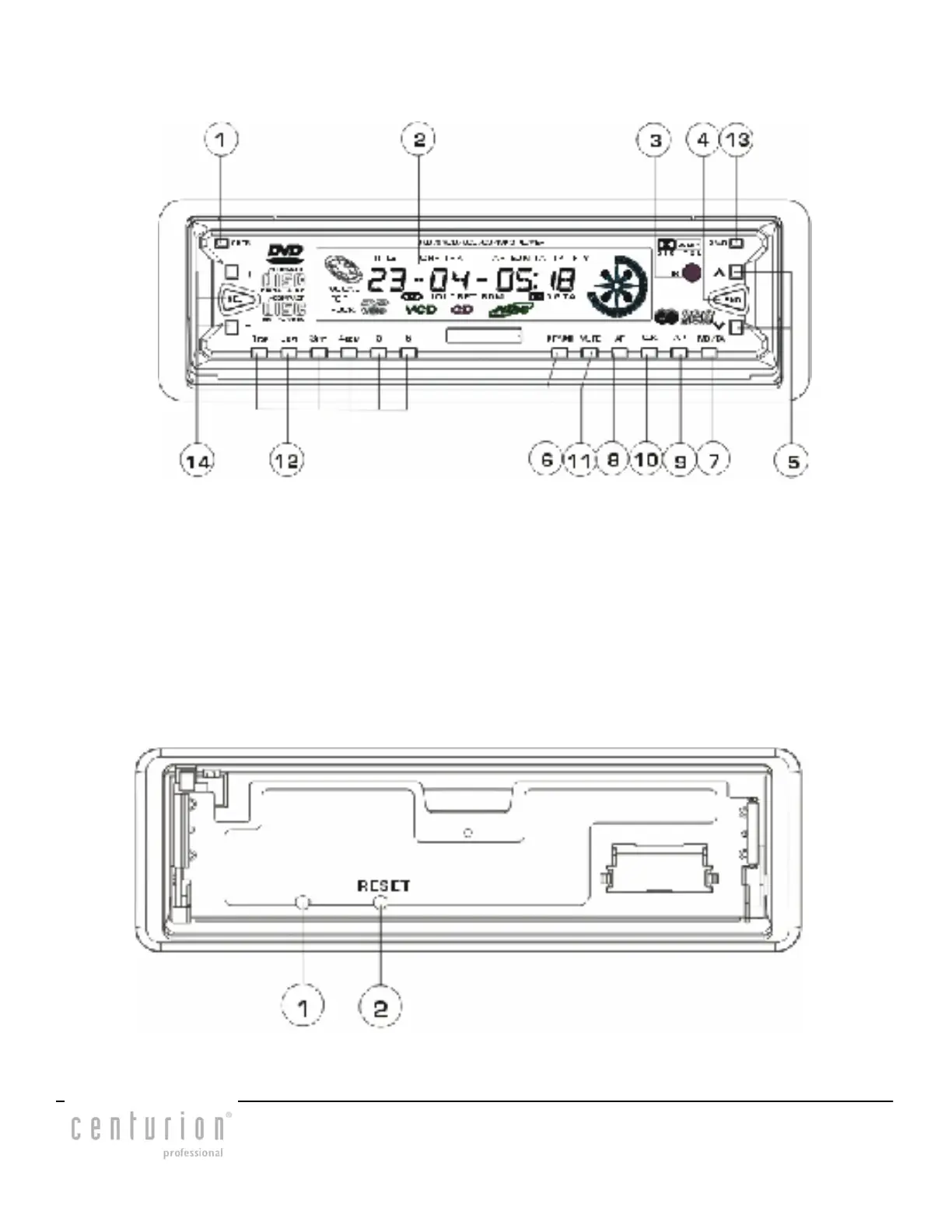
Front Panel Controls
1. OPEN BUTTON 2. LCD SCREEN
3. IR REMOTE SENSO 4. BAND BUTTON
5. UP(^)/DN(V) BUTTONS 6. PTY/PLAY/PAUSE BUTTON
7. MODE/TA BUTTON 8. AF BUTTON
9. AUTO STORE AND PRESET BUTTON 10. CLOCK BUTTON
11. MUTE/LCD COLOUR BUTTON 12. PRESET STATION AN TOP/RPT
/INT/RDM BUTTONS
13. POWER BUTTON
14. SOUND MODE AND LEVEL BUTTONS
DESCRIPTION OF THE FRONT FACE AFTER TAKING OUT THE FRONT PANEL
1.LED INDICATOR: Flashing when detachable panel is removed.
2.RESET BUTTON: Press to reset the disc position.
CENDVDLFM Page 3


 To Next Page