RADIO OPERATION
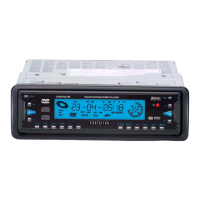
1. PRESET STATION [ 1-6 ] BUTTONS
A]. To memorize the current frequency, press any one of the six preset
buttons(1-6) on the front panel or on the remote control and hold for more
than 2 seconds.
B]. To recall the preset memory, press one of the preset buttons [1-6].
AS/PS BUTTON
Press the A.P button on the front panel or the A/P button on the remote control, the radio
searches for each preset station. When a strong station is detected the mute will be briefly released
then the radio will continue to search again.
When the A.P or A/P button is held down (more than 1 second), the radio searches from the
current frequency and checks the signal strength until 1 cycle search is finished and then the 6
strongest stations are preset to the corresponding preset number.
In FM band, only search for FM 3; In AM band, only search for AM2
When the AS operation is finished, the radio executes the preset scan.
BAND BUTTON
In RADIO mode, press repeatedly on the remote control or the BND button
on the front controls to select your desired radio band and the band
selected will be displayed on the LCD.
TUNE/SEEK UP/DOWN BUTTONS
Press the UP or DN buttons on the remote control or the ^ or v button on the front panel to manually
tune up or down for your desired station. Press then hold for more than 2 seconds to automatically tune
up or down to the strongest station.
TA [TRAFFIC ANNOUNCEMENT] BUTTON
Press the TA button on the front panel and hold to turn on TA search mode and flash TP. Press the TA
button on remote control to turn on TA search mode and flash TP. When traffic announcement is
transmitted:
CENDVDLFM Page 9


 To Next Page