Mounting the
origin marker
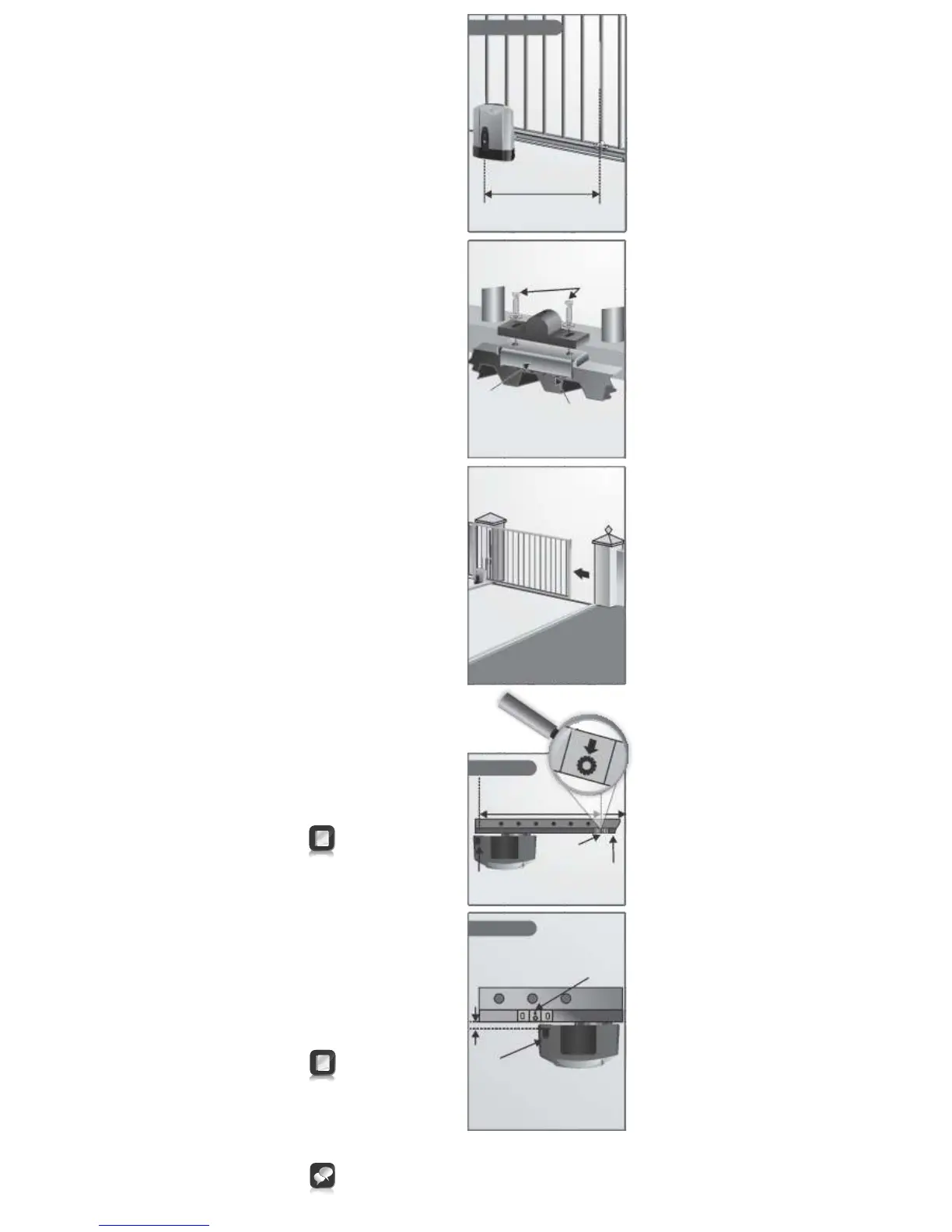
1. Close the gate completely.
2. Mount the origin marker to
the rack a minimum of
500mm from the origin
sensor.
3. For steel rack, mount the
origin marker onto the rack
using the bracket provided.
4. Weld the bracket to the
rack.
5. Bolt the origin marker onto
the bracket using the
fasteners provided.
6. Manually slide the gate
OPEN until the origin
marker is in line with the
origin sensor.
It is possible to make the distance between the marker and the
sensor much greater than 500mm. However, if using the
pedestrian opening facility, although the position of the marker
will not affect the width of the pedestrian opening, it is
preferable to have the marker mounted inside of the pedestrian
opening point
Isometric view
Greater than 500mm
8. Adjust distance by sliding
the origin marker along the
slotted mounting holes
until the specified distance
is achieved.
For best results keep gap
between marker and
sensor as small as
possible
Origin
sensor
Origin
marker
13-20mm
Gate
Rack
Plan view
7. Ensure distance between
face of marker and front
face of sensor is between
13 and 20mm.
Take care with the
orientation of the arrow on
the origin marker. This
arrow must face the
operator
Greater than 500mm
Gate in
closed
position
Origin
marker
Origin
sensor
Origin marker
bracket
Weld mounting
bracket provided to
steel rack
Steel rack
Bolt using
fasteners
provided
Plan view



 To Next Page