© Cesab 14 – 4 T Code(s): 841, 842, 843
Repair manual: Electrical components-5000 Model(s): S210, S212, S212S, S212L, S214, S214L, S220D
Publication Number: 7588857-040 Date: 2018-05-01 Applies from serial number: 6384351-
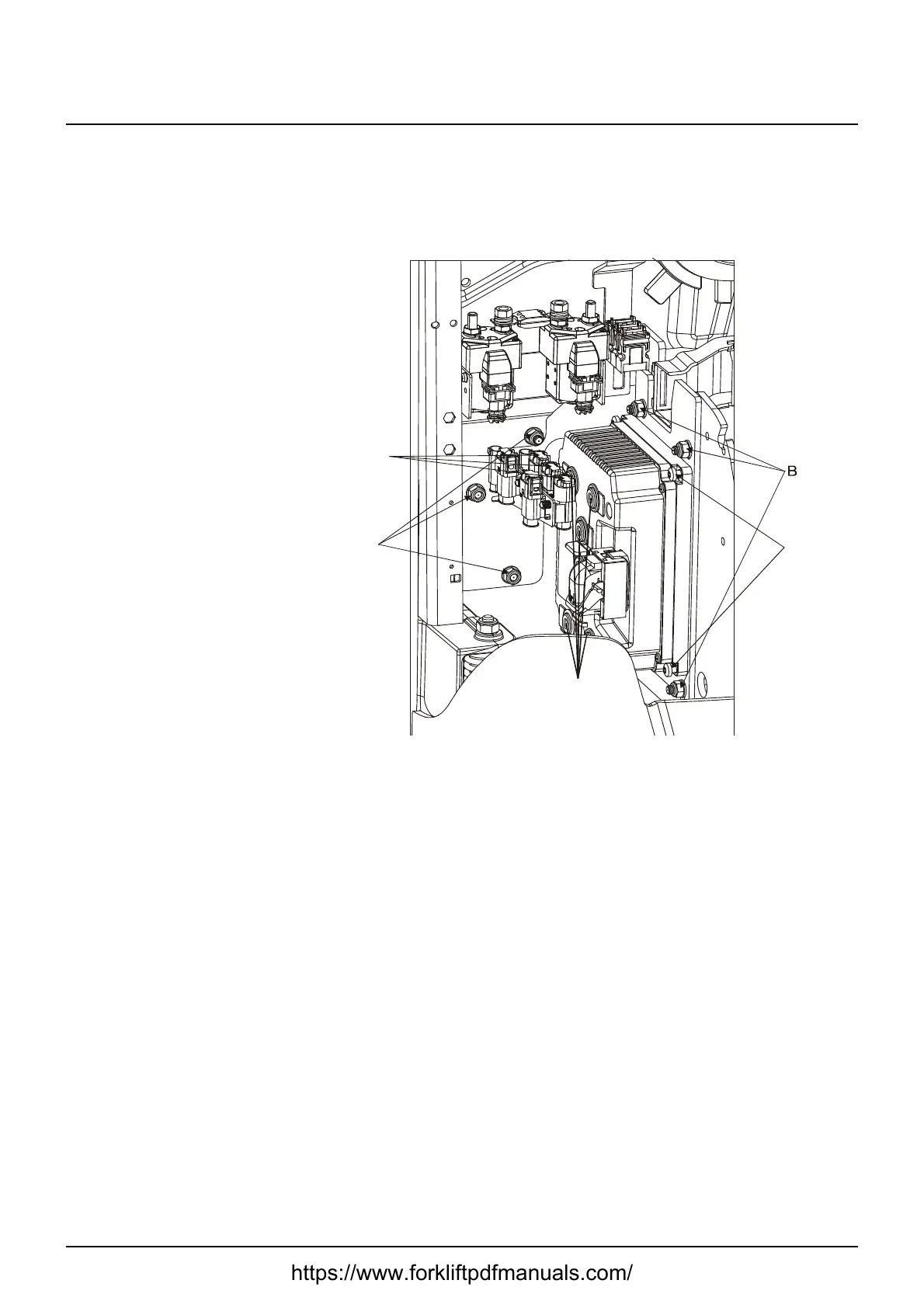
14.4 Replacing the transistor regulator
Note:
This action requires access to TruckCom!
1. Remove the inspection cover.
2. Cut off the cable ties of the cable duct on the transistor regulator side.
3. Disconnect the connectors (A) from the connector bracket.
4. Undo the screws (D) and move the connector bracket aside.
5. Disconnect all cables and connectors from the transistor regulator.
6. Loosen the fastening nuts (B) of the fixing plate.
7. Remove the transistor regulator.
Angle out the top edge of the fixing plate and turn it in the drive wheel di-
rection in order to remove it from the truck.
8. Unscrew the transistor regulator from the fixing plate (C).
Assembly is done in reverse.
https://www.forkliftpdfmanuals.com/



 To Next Page