Chapter 2
12
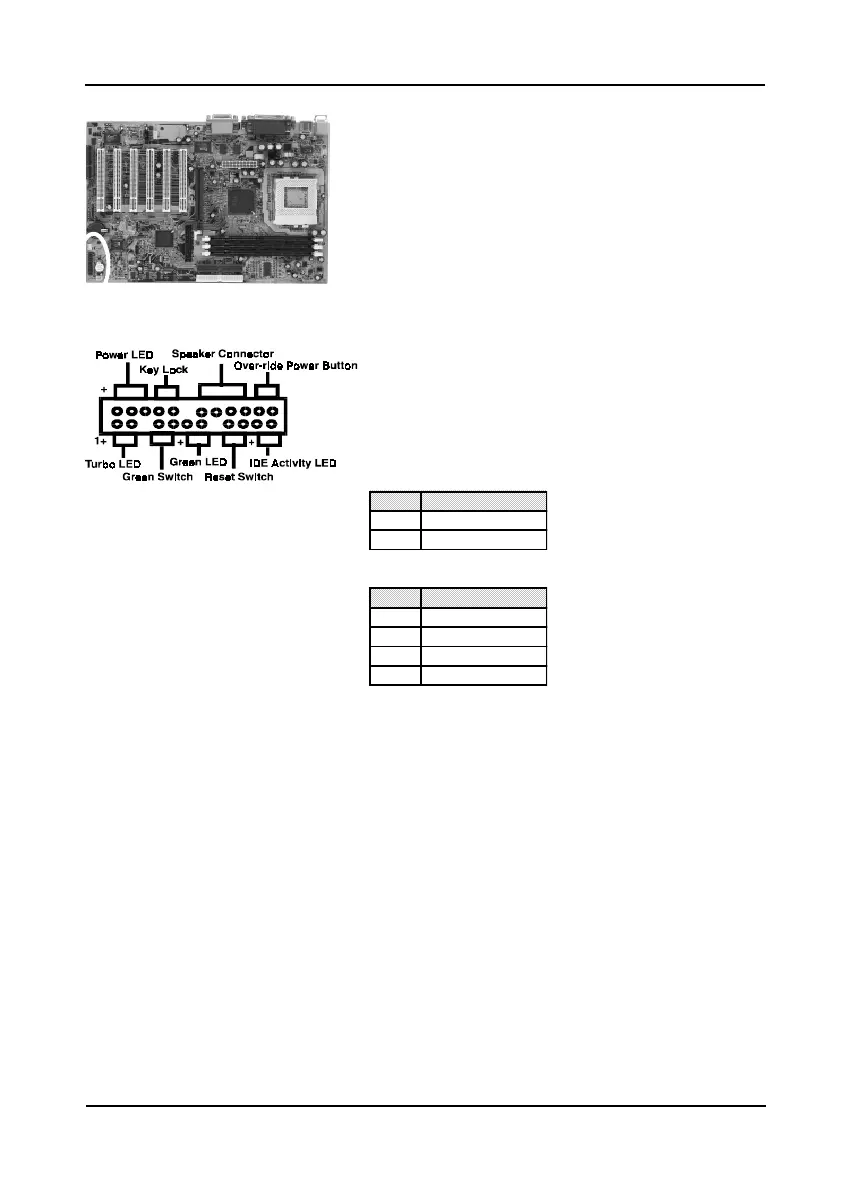
C. Green Switch/Green LED Connector
Some ATX cases provide a Green switch which
is used to put the system in Suspend mode. In
Suspend mode, the power supply to the system
is reduced to a trickle, the CPU clock is stopped,
and the CPU core is in it's minimum power state.
The system is woken up whenever the keyboard
or mouse is touched. The system resumes in
different ways as defined by Power Management
Setup screen in BIOS.
D. System Reset Switch Connector
This connector should be connected to the reset
switch on the front panel of the system case. The
reset switch allows you to restart the system
without turning the power off.
E. Speaker Connector
F. IDE Activity LED Connector
The IDE activity LED lights up whenever the
system reads/writes to the IDE devices.
G. Turbo LED Connector
This mainboard does not have a Turbo/De-turbo
speed modes. So the turbo LED will always light.
Blinking LED in Suspend Mode
While in Suspend mode, the LED light on the front panel of your computer will
flash. Suspend mode is entered by pressing the Override Power Button, pushing
the Green button on your ATX case, or enabling the Power Management and Suspend
Mode options in BIOS's Power Management menu.
Pin Definition
1 System
2 GND
Pin Definition
1 Speaker Signal
2 No Connection
3 No Connection
4 +5V DC



 To Next Page