Hardware Setup
15
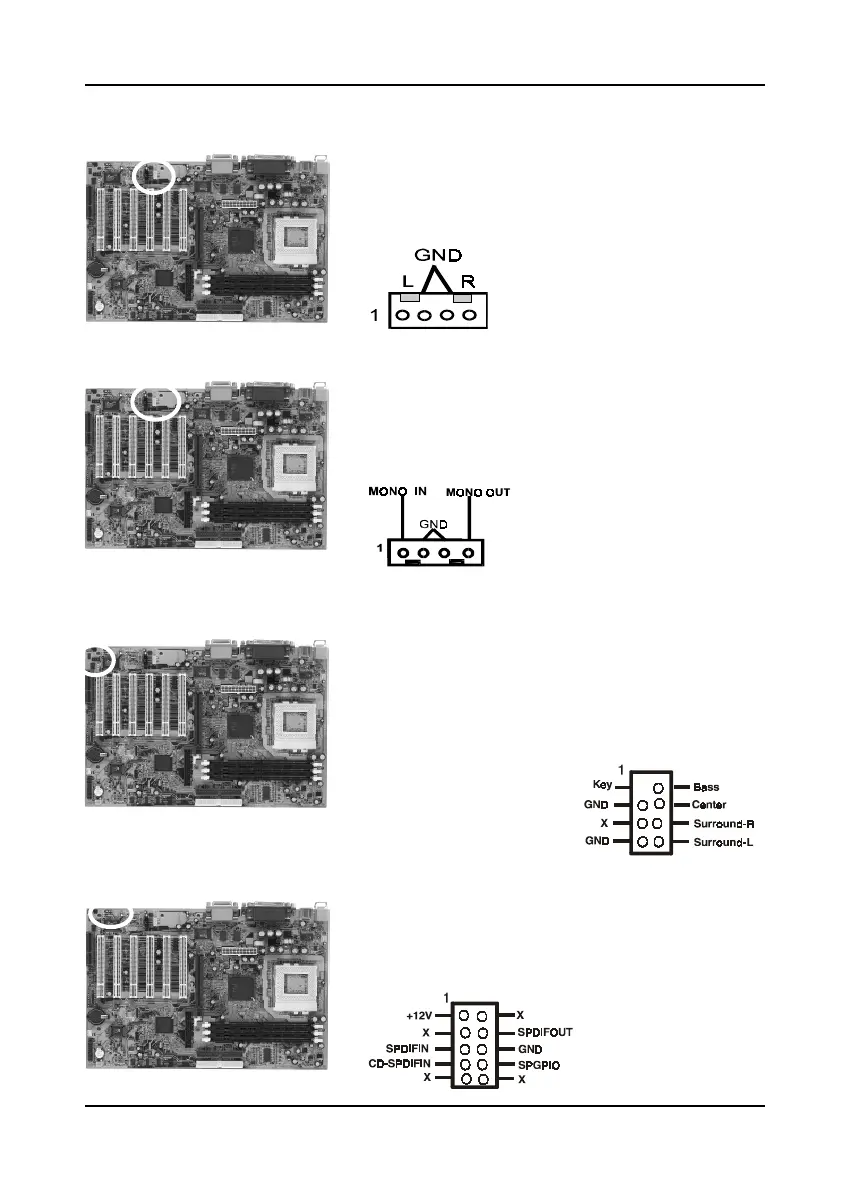
Auxiliary Audio-in Connector (CN3)
Use the auxiliary audio cable enclosed with your
CD-ROM disk drive to connect the CD-ROM to
your mainboard. This will enable your CD-ROM's
audio function.
Optional Audio Mono-in/out Connector (CN4)
Use the mono audio cable enclosed with your CD-
ROM disk drive to connect the CD-ROM to your
mainboard. This will enable mono audio in/out
function.
Optional AC3 Surround/Center + Bass Connector (CN4B)
This connector is for Surround and Center+Bass
speaker output ext. Plug in the optional AC3
Surround/Center+Bass jack extension into this
connector. The black colored jack is for surround
speaker output and the orange colored jack is for
center+bass speaker output.
Optional S/PDIF-In/Out Connector (CN4C)
The S/PDIF-In/Out connector supports the digital
audio. This connector must be connected to the
cable from an external device. (Ex. 2-channel
decoded AC-3 from DVD decoders)



 To Next Page