Chapter 2
16
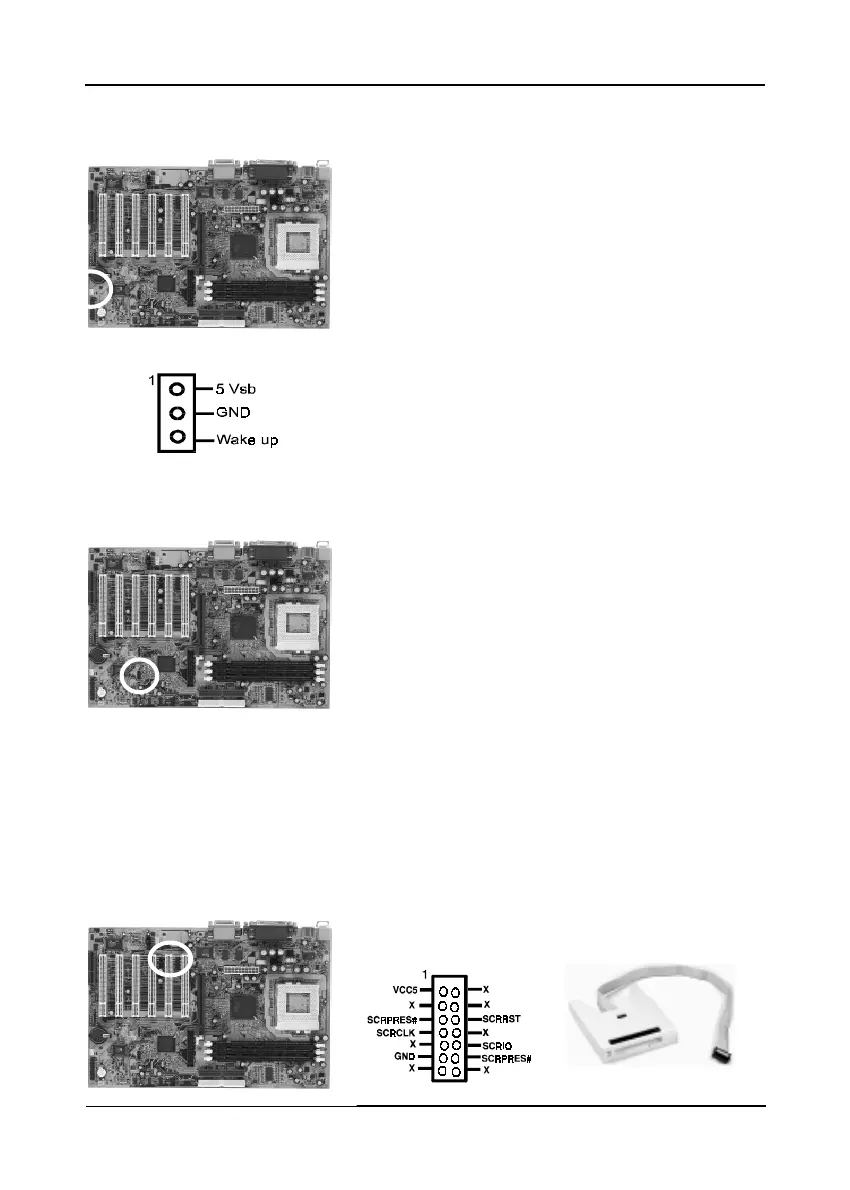
WOL (Wake-on-LAN) Connector (CN5)
Enable the Wake Up On LAN selection in BIOS's
Power Management Menu to use this function.
The capability to remotely manage PCs on a
network is a significant factor in reducing
administrative and ownership costs. Magic Packet
technology is designed to give WOL (Wake-on-
LAN) capability to the LAN controller. When a
PC capable of receiving wake up command goes
to sleep, the Magic Packet mode in the LAN
controller is enabled. When the LAN controller
receives a Magic Packet frame, the LAN controller
will wake up the PC. This header is used to
connect an add-in NIC (Network Interface Card)
which gives WOL capability to the mainboard.
USB Ports and USB 2/3 Connector (USB1/CN6)
If you want to use a USB keyboard, you must
enable the onchip USB & USB keyboard support
function in BIOS's Integrated Peripherals menu
(See Section 3-4). USB is an open industry
standard, providing a simple and inexpensive
way to connect up to 125 devices to a single
computer port. Keyboards, mice, tablets, digitizers,
scanners, bar-code readers, modems, printers and
many more can all be used at the same time.
This board contains a USB Host controller and
includes a root hub with two USB 0/1 ports (meets
USB Rev 1.0 spec.) and a connector for optional
USB Adaptor (USB2/3). Four USB peripherals or
hub devices are able to be connected.
Smart Card Reader Connector (CN7)
This connector must be connected to a Smart card
reader(Optional).
Smart Card Reader (Optional)



 To Next Page