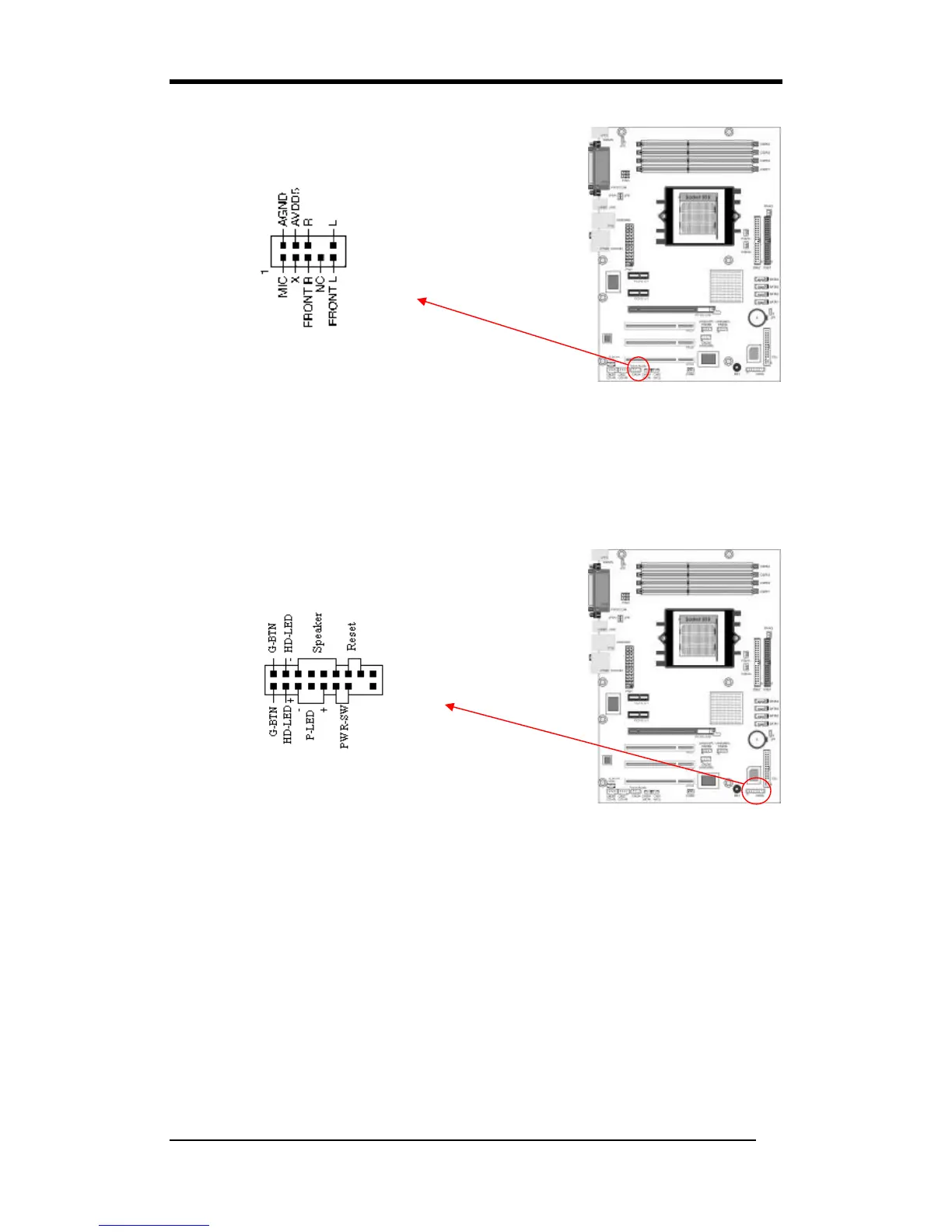
This connector gives you the option of a front-panel audio-jack cable to be plugged
into a case supporting front panel audio.
Remove the two jumper caps at pins [5-6] and [9-10] then plug it into the (optional)
cable connector. Pins [5-6] and [9-10] are shorted (default) to enable back-panel
audio.
CN1A (Front Panel Connector):
1. PWR-SW (Over-ride Power Button Connector):
The power button on the ATX chassis can be used as a normal power switch as well
as a device to activate the Advanced Power Management Suspend mode. This is a
power-saving mode used for saving electricity when the computer is idle for long
periods of time. The Soft-OFF by PWR-BTTN function in BIOS's Power
Management Setup menu must be set to [Delay 4 Sec.] to activate this function.
When the Soft-OFF by PWR-BTTN function is enabled, pressing the power button
rapidly will switch the system to Suspend mode. Any occurrence of external
activities such as pressing any keys on the keyboard or moving the mouse will
bring the system back to Full-On. Pushing the button while in Full-On mode for
more than [4 seconds] will switch the system completely off. See Over-ride Power
Button Operation diagram.



 To Next Page