pg 8
Remove the gate operator from it's
package and make sure that all parts are
included. Refer to General Information and
Parts Identification. If any parts appear to be
missing, contact a dealer.
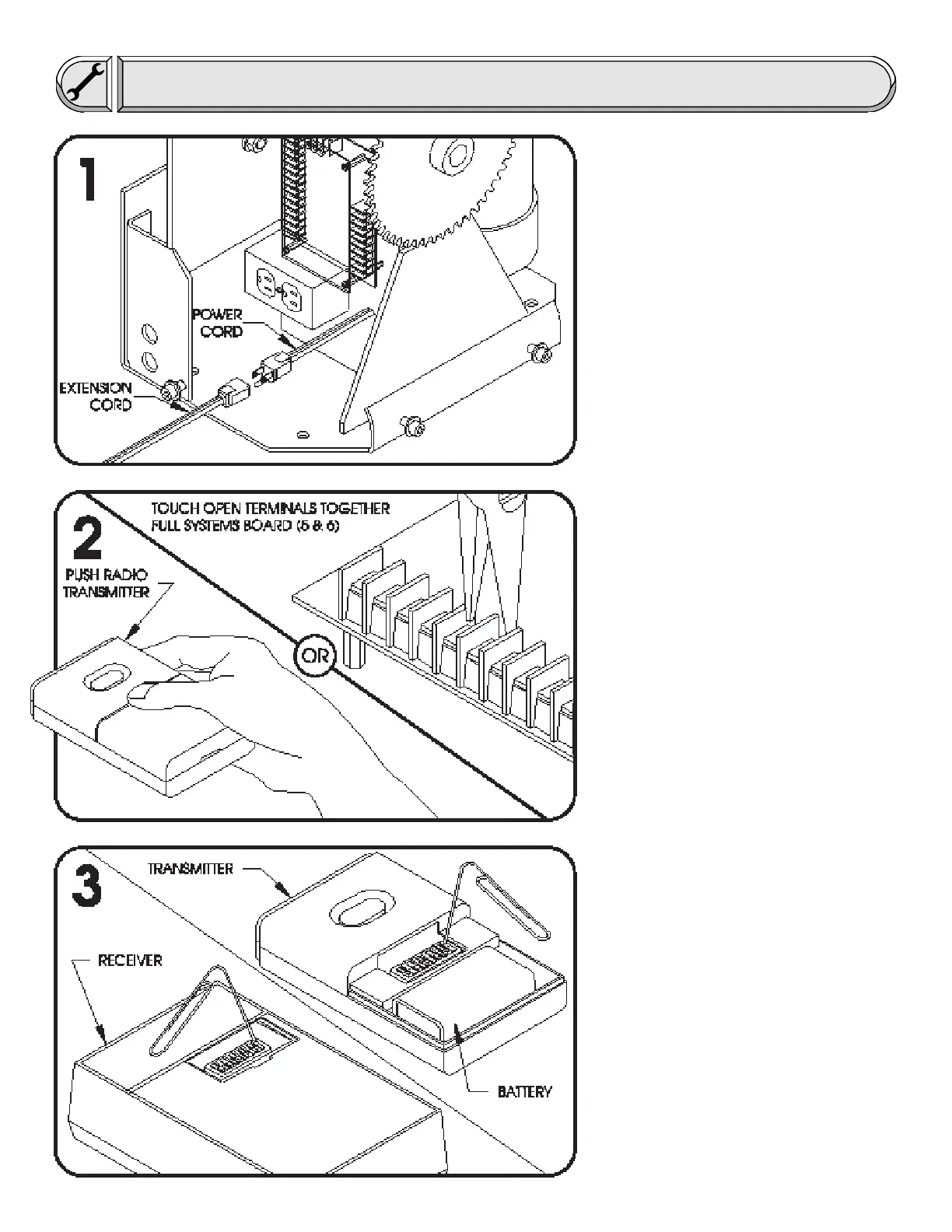
Temporarily plug the operator into
115 Volt outlet or extension cord.
Before beginning installation, test the
gate operator by running the operator back
and fourth 2 or 3 times. If the gate operator
appears to have any shipping damage,
contact a dealer.
If the gate operator is equipped with
radio controls, the operator may be run back
and fourth by pressing the radio transmitter.
If the gate operator is not equipped
with radio controls, the operator may be run
back and fourth by momentarily touching the
open input terminals together. The terminals
can be touched together with a short length of
wire, paper clip or needle nose pliers. For the
full systems capability circuit board, the open
input terminals are 5 and 6.
Disconnect Power when finished!
Now is a good time to set the radio
transmitter and receiver to a unique setting.
All units come from the factory with identical
settings and therefore it is advisable to
change the setting. To change the switch
setting, simply set the switches in the radio
receiver (using a paper clip or similar) to any
arbitrary setting and then set the switches in
the transmitter/s to match the switches in the
receiver. The battery in the transmitter may
last 1 to 2 years. Be sure to replace the
battery only with one that is the same type
as the original (9 Volt).
Installation
INSPECT PACKAGING
TEST OPERATOR
SET TRANSMITTER SWITCHES










 To Next Page