EasyManua.ls Logo

Chamberlain Security+ 3950 - User Manual

Chamberlain Security+ 3950
24 pages
Print Icon
To Next Page IconTo Next Page
Loading...
Owner’s Manual
Please read this manual and the enclosed safety materials carefully!
The door WILL NOT CLOSE unless The Protector System
®
is connected and properly aligned.
Periodic checks of the operator are required to ensure safe operation.
The model number label is located behind the hinged door of your operator.
DO NOT exceed 10 complete cycles of door operation per hour.
DO NOT use with sectional type doors.
This manual is to be left with the property owner.
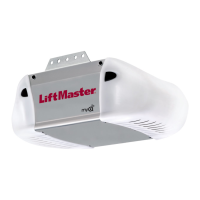
DOOR OPERATOR
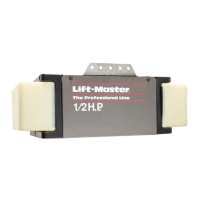
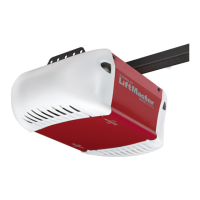
Model 3950
For Light Duty Commercial Use
The Chamberlain Group, Inc.
845 Larch Avenue
Elmhurst, Illinois 60126-1196
www.liftmaster.com
®
C
o
m
p
a
t
i
b
l
e
w
i
t
h
Serial #
(Located on electrical box cover)
Installation Date
2 YEAR WARRANTY

Questions and Answers

  • J
    James TorresAug 17, 2025
    What to do if my Chamberlain Security+ 3950 Garage Door Opener doesn’t open completely?
    • M
      Matthew LoweryAug 17, 2025
      If your Chamberlain Garage Door Opener isn't opening fully, check for obstructions blocking the door's path. Also, examine if the door is out of balance or if the springs are broken. Remove any obstructions, or repair the door as needed.
  • G
    gabriel01Aug 20, 2025
    Why does my Chamberlain Security+ 3950 open and close by itself?
    • J
      Jessica GrayAug 20, 2025
      There are several reasons why your Chamberlain Garage Door Opener might be opening and closing on its own. First, ensure that all remote control push buttons are off. If the problem persists, remove the bell wire from the door control terminals and operate the opener using only the remote. If this resolves the issue, the single button control station is likely faulty and needs replacement, or there may be an intermittent short in the wiring between the control console and the motor unit. Alternatively, try clearing the memory and reprogramming all remote controls.
  • R
    Ronnie Johnson Jr.Aug 23, 2025
    What to do if my Chamberlain Garage Door Opener doesn’t operate from either the door control or the remote control?
    • M
      Michelle MendezAug 23, 2025
      If your Chamberlain Garage Door Opener isn’t responding to either the door control or the remote, first check if the operator has electric power by plugging a lamp into the outlet. If the lamp doesn’t light, inspect the fuse box or circuit breaker. Also, make sure the outlet isn't controlled by a wall switch. Another potential issue is ice or snow buildup under the door, which can freeze the door to the ground. Remove any such restrictions.
  • G
    George ColemanAug 26, 2025
    Why does my Chamberlain Security+ 3950 reverse for no apparent reason?
    • C
      christopher92Aug 26, 2025
      If your Chamberlain Garage Door Opener reverses unexpectedly, it could be due to a few reasons. Check for any obstructions in the door's path. You can test this by pulling the emergency release handle and operating the door manually. If the door is unbalanced or binding, it's best to call a trained door systems technician. Also, clear any ice or snow from the floor area where the door closes. Finally, inspect the safety reversing sensor and remove any obstructions that may be present.
  • J
    Jason GreenAug 28, 2025
    What to do if my Chamberlain Garage Door Opener remote control has short range?
    • M
      morganmatthewAug 28, 2025
      If your Chamberlain Garage Door Opener remote control has a limited range, ensure that the antenna on the side or back panel of the operator is fully extended downwards. Keep in mind that certain installations, such as those with a metal door, foil-backed insulation, or metal siding, might experience shorter range.
  • S
    Sheila BarrettAug 31, 2025
    How to manually operate Chamberlain Security+ 3950 Garage Door Opener during power failure?
    • B
      brianwoodAug 31, 2025
      In the event of a power failure and your Chamberlain Garage Door Opener won't operate, use the emergency release handle to disconnect the door. You can then open and close the door manually. When power is restored, pull the manual release a second time to reconnect it. If you have a standby power unit connected, the operator should be able to function up to 20 times without power.
  • B
    Brenda EvansSep 2, 2025
    Why does my Chamberlain Security+ 3950 Garage Door Opener strain to operate the door?
    • P
      pagekristenSep 3, 2025
      If your Chamberlain Garage Door Opener struggles to operate the door, it might be due to an imbalance or broken springs. To check this, close the door and use the emergency release handle to disconnect it. Then, manually open and close the door. A balanced door should remain in place at any point of travel when supported by its springs. If it doesn't, disconnect the operator and consult a trained door systems technician.
  • J
    johnsonrichardSep 5, 2025
    What to do if Chamberlain Security+ 3950 operates from the remote, but not from the single button control station?
    • T
      Tracy RamirezSep 5, 2025
      If your Chamberlain Garage Door Opener operates with the remote but not the single button control station, verify that the wiring connections are correct. Please review the installation instructions.
  • P
    Paul BurchSep 8, 2025
    What to do if my Chamberlain Security+ 3950 operates from the single button control station, but not from the remote control?
    • K
      kramirezSep 8, 2025
      If your Chamberlain Garage Door Opener responds to the single button control station but not the remote, program the operator to match the remote control code. Repeat this process with all remotes. Refer to the instructions on the motor unit panel for guidance.
  • J
    Justin AndrewsSep 12, 2025
    Why does my Chamberlain Security+ 3950 Garage Door Opener motor hum briefly, then won’t work?
    • T
      terri09Sep 12, 2025
      If your Chamberlain Garage Door Opener motor hums briefly but doesn't work, the door springs may be broken. Refer to the information about what to do if the operator strains to operate.

Summary

Introduction

Safety Symbol Review and Signal Word Review

Explains safety symbols and signal words used in the manual.

Preparing Your Door

Specifications

Lists technical specifications for the door operator.

Installation

Important Installation Instructions

Crucial safety warnings and general instructions for installation.

Install the Door Sprocket

Step-by-step guide for attaching the door sprocket to the door shaft.

Mount the Operator

Instructions for securely mounting the operator unit to the wall.

Attach Emergency Release Rope and Handle

How to connect the manual release rope and handle for emergency operation.

Install Single Button Control Station

Guide for wiring and mounting the operator's wired control station.

Electrical Requirements

Details on power connection, wiring, and electrical safety.

Install Safety Reversing Sensors

Instructions for installing safety sensors, brackets, wiring, and alignment.

Troubleshoot Safety Reversing Sensors

Addresses issues and diagnostic codes for the safety reversing sensors.

Adjustment

Program Travel Limits

Sets the fully open and closed positions for the door operation.

Set the Force

Calibrates the force required for opening and closing the door.

Test The Protector System

Verifies the functionality and safety of the reversing sensor.

Open Door Manually

Procedure for releasing and operating the door by hand during power loss.

Operation

Important Safety Instructions

Key safety guidelines for operating the door operator safely.

Using Your Operator

How to operate the door using control stations and remote controls.

Operator Maintenance Schedule

Recommended monthly checks and maintenance tasks for the operator.

Troubleshooting

Common Problems and Solutions

Lists common issues encountered with the operator and their resolutions.

Diagnostic Chart

Interprets flashing indicator lights for system fault diagnosis.

Programming

Program Remote Controls

Adds or reprograms hand-held remote controls to the operator.

Erase All Remote Codes

Clears all previously programmed remote control codes from memory.

Program Keyless Entry PIN

Sets up or changes Personal Identification Numbers for keyless entry.

Repair Parts

Installation Parts List

Lists parts included with the operator for initial installation.

Motor Unit Assembly Parts

Lists individual components within the motor unit assembly.

Accessories

Notes

Chamberlain Security+ 3950 Specifications

General IconGeneral
Horsepower1/2 HP
Remote ControlYes
Drive TypeChain Drive
Max Lift Height7 feet
Security FeaturesSecurity+ Rolling Code Technology
Voltage120V
SecuritySecurity+ Rolling Code

Related product manuals