10
ASSEMBLY STEP 4
Install the Belt
and Attach the Belt Cap Retainer
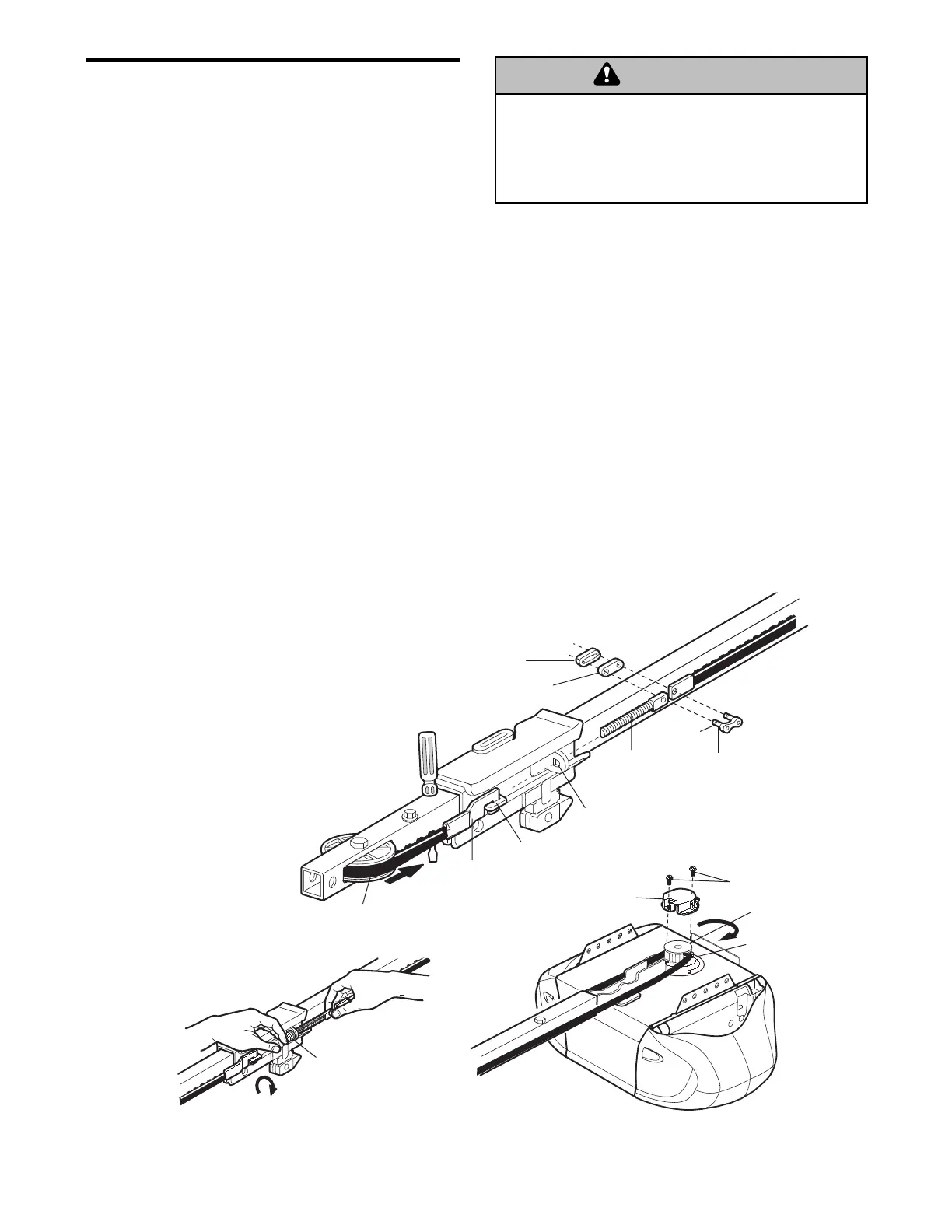
1. Pull the belt around the idler pulley and toward the
trolley. The ribbed side must contact the pulley.
2. Hook the trolley connector into the retaining slot
on the trolley as shown.
3. With the trolley against the screwdriver, dispense
the remainder of the belt along the rail length
toward the motor unit and around the sprocket.
The sprocket teeth must engage the belt.
4. Check to make sure the belt is not twisted and the
FLAT side of the trolley threaded shaft is facing
the rail. Connect the trolley threaded shaft with the
master link, as illustrated:
• Push pins of master link bar through holes in
end of belt and trolley threaded shaft.
• Push master link cap over pins and past pin
notches.
• Slide clip-on spring over cap and onto pin
notches until both pins are securely locked in
place.
5. Insert the trolley threaded shaft through the hole in
the trolley. Be sure the belt is not twisted and the
FLAT side of the trolley threaded shaft faces the
rail.
6. Hold the belt at the trolley shaft as you thread the
spring nut by hand onto the shaft until finger tight
against the trolley. Do not use any tools.
7. Remove the screwdriver.
8. Position the belt cap retainer over the motor unit
sprocket as shown and fasten to the mounting
plate with 8x3/8" hex screws provided.
To avoid possible SERIOUS INJURY to fingers from
moving garage door opener:
• ALWAYS keep hand clear of sprocket while operating
opener.
• Securely attach sprocket cover BEFORE operating.




 To Next Page