EasyManua.ls Logo

Char-Broil SmartChef - User Manual

Char-Broil SmartChef
19 pages
Print Icon
To Next Page IconTo Next Page
Loading...
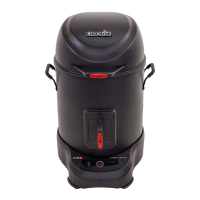
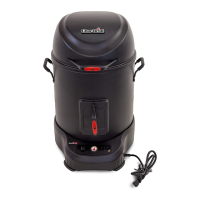
Congratulations and welcome to ownership of your Simple
Smoker™ with SmartChef™. You now own the easiest to use
and most intelligent smoker on the market. With the Simple
Smokers intuitive design and the SmartChef monitoring and
control capabilities, you’ll be a BBQ hero in no time, no matter
what your skill level.
We suggest you take a few moments to read the Product
Guide to gain a basic understanding of the Char-Boil
SmartChef app and the components of the smoker to ensure
that you are familiar with both its construction and operation
before using.
Don’t forget to register your product at
support.charbroil.com/product-registgration to activate the
warranty. Y
ou can also mail the warranty card found on the
last page of your Product Manual, if you prefer.
HAPPY COOKING!

Questions and Answers

  • D
    Deborah ChristensenAug 17, 2025
    Why Char-Broil SmartChef app does not discover appliance?
    • S
      Stephanie MartinezAug 18, 2025
      If your Char-Broil Smoker app doesn't discover an appliance that was previously set up, it could be due to the app not communicating correctly. Try closing and restarting the app. Also, the appliance might still be connecting to the Wi-Fi router. Wait for the appliance to finish connecting. Once you receive a push notification that the appliance is ready, you can open the app and start using it. Power cycling the appliance and waiting for it to reboot and connect may also resolve this issue.
  • K
    katherine66Aug 20, 2025
    What to do if Char-Broil Smokers appliance loses communication with phone?
    • K
      Kaylee JohnsonAug 20, 2025
      If your Char-Broil Smoker loses communication with your phone, it may take up to 30 seconds to reconnect once the phone and app are reopened. Wait for the phone to reconnect to the appliance. If, after 30 seconds, the appliance is still not communicating, restart the app.
  • K
    Kimberly BrowningAug 23, 2025
    Why Char-Broil SmartChef Smokers app does not complete connection?
    • M
      mark03Aug 23, 2025
      If the app attempts to connect to the appliance and does not complete the connection (spinner), it may be out of range or the connection may not be established. Restart the application and attempt to connect to the existing appliance.
  • F
    Frank FosterAug 26, 2025
    Why phone does not connect to Char-Broil Smokers appliance?
    • B
      Brenda NicholsonAug 26, 2025
      If, when restarting the app, the phone does not connect to the Char-Broil Smoker appliance, ensure that both the phone and the appliance are on the same Wi-Fi network.
  • T
    Thomas HarveyAug 27, 2025
    Why Char-Broil SmartChef app does not discover appliance on first run?
    • B
      Breanna DiazAug 27, 2025
      If the app does not discover a Char-Broil Smoker appliance that has been previously set up during the first run, ensure that your phone is on the same Wi-Fi network as the appliance.
  • C
    Carl LittleAug 30, 2025
    What to do if Char-Broil SmartChef has no connection?
    • T
      Tonya JonesAug 30, 2025
      If you experience no connection with your Char-Broil Smoker, and there is no response during connection, power cycle the appliance.
  • R
    Robert WallaceSep 2, 2025
    Why Char-Broil Simple Smokers has no connection?
    • K
      Kristen MendezSep 2, 2025
      If you have no connection with your Char-Broil Smoker, and other internet devices are connecting but not the smoker, power cycle the appliance.
  • J
    Janet BanksSep 4, 2025
    What to do if my Char-Broil SmartChef appliance is disconnected?
    • H
      hughesaaronSep 4, 2025
      If your Char-Broil Smoker app alerts you that the appliance is disconnected, the appliance may be rebooting or not properly powered. Ensure the appliance is plugged in and working correctly. Alternatively, power cycle the appliance, restart the app, and ensure you are on the same Wi-Fi network.
  • K
    Kenneth ReedSep 6, 2025
    How to configure Char-Broil SmartChef Smokers if DADO button is not flashing?
    • M
      Marisa FergusonSep 6, 2025
      If you are unable to configure your new Char-Broil Smoker appliance and the DADO button is not flashing, it may be because you waited longer than 5 minutes to attempt configuration, and the wireless radio powered down due to security restrictions. Press the DADO button to initiate configuration mode and confirm it is flashing. Alternatively, restart the appliance by removing power.
  • J
    John WilliamsSep 9, 2025
    What to do if Char-Broil SmartChef Smokers receives incorrect password error?
    • D
      Dawn PhillipsSep 9, 2025
      If you see the appliance in the app, attempt configuration, and receive an incorrect password error with your Char-Broil Smoker, it's likely that you entered the incorrect router password. Re-enter the correct password. Also, verify security settings (WPA/WPA2).

Summary

Getting Started with Your Simple Smoker

Meat Probe Placement

Insert probe into the thickest part of the meat for accurate readings.

Initial Smoker Setup

Place meat, add wood chips, and connect the smoker to the app.

SmartChef Remote Monitoring

Monitor cooking progress and receive notifications remotely via smartphone.

Worry-Free Cooking Experience

Relax while SmartChef notifies you when the meal is ready.

How the SmartChef System Works

Cloud-Based Connectivity

Explains how the smoker connects via cloud and DADO platform for data exchange.

Real-Time Data Integration

Smoker uses internet data like local temp for cook time accuracy.

Smoker Component Identification

Smoker Parts Diagram

Diagram illustrating key parts like smoking basket, smoker box, and control panel.

Simple Smoker Control Panel

Start;Stop Button Function

Initiates cook sequence once loaded from the app.

Light Ring Status Indicator

Provides visual feedback on the smoker's status at a glance.

Meat Probe Connection Port

Port for plugging in the integrated meat probe.

Preset Cook Mode Button

Cycles through pre-loaded cook profiles stored locally.

DADO Wi-Fi Button

Resets Wi-Fi broadcast or Wi-Fi credentials.

Light Ring Status Guide

Ready;On Status

Solid green light indicates appliance is online and ready.

Start Cooking Status

Flashing green light signals the start of the cooking process.

Cooking Progress Status

Flashing orange quadrants show cook progress.

Cook Done;Warming Status

Flashing orange ring signals cook completion or warming period.

Error Status Indicator

Red flashing light signifies an error state.

DADO Button and Light Indicators

DADO Button: Off Status

Indicates the DADO button is not connected to the internet.

DADO Button: On;Solid Status

Indicates the DADO button is connected to the internet.

DADO Button: On;Blinking (Slow)

Signals pairing or reconnection attempt to Wi-Fi network.

DADO Button: On;Blinking (Rapid)

Indicates firmware update initiated from the app.

Using the Char-Broil App

App Download and Installation

Download the Char-Broil app from App Store or Google Play.

User Account Configuration

Open the app, create a user login, and configure the device.

In-App Usage Guidance

The app guides users through the remaining setup and cooking processes.

Preparing Your Smoker for First Use

Cooking Chamber Alignment

Ensure cooking chamber holes align with smoker box for proper smoke flow.

Cooking Chamber Seasoning

Coat interior surfaces with oil and run a cleaning cycle for optimal performance.

Seasoning and First Cook Tips

Continue seasoning process and learn about cooking chamber benefits.

SmartChef Cooking Process

Meat Probe Etiquette

Insert probe into thickest part of meat, avoiding bone/fat, for accurate readings.

Cooking Modes Overview

Guided Cook Mode Explained

Follow step-by-step guidance for meal prep and cooking.

Manual Cook Mode Explained

Set custom parameters like target temperature and time for cooking.

Preset Cook Mode Usage

Use preprogrammed parameters for quick cooking without Wi-Fi.

Preset Parameters Details

Details pre-programmed cook profiles for Pulled Pork, Brisket, Chicken/Turkey.

Using the Smoking Basket

Basket Setup for Large Cuts

Use half shelves for large cuts like briskets or ribs.

Basket Setup for Poultry

Place whole poultry vertically in the basket for even cooking.

Basket Setup for Small Items

Stagger smaller pieces of meat or poultry using half shelves.

Smoking Basket Tips and Tricks

Allow cooling, use secondary basket for sides, use basket hook.

Using the Smoker Box for Flavor

Adding Wood Chips for Smoke

Use app to add chips; filling yields 45-60 mins of smoke.

Wood Flavor Selection Guide

Wood Flavor Chart Explained

Explains which woods provide heavier or milder flavors.

Wood Chip Usage Recommendations

Do not soak chips; use only chips or pellets in the smoker box.

General Cooking Information

Estimated Cooking Times and Temperatures

Table provides estimates for various meats, cuts, cooking/target temps.

Safe Internal Temperature Guidelines

Lists USDA recommended minimum internal temperatures for safe consumption.

Troubleshooting Setup and Connection

DADO Button Not Flashing Issues

Solutions for when the DADO button doesn't flash during setup.

App Communication Failures

Addresses issues when the app cannot communicate with the appliance.

Incorrect Password Resolution

Steps to resolve incorrect password entry during setup.

Appliance Discovery Problems

Solutions for when the app cannot discover the appliance.

Discovery Issues Post-Setup

Fixes for appliance not being discovered after initial setup.

Re-establishing Lost Communication

How to re-establish communication if it's lost during usage.

Push Notification Troubleshooting

Solutions for not receiving push notifications from the app.

Appliance Disconnected Alerts

Addresses alerts indicating the appliance is disconnected.

Disconnection Alerts and Reconnection

Ensures appliance is plugged in and on the same Wi-Fi network.

Connection Attempt Failures

Solutions for failed connection attempts or spinner issues.

General Connectivity Troubleshooting

Addresses no connection issues with appliance or router.

Char-Broil SmartChef Specifications

General IconGeneral
Fuel TypeElectric
Temperature ControlDigital
ConnectivityWi-Fi
Cooking Area725 square inches
MaterialSteel
Warranty1 year

Related product manuals